
Finding a hidden email account is a legitimate need in more situations than most people expect. A sales rep working from a phone number or a name with no publicly listed email. A recruiter trying to reach a candidate whose profile shows no contact details.
A fraud investigator tracing an identity across multiple online platforms. In each case, the challenge is the same: the email exists, but it is not visible through a standard search.
This guide covers the most reliable free and paid methods for finding hidden email accounts in 2026, from search engine operators and social media investigation to professional enrichment tools built specifically for verified contact discovery at scale.
Definition and Purpose of Hidden Email Accounts
A hidden email account is any email address that is not publicly associated with a person's name or primary identity. Some people maintain separate addresses for specific platforms or professional roles. Others use secondary accounts to compartmentalize their online activity.
In B2B contexts, professionals often have work emails, personal emails, and role-based addresses such as info@ or sales@ that are not discoverable through a standard name search.
Understanding which type of hidden email you are looking for shapes which method works best. A work email hidden behind a company domain is found differently from a personal Gmail address that someone has never made public.
Why Finding Hidden Email Accounts Matters?
The ability to surface a non-public email address has direct commercial value. Sales teams working from phone numbers or LinkedIn profiles regularly hit dead ends when a prospect's email is not listed anywhere obvious. The same goes for recruiters as well as sourcing candidates from databases encountering the same gap: a name and a phone number, but no verified email for outreach.
For investigators and compliance teams, tracing an email address linked to a specific identity is often the first step in verifying whether someone is who they claim to be across multiple platforms. For marketers running re-engagement campaigns, finding an updated email for a contact whose address has bounced is the difference between a recovered relationship and a permanently lost one.
FullEnrich solves this at the B2B level by running waterfall enrichment across 20+ premium data providers to surface verified work emails and personal emails that no single tool can find alone.
Legal and Ethical Considerations

Before using any method to find a hidden email account, the legal framework matters. In the US, the CAN-SPAM Act governs how commercially obtained email addresses can be used. In Europe, GDPR restricts how personal data including email addresses can be collected, stored, and processed. In California, CCPA applies equivalent protections to consumer data.
The key principle across all three frameworks is purpose. Finding an email address for legitimate professional outreach, fraud investigation, or identity verification sits within compliant use. Finding one to send unsolicited spam, harass an individual, or access accounts without permission does not.
FullEnrich is SOC 2 Type II certified and both GDPR and CCPA compliant. All data is sourced from public professional records and opt-in databases, making it one of the safest options for B2B teams operating across multiple jurisdictions.
Always confirm that your intended use of any discovered email address complies with the regulations applicable to your location and the recipient's location before sending anything.
Free Methods to Find Hidden Email Accounts
Several free methods including search engines, social media investigations and access to public records through databases can surface hidden email accounts before any paid tool is needed. Each works best in a specific situation and has a ceiling beyond which a professional tool is required.
1. Search Engines
Search engines index email addresses from company websites, press releases, forum posts, PDF documents, and directory listings. If an email address has ever appeared on a publicly indexed page, a targeted search can surface it.
Effective Google search strings for finding hidden email accounts:
"first name last name" "email"
"first name last name" "company name" contact
"first name last name" site:linkedin.com email
"first name last name" filetype:pdf email
site:companywebsite.com "email" "first name"
The quotation marks force Google to search for exact phrases. The filetype:pdf operator surfaces contact sheets, conference bios, and document archives that standard searches miss entirely. Bing and DuckDuckGo index different content from Google and are worth running the same strings through when Google returns nothing.
Limitation: This method only works when the email address has appeared somewhere on a publicly indexed page. If the person has never published their email publicly, search engines will not find it.
2. Social Media Investigations
Social media platforms connect phone numbers, names, and email addresses in ways that are often visible to other users if privacy settings allow it.
LinkedIn: Go to the person's profile and click Contact Info below their headline. First-degree connections can see any email address the person has chosen to share. The About section sometimes contains an email written out in full. Some professionals include their email in their featured section or in posts promoting services.
Facebook: Go to the person's profile, click About, then Contact and Basic Info. Some users list their email address publicly. Searching the person's name alongside their employer in Facebook's search can surface a business page with contact details listed.
Twitter/X: Check the bio and pinned tweets. Some professionals include an email address when actively promoting consulting or freelance work. The linked website in the bio often leads to a page where contact details are listed.
Limitation: Privacy settings on all three platforms can hide contact information entirely. This method works best for professionals who actively want to be reachable and have not restricted their contact visibility.
3. Public Records and Databases
Public records can surface email addresses that people have used to register businesses, file documents, or participate in public-facing roles.
Whitepages covers over 250 million US records and sometimes surfaces email addresses alongside phone numbers and addresses for personal contacts.
Government business registration databases list the email addresses that business owners used when registering their company. In the US, many state Secretary of State websites publish this information publicly and it is searchable by business name or owner name.
Limitation: Public records work best for US-based contacts and business owners. They are rarely updated in real time, so information may be months or years out of date.
4. Email Permutation Techniques
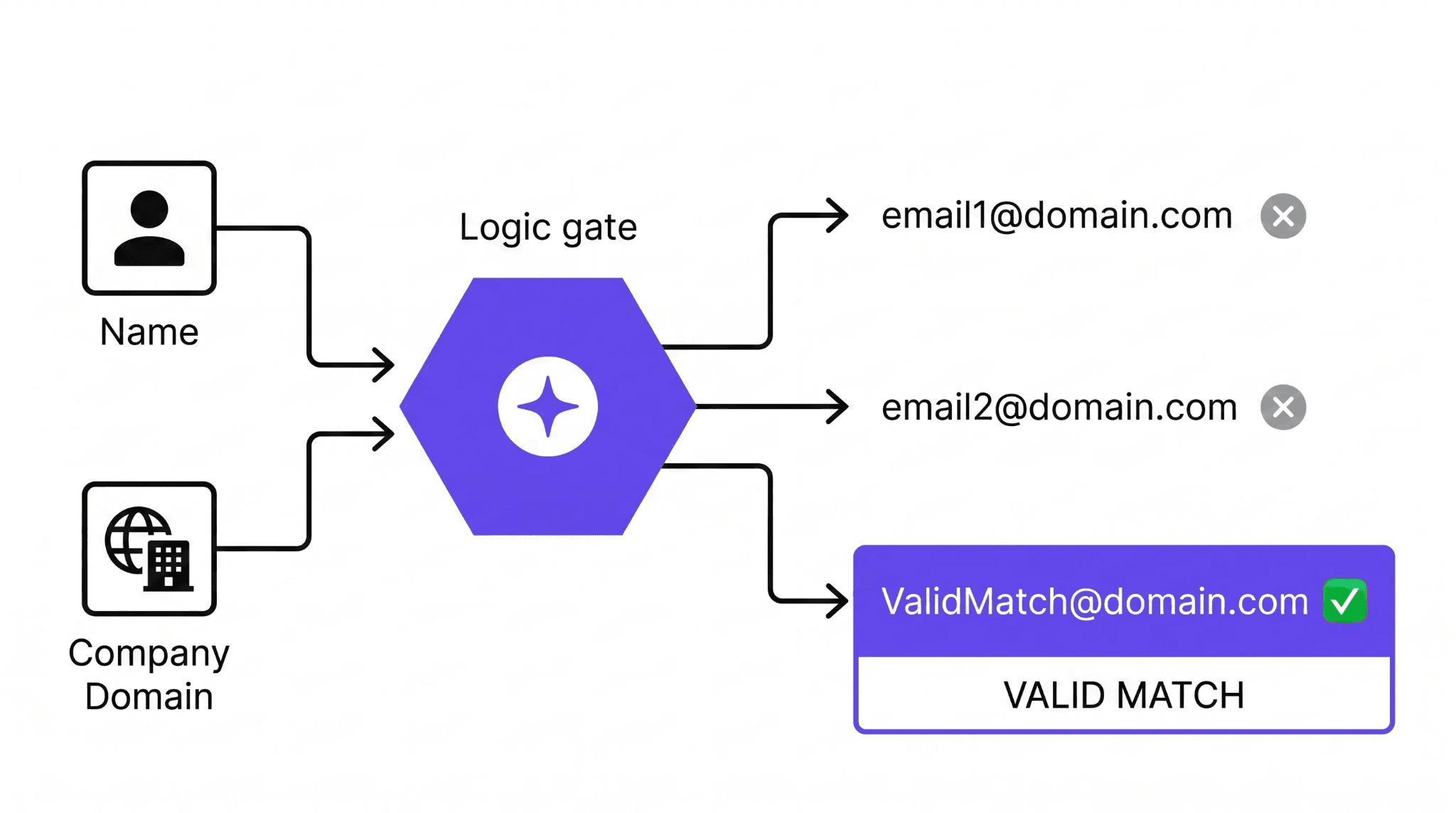
Once you know a company's email format, applying it to a person's name gives you a high-probability address to verify. Most companies follow one of a small number of patterns: firstname@company.com, firstname.lastname@company.com, f.lastname@company.com, or firstnamelastname@company.com.
Find the format by looking at any email address the company has published publicly, such as a press contact or a support address. Apply that format to the person's name and run the resulting address through a free email verification tool to confirm whether the mailbox exists before sending anything.
Limitation: This technique requires knowing the company domain and at least one publicly visible email from that domain to identify the format. It does not work for personal email addresses on Gmail, Outlook, or Yahoo.
5. Reverse Image Search
A reverse image search traces a profile photo across multiple platforms and can surface accounts and associated contact details that a name search misses. Use Google Images or TinEye, upload the profile photo, and review which pages the image appears on.
Conference speaker pages, company team pages, and personal websites that appear in the results often list contact details including email addresses.
Limitation: This method, more than often, is used for finding out the identity of a person or a company. Very few pages add additional info like email address to the image in the context.
Free Tools and Services for Finding Hidden Emails
Free methods cover a significant portion of straightforward cases. When they fail, dedicated tools go deeper by cross-referencing multiple databases, verifying results in real time, and returning contact details that public sources do not index.
FullEnrich
FullEnrich is one of the strongest tools available for finding hidden professional email accounts at scale. Where single-provider tools query one database and return whatever that database contains, FullEnrich runs waterfall enrichment across 20+ premium data providers sequentially.
When one provider returns no result, the next is queried automatically until a verified email is found or all sources are exhausted.
The result is an 80% or above find rate on typical B2B contact lists, with a minimum bounce rate that is achieved through triple email verification across three independent verification services.
How to use FullEnrich to find hidden email accounts:
- Sign up atFullEnrich; new accounts receive 50 free credits, no card required
- Upload a CSV with the person's name and company, LinkedIn URL, or phone number as the input
- FullEnrich queries all 20+ providers and returns the verified work email and personal email where available
- Results include LinkedIn job title, company name, industry, headcount, and company LinkedIn URL alongside the email
- Export directly to HubSpot, Salesforce, or via Zapier, Make, or n8n
Pricing:
- Free: 50 credits on signup, no card required. 1 email found costs 1 credit
- Start plan: $29/month for 500 credits
- Pro plan: $55/month for 1,000 credits
- Scale plan: from $500/month with custom credits for high-volume teams
- Annual credits roll over for the full year. Unlimited seats on all plans. Credits charged only on successful enrichment.
Best for: Sales teams, recruiters, and marketing professionals who need verified emails for B2B contacts at scale, especially when the standard search methods above have returned nothing.
Hunter.io
Hunter.io finds email addresses by company domain. Enter a person's name and their company domain and Hunter returns the most likely email address with a confidence score verified against the mail server. It is also a suitable option for straightforward B2B lookups where the company domain is already known.
Voila Norbert
Voila Norbert uses a name and company domain to identify the most likely email address and verify it. It offers a free trail and after it, paid plans are required. Like Hunter, it is a single-source tool, which means contacts not in its database return empty rather than cascading to additional sources.
FindThatLead
FindThatLead searches for email addresses associated with a company domain or website. It is useful for finding multiple contacts within the same organization when the domain is known. The free plan is limited to a small number of monthly searches. It does not perform individual reverse lookups from a phone number or name alone without the domain as a supporting input.
Other Techniques for Uncovering Hidden Emails
Apart from the mentioned techniques, there are some other techniques as well to find hidden email accounts through a combination of programmatic discovery and technical forensic analysis. While manual tricks can work for isolated cases, high-volume detection requires a more sophisticated infrastructure, and that’s where WHOIS Lookups and email headers play their role.
WHOIS Lookups
A WHOIS lookup returns the registration record for a domain name, which often includes the email address the domain owner used when registering it. Use a service like Whois.net or DomainTools, enter the domain name, and look for the Registrant Email or Admin Email field.
Note that many domain owners now use private registration services that replace their personal email with a proxy address. When private registration is in place, WHOIS returns the registrar's privacy email rather than the owner's actual address. This technique works best for smaller businesses and individuals who registered their domain without privacy protection enabled.
Analyzing Email Headers
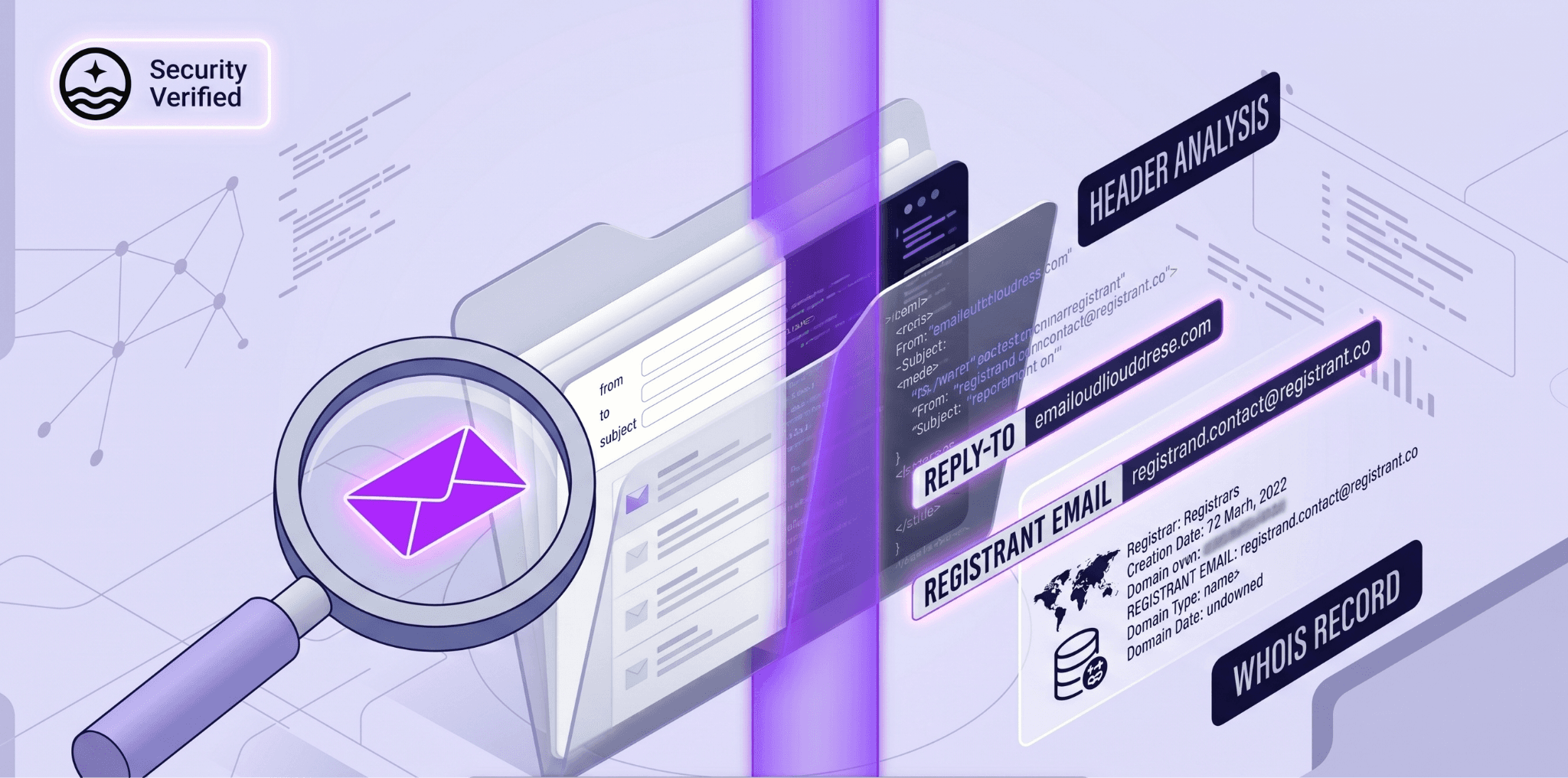
If you have received an email from someone and need to identify a secondary or hidden address they use, email headers contain the full routing path of the message including the original sender's IP address and mail server.
- In Gmail, open the email, click the three dots at the top right, and select Show Original.
- In Outlook, right-click the email and select View Source or Message Options.
- In Yahoo Mail, click More and select View Full Headers.
- Look for the Reply-To field, which sometimes reveals a different address from the From field, and the Received lines, which show the originating server.
This technique is most useful in fraud investigation and compliance contexts where you already have email correspondence and need to verify whether the stated sender address matches the actual origin of the message.
Strategies for Confirming Hidden Email Accounts
Finding a potential email address is only half the task. Confirming that the address is active, correctly attributed, and deliverable before using it protects your sender reputation and saves outreach effort.
Email Verification Services
Email verification checks whether a mailbox exists and is active without sending an actual email. FullEnrich applies triple email verification across three independent verification services to every email it returns, which is why its bounce rate sits under one percent.
This is the most reliable verification approach available because a single verifier can miss catch-all domains that accept all incoming mail regardless of whether the specific mailbox exists.
For standalone verification of addresses found through other methods, NeverBounce and ZeroBounce are reliable options that offer free monthly verification credits.
Cross-Referencing Information
Once a potential email address is identified, cross-reference it against at least one other data source before using it. Check whether the address appears on the person's LinkedIn profile, their company website, or any publicly indexed page.
Run it through an email verification tool. If the address was found through email permutation, confirm the company's email format is consistent by checking at least two other publicly visible addresses from the same domain.
FullEnrich handles this cross-referencing automatically through its reverse email lookup feature, which takes an email address as input and returns the associated name, phone number, company, and LinkedIn profile to confirm the attribution is correct before any outreach begins.
Protecting Your Own Email Privacy
Understanding how hidden email accounts are found is also useful for protecting your own. While we have focused on finding hidden email accounts, it is equally important to protect your own email privacy. Here are some best practices to keep your email accounts private and secure:
- Use strong unique passwords for each email account and enable two-factor authentication.
- Review the privacy settings on LinkedIn, Facebook, and Twitter to control which contact details are visible to connections versus the public.
- When registering domains, opt for private registration to keep your email address out of WHOIS records.
- Avoid listing personal email addresses in public documents, forum posts, or conference materials where search engines will index them permanently.
- For businesses, audit which employee email addresses appear on company pages, press releases, and public-facing documents regularly. Outdated contact information left on indexed pages becomes a data quality problem for your own team when it surfaces in enrichment tools months or years after the employee has left.
By following these best practices and avoiding common mistakes, you can significantly reduce the risk of your email account being compromised or discovered by others.
Conclusion
Finding hidden email accounts can be a complex and delicate process. With the right techniques and tools, you can uncover hidden email accounts, but it's essential to use this power responsibly and ethically.
In this article, we have covered a range of methods to find hidden email accounts, from simple search engine queries to advanced techniques like FullEnrich waterfall technique and reverse image search.
We have also explored free tools and services that can aid in your search, as well as strategies for verifying and confirming hidden email accounts.
As you venture into the world of email discovery, remember that privacy is a fundamental right. Be mindful of the ethical implications of your actions, and always respect the privacy of others.
Use these techniques for legitimate purposes, such as personal or professional investigations, and never for malicious or illegal activities.
Lastly, don't forget to take steps to protect your own email privacy. By following best practices like using strong passwords and two-factor authentication, you can ensure that your email accounts remain secure and private.