
Most people think the only difference between LinkedIn premium tiers is the price tag and a few extra InMail credits. In reality, the choice comes down to a hidden penalty: the commercial search limit. If your only goal is to secure a new job, Premium Career is a perfectly capable toolkit. It gives you the applicant insights needed to benchmark your skills against competing talent and hands you five direct messages to bypass the standard application pile.
Premium Business exists specifically to remove that leash. It is designed for founders, consultants, and anyone doing light lead generation who needs to scout the market without hitting a paywall with every complex search.
Attributes | Linkedin Career | LinkedIn Business |
|---|---|---|
Primary Goal | Personal career advancement, networking, and job search | Company brand building, audience engagement, lead generation, and hiring |
Main User | Individuals (job seekers, professionals) | Companies, organizations, brands |
Networking | Connect with professionals, join groups, follow thought leaders | Build followers, engage audiences, connect with customers and prospects |
Premium Options | LinkedIn Premium (Career), Career Explorer | LinkedIn Premium Business / Sales Navigator / Recruiter |
Analytics / Insights | Basic profile views, search appearances, and post engagement | Company analytics: impressions, engagements, follower demographics |
Use Cases | • Find a job | |
• Grow a professional network | ||
• Share expertise | ||
• Get endorsements | • Promote products & services | |
• Build talent pipeline | ||
• Engage with the audience | ||
• Run ads & generate leads | ||
Metrics Focus | Views, endorsements, engagement per post | Impressions, CTR, conversions, follower demographics |
Key Takeaways
- LinkedIn Career is designed strictly for individual job seekers seeking to get hired or build a personal network. It tracks basic metrics like who viewed your profile and how many endorsements you have, keeping the focus entirely on your personal advancement.
- The Business tier is designed for companies and brands that need to actively engage their audiences and drive revenue. Instead of looking for a job, you use this side of the platform to run targeted ads, promote your services, and build a reliable pipeline of talent or customers.
What is LinkedIn Career?
Designed as a "Job Seeker's Suite," LinkedIn Career is engineered to give individuals a competitive edge in a hyper-competitive hiring market by focusing on visibility and candidate intelligence. The "Featured Applicant" status ensures your name appears at the top of recruiter lists. In contrast, "Applicant Insights" provides a detailed view of the competition, allowing you to rank your skills against those of other candidates.
With 5 monthly InMail credits and AI-powered interview preparation tools, the plan is built to help professionals land their next role faster while building new skills through full access to the LinkedIn Learning library.
What is LinkedIn Business?
LinkedIn Business functions as an "Entrepreneur’s Engine," customized for founders and consultants who need to move beyond standard networking limits to drive growth. This plan removes the "Commercial Use Limit," allowing unlimited people to browse and research prospects and competitors without search results being throttled or blurred.
It offers 15 monthly InMail credits triple the Career tier, and features a custom "Call-to-Action" (CTA) button on your profile to drive traffic directly to a website or booking link. With added company insights and growth trends, it is the optimal tool for those looking to expand their brand presence and identify new business opportunities in real-time.
What Services Does LinkedIn Career and LinkedIn Premium Business Offer?
The services offered by LinkedIn’s Premium tiers are strategically designed to support two distinct professional objectives: landing a dream job and driving business growth. While both plans provide a baseline of networking tools, the specific services they offer act as either a candidate toolkit or a business development engine.
Services Offered by LinkedIn Premium Career
LinkedIn Premium Career provides specialized services designed to accelerate your job search and help you stand out to hiring managers.
- Featured Applicant Status: Automatically places your application at the top of a recruiter's list for any job you apply for on LinkedIn, making you 39% more likely to hear back.
- Applicant Comparison Insights: Provides data-driven analysis of how your skills and experience rank relative to other candidates for a specific role, highlighting areas where you lead and where you need to improve.
- Top Choice Job Marking: Allows you to flag up to three jobs per month as your "Top Choice," signaling your high level of interest directly to the hiring team.
- Direct Recruiter Outreach: Provides 5 InMail credits per month, enabling you to message hiring managers and recruiters outside your network to follow up on applications.
- AI-Powered Interview Prep: Offers a specialized coaching service with sample interview questions, AI-generated feedback on your responses, and expert tips for high-stakes interviews.
- LinkedIn Learning Access: Includes a full library of 22,000+ expert-led courses to help you bridge skill gaps identified in your target job descriptions.
Services Offered by LinkedIn Premium Business
LinkedIn Premium Business is a lightweight CRM and networking service designed for entrepreneurs, freelancers, and small-business leaders.
- Unlimited Search Discovery: Removes the "Commercial Use Limit" found on Free and Career accounts, allowing you to search for and browse an unlimited number of people and company profiles.
- Expanded Messaging Capacity: Includes 15 InMail credits per month, triple the amount of the Career tier to facilitate higher-volume networking and partnership scouting.
- Profile Branding Services: Features a custom Call-to-Action (CTA) button (e.g., "Book a Demo" or "Visit Website") on your profile, which can drive up to 2.4x more traffic to your business site.
- Market Growth Insights: Provides advanced company data, including headcount growth, department-specific hiring trends, and competitive intelligence to identify "warm" business opportunities.
- Extended Viewer History: Offers a full year (365 days) of data on who has viewed your profile, including the ability to see the specific companies and job titles of your visitors.
- AI Writing Assistant: Provides a content optimization service that uses AI to help you draft posts and messages that are statistically more likely to generate engagement.
LinkedIn Premium Pricing Plans
While both plans offer significant discounts for annual commitments, the Premium Business plan is roughly twice as expensive as the Career tier. LinkedIn Premium Pricing gap reflects the shift from personal job-seeking tools to unrestricted business networking and lead generation capabilities.
LinkedIn Career Pricing ($29.99/mo)
This plan is priced as an "investment in yourself." For less than the cost of a daily coffee, you gain the ability to message 5 recruiters directly via InMail and access "Top Applicant" status on job posts. LinkedIn continues to offer a 30-day free trial for this tier, allowing job seekers to test the featured applicant status during their peak hunting period without an immediate upfront cost.
LinkedIn Business Pricing ($59.99/mo)
The Business plan is positioned as a professional networking engine. The higher price point grants you 15 InMail credits and, most importantly, Unlimited People Browsing. For entrepreneurs and consultants, this removes the "Commercial Use Limit" that throttles free accounts. It also includes the Custom CTA button, which serves as a lead-generation tool on your profile header.
Who Should Use LinkedIn Career vs LinkedIn Business Premium?
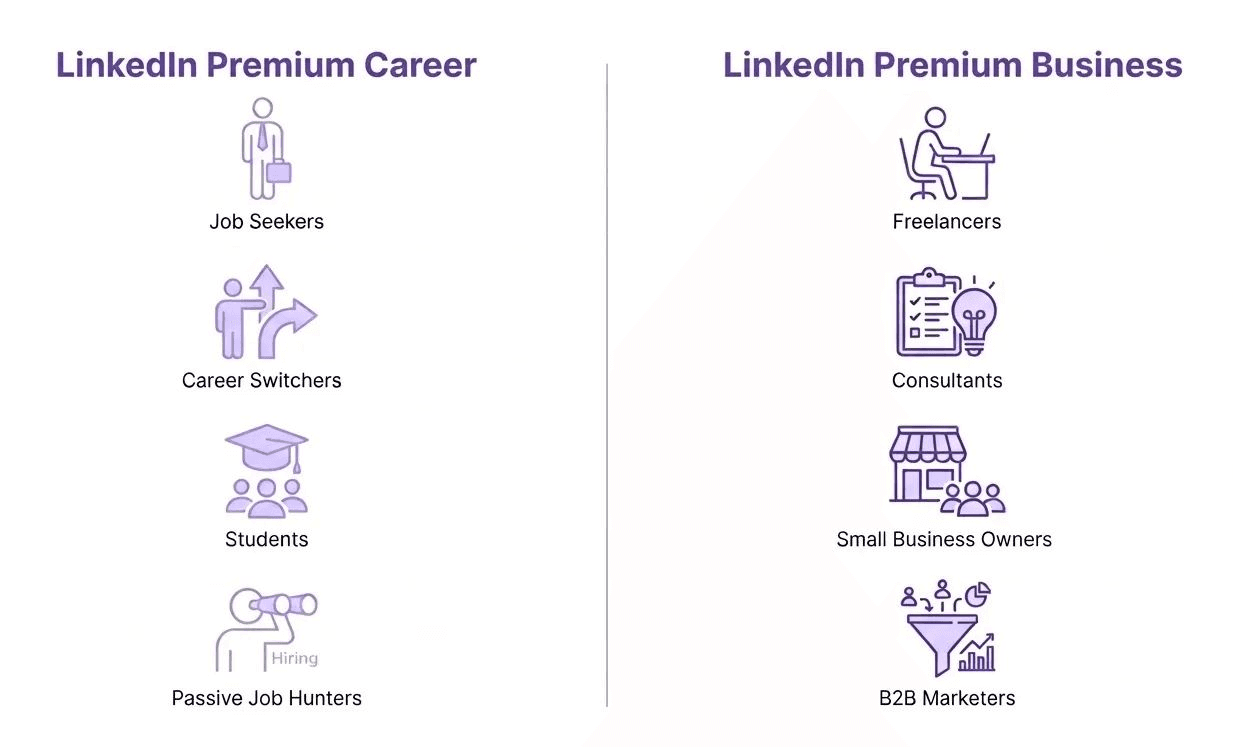
LinkedIn’s premium tiers are designed around two distinct professional paths: personal mobility and commercial expansion. Identifying your target audience segment is critical because the tools are optimized for specific use cases.
Who Should Use LinkedIn Premium Career?
This tier is a "Candidate-First" toolkit. It is designed for individuals navigating the job market who need to bridge the gap between their profile and a recruiter’s inbox.
- Active Job Seekers: Individuals currently out of work or looking to transition immediately. They use the "Featured Applicant" status to ensure they aren't buried under hundreds of other resumes.
- Career Switchers: Professionals moving from one industry to another who need LinkedIn Learning to bridge skill gaps and Applicant Insights to see how their diverse background ranks against "traditional" candidates.
- Student & Entry-Level Talent: New graduates who need to build credibility. They leverage the AI Profile Assistant to optimize their lack of experience into a compelling professional narrative.
- Passive Seekers ("Career Accelerators"): Professionals who are currently employed but want to keep their "finger on the pulse." They use Who Viewed Your Profile to see if recruiters from top-tier firms are headhunting them.
Who Should Use LinkedIn Premium Business?
This tier is a "Growth-First" toolkit. It is designed for the "Power Networker" who treats LinkedIn as a database for discovery and a platform for lead generation.
- Solopreneurs & Freelancers: Independent contractors who need to find new clients. They use the Custom CTA button to drive traffic to their portfolios and the 15 InMail credits to pitch their services.
- Small Business Owners: Founders who need to keep tabs on their industry. They use Company Insights to track competitors' headcount and hiring trends to identify market gaps.
- Consultants & Coaches: Professionals whose brand is their business. They use Unlimited People Browsing to research potential high-ticket clients without being stopped by commercial search limits.
- B2B Marketers: Marketing teams focusing on "Demand Gen." They use the AI Content Assistant to ensure their thought-leadership posts reach the maximum number of decision-makers.
Pros and Cons of LinkedIn Premium Career vs LinkedIn Business
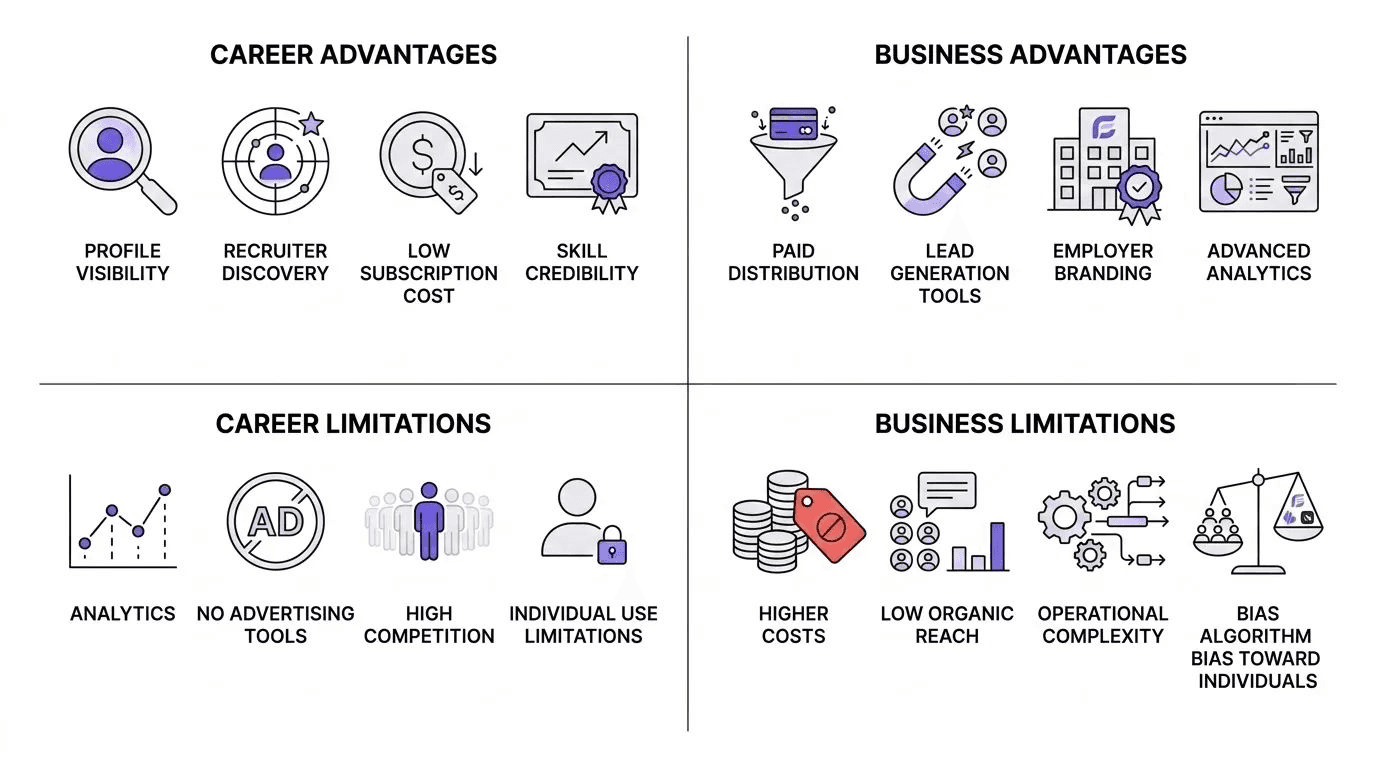
While Premium Career is a targeted investment for individuals in transition, Premium Business is a broader tool for market influence. Both have distinct advantages and limitations that can impact your ROI.
LinkedIn Career Pros and Cons
LinkedIn Career is the primary channel for professionals who want inbound opportunities without paid distribution, but its individual-first design limits scalability and analytics.
LinkedIn Career Pros
- Organic Visibility Advantage: LinkedIn Career profiles consistently receive 2–4× higher organic reach than Company Pages, as the 2026 LinkedIn algorithm prioritizes personal content in feeds.
- Recruiter Discovery Engine: LinkedIn Career profiles with complete experience, skills, and activity receive up to 40% more recruiter messages, especially when marked “Open to Work.”
- Low Cost of Entry: LinkedIn Career remains free for core job-seeking workflows, with Premium Career plans starting at $29–$39/month, well below the cost of business tools.
- Skill Signaling and Credibility: LinkedIn Career integrates LinkedIn Learning, endorsements, and recommendations, improving skill-match rates by approximately 25% for mid-level roles.
LinkedIn Career Cons
- Limited Analytics Depth: LinkedIn Career provides only surface-level metrics, such as profile views and search appearances, offering no funnel visibility or conversion attribution.
- No Paid Amplification: LinkedIn Career profiles cannot run ads, sponsor content, or scale reach predictably, making growth entirely dependent on posting consistency and network size.
- High Market Saturation: With over 1 billion users, LinkedIn Career profiles compete heavily for recruiter attention, especially in sales, marketing, and tech roles.
- Individual Ceiling: LinkedIn Career cannot support team workflows, hiring pipelines, or lead generation, limiting usefulness beyond personal advancement.
LinkedIn Business Pros and Cons
LinkedIn Business is designed for organizations that require predictable reach, audience targeting, and measurable outcomes, but it demands budget and operational maturity.
LinkedIn Business Pros
- Paid Distribution at Scale: LinkedIn Business enables Sponsored Content and InMail campaigns that reach 80%+ of B2B decision-makers and outperform most social platforms for enterprise targeting.
- Lead Generation Infrastructure: LinkedIn Business Lead Gen Forms convert at 10–15%, significantly higher than standard landing pages due to pre-filled professional data.
- Employer Branding and Hiring: LinkedIn Business pages improve employer trust perception by up to 60%, while LinkedIn Recruiter reduces time-to-hire by approximately 35%.
- Advanced Analytics and Attribution: LinkedIn Business provides impressions, CTR, conversion tracking, and audience demographics, enabling full-funnel measurement for marketing and recruitment.
LinkedIn Business Cons
- High Cost Threshold: LinkedIn Business advertising averages $6–$9 CPC, and tools like Recruiter or Sales Navigator cost $99–$160 per seat/month, limiting accessibility for small teams.
- Weak Organic Reach: LinkedIn Business pages often see organic reach below 5%, making paid promotion almost mandatory for meaningful visibility.
- Operational Complexity: LinkedIn Business requires consistent content production, campaign management, and targeting expertise, increasing reliance on marketing or RevOps teams.
- Algorithm Bias Toward Individuals: LinkedIn’s feed algorithm continues to favor LinkedIn Career profiles over Company Pages, reducing organic leverage for brands.
Which Plan Offers the Best Value?
The Career plan is the most cost-effective if your only goal is to land a new position. The annual plan is particularly attractive if you expect your search or upskilling via LinkedIn Learning to take more than 4–5 months.
The Business plan is mandatory if you are actively prospecting,. The ability to search without limits and the extra 10 InMail credits justify the $30 monthly increase over the Career tier.
You can purchase additional credits individually, if you use up all InMail credits though they are expensive ($10+ each). This is why many users turn to third party tools like FullEnrich to find verified email addresses rather than purchase additional credits.
Also, LinkedIn does not provide direct emails or phone numbers. To find that data, you need to use FullEnrich. FullEnrich is a B2B contact data enrichment platform for GTM teams that helps you find and verify business emails and phone numbers, enrich CRM records, and improve outbound performance.
As we move through 2026, the "best" LinkedIn Premium plan is no longer about which plan offers the most features, but which one aligns with your active intent. LinkedIn has successfully bifurcated its user base: Premium Career is a high-octane job-search engine, while Premium Business is a lightweight platform for business development and branding.
Frequently Asked Questions (FAQs)
What is the main difference between LinkedIn Career and LinkedIn Business?
LinkedIn Career is built for job seekers (focusing on "Top Applicant" status and recruiter insights). In contrast, LinkedIn Business is built for networking and growth (focusing on unlimited search and business branding tools).
Can I switch between Career and Business plans?
Yes. You can upgrade or downgrade your plan through your account settings. If you move from Business to Career, you will lose the custom CTA button and unlimited search but gain job-seeking tools.
Is there a free trial for these plans in 2026?
LinkedIn typically offers a 1-month free trial for both tiers for eligible users. Be sure to cancel before the month ends to avoid being charged the premium fee.
Can I have both Career and Business subscriptions simultaneously?
No. You can only have one active individual premium subscription per LinkedIn account.
Do InMail credits roll over to the next month?
Yes, credits roll over for up to 90 days. Career allows up to 15 accumulated credits, while Business allows up to 45.
Is LinkedIn Business worth the $30 price jump from Career?
It is worth it only if you need to perform high-volume searches. If you are a recruiter or sales pro hitting the "Commercial Use Limit" on search, the Business tier is mandatory.
Does LinkedIn Business include everything in LinkedIn Career?
Yes, the Business plan includes all the core features of the Career plan, such as LinkedIn Learning and the ability to see who viewed your profile, while adding business-specific power tools.
What is the "Custom CTA Button" on the Business plan?
This allows you to add a button, such as "Visit Website" or "Book a Demo," to your profile. LinkedIn data shows this can increase website traffic from your profile by up to 2.4x.
Can I see who viewed my profile anonymously?
Both plans allow you to view the full list of people who viewed your profile over the past 365 days (unless the viewer has their privacy settings set to "Private Mode").
Does LinkedIn Learning come with both plans?
Yes. Both tiers provide full, unlimited access to the library of 22,000+ courses and certifications.
Which plan is best for a freelancer?
LinkedIn Business is usually better. Freelancers need the unlimited search to find prospects and the custom CTA button to drive traffic to their portfolio.
I am an executive seeking a position. Should I get Business or Career?
Even for executives, Career is usually better for the job hunt because of the "Featured Applicant" status.