You open your inbox and spot a message from an address you do not recognize. Is it a qualified sales lead ready to buy, or just another phishing scam trying to steal your data?
Guessing is a terrible strategy. Replying blindly wastes your time and puts your security at risk. You have to know exactly who is sitting on the other side of that screen before you hit the reply button.
Tracing an email back to a real person is simple when you know exactly where to look. This guide shows you how to find the owner of an unknown email address, verify their true identity, and keep your daily operations running smoothly.
Why do you need to find out who owns an email?
There are several reasons you might need to find out who owns an email address, and the specific reason depends on your goal. Whether you are trying to protect your personal security or stop wasting time on fake business contacts, knowing exactly who is on the other side of an inbox is the only way to separate real opportunities from dangerous scams.
For sales teams, chasing down bad data kills daily productivity. When a new lead enters your system, you have to verify there is a real human behind that address before you spend hours planning your outreach. Tracing the email proves it is a valid buyer rather than an automated bot or a competitor hiding their identity.
For recruiters, tracing an email address is a direct way to source passive talent and verify applicants. If a hiring manager finds an impressive online portfolio or an open-source coding project, they usually only have an anonymous email address to work with. Finding the owner allows them to connect that address to a professional profile, confirm the candidate's work history, and reach out directly with a relevant job offer.
For everyday use, finding the owner is entirely about safety. Cybercriminals constantly send fake invoices and dangerous phishing links from addresses that look almost legitimate. By tracing the exact sender, you can quickly figure out if an anonymous message is an actual request from a real business or a trap designed to steal your financial details.
How to find out who owns an email address
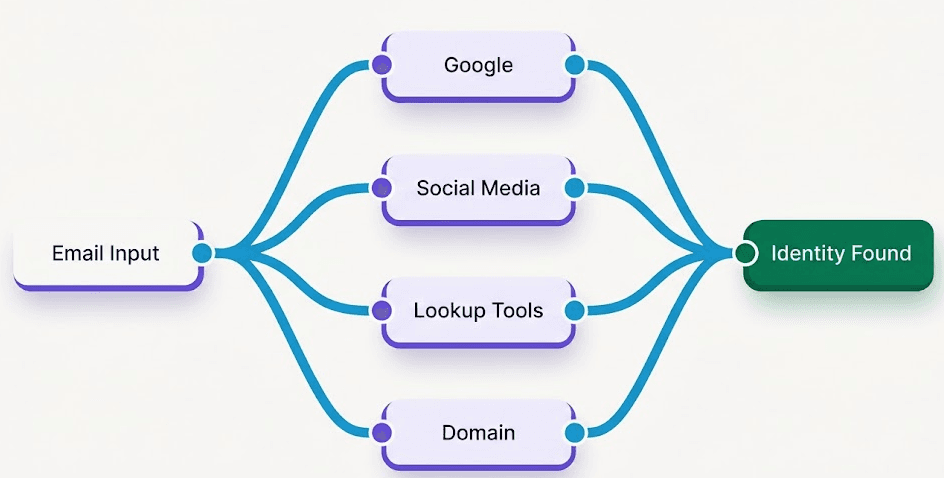
You can find the owner of an email address by running the exact address through search engines, searching social media databases, or using reverse lookup tools. Before you pay for premium software, you can start with free manual checks. Here is a breakdown of the most effective methods.
How to find the owner of an email address on Google
You can find the owner of an email address on Google by copying the unknown address, pasting it into the search bar, and wrapping it in quotation marks (for example: "name@company.com").
These quotation marks force Google to find that specific, exact match instead of pulling up random results. If the person has ever published that address online, this trick will find it. This method frequently uncovers personal blogs, public PR releases, or old forum accounts that display the sender's real name.
How to find the owner of an email address from social media
You can find the owner of an email address from social media by typing the exact address into the search bars of major networks, as most people link their primary accounts to their email. This is a very reliable method because almost everyone uses an email address to register for these platforms.
LinkedIn: This is the best place to check for professional or B2B email addresses. Paste the address into the top search bar. If the person has that email listed publicly on their profile or in their contact information, their current job title and full name will appear immediately.
Facebook and X (Twitter): These platforms are great for identifying personal email owners. Type the address directly into the search function. Users often leave their contact details public on their Facebook "About" page or drop their email in old tweets to connect with others.
How to find the owner of an email address using a reverse email lookup tool
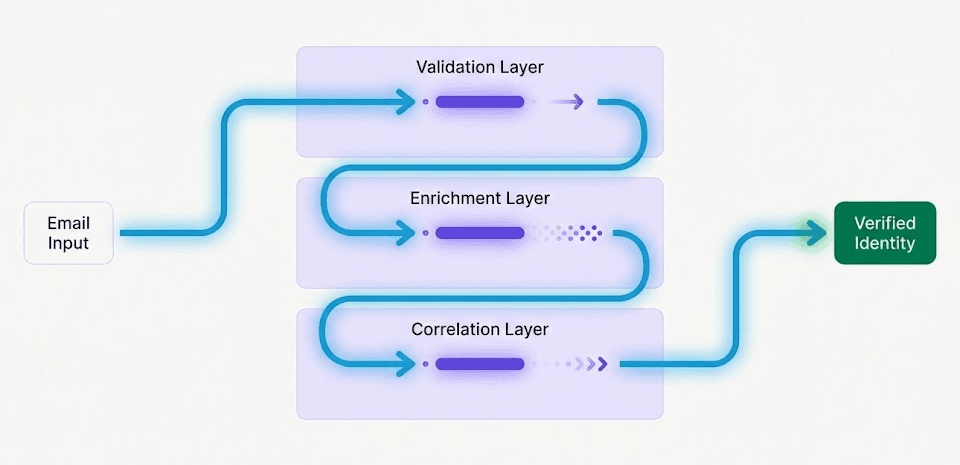
You can find the owner of an email address using a reverse email lookup tool that scans massive public databases to match the unknown address to a specific name, phone number, or physical location.
These tools work by pulling data from public records, data brokers, and business directories. You simply enter the email address into the software, and the system cross-references it across billions of records. It is highly recommended to use a B2B enrichment platform like FullEnrich to identify the sender.
Instead of relying on a single database, FullEnrich uses a waterfall enrichment process to check data from over 20 premium vendors at the exact same time. This quickly matches a corporate email to a verified employee profile and gives you highly accurate details within minutes. For personal addresses, standard public background check tools often reveal exactly who registered the account.
How to find the owner of an email address using the domain
You can find the owner of an email address using the domain by visiting the company website to check their team directory or by running a public domain registry search. You do not need to guess if the address comes from a private company and looks like "name@specificcompany.com".
First, go directly to that specific website. Look for an "About Us" or "Meet the Team" page. Companies usually list their staff members there, so you can easily match the first name in the email address to a real face and job title. If the website is vague or lacks a team page, you can perform a quick "WHOIS" lookup online. This is a public internet registry that shows exactly who bought the website domain. It frequently provides the exact name and contact details of the business owner.
How to find the owner of an email address using a mailing list
You can find the owner of an email address using a mailing list by joining their website's newsletter to trigger an automated welcome message, or by replying directly to ask for their name. Sometimes the easiest tactics are the ones people overlook the most.
If the email address belongs to a business, an agency, or an independent creator, go directly to their website and sign up for their newsletter. In most cases, the automated welcome email that hits your inbox will include the sender's actual first and last name in the signature block.
Alternatively, if the message looks like a genuine business inquiry but lacks a name, just hit reply. A simple, polite message asking, "Who am I speaking with?" is often the fastest way to get a direct answer from a real person.
Is it legal to find out who owns an email address
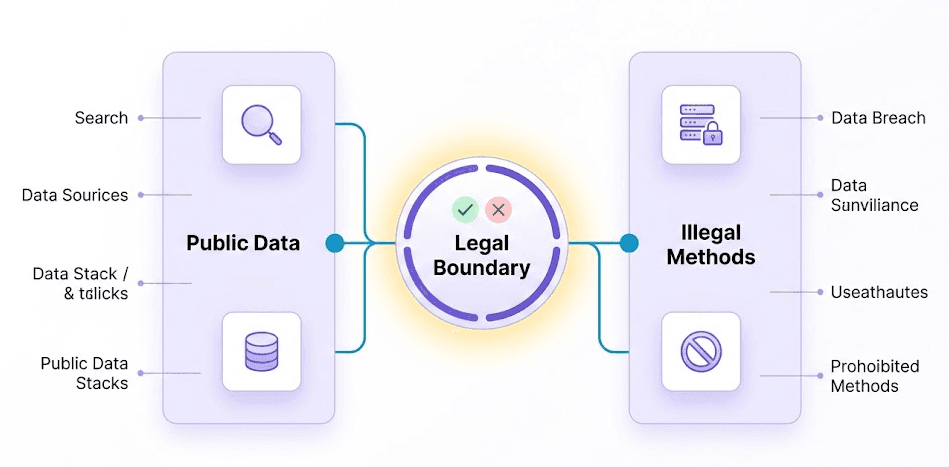
Finding out who owns an email address is completely legal as long as you use publicly available information to conduct your search. You are simply organizing data that the person or business has already shared with the public.
Searching Google, looking at open social media profiles, and using commercial reverse lookup tools are all lawful activities. These methods rely entirely on information that already exists in the public domain. If someone willingly lists their contact details on a company website, a public X (Twitter) account, or a community forum, anyone is legally allowed to find and view that connection.
The practice only becomes illegal if you cross the line into cybercrime. Hacking into a private server, bypassing passwords, or buying stolen databases to reveal a sender's identity is strictly against the law.
You must also consider what you do with the information after you find the owner. Tracing an email address to a real name is perfectly legal, but adding that person to an automated marketing list without their consent might violate regional privacy laws, such as the GDPR in Europe or the CCPA in California. As long as you stick to public searches and use the information responsibly, you have nothing to worry about.
What to do if you can't find the owner of the email address
If you still cannot identify the sender after exhausting all search methods, you should treat the email as a security risk, avoid clicking any links, and block the address immediately. The reality is that some people intentionally hide their digital tracks.
If an email address has zero social media presence, does not appear in Google searches, and reverse lookup tools find absolutely nothing, you are likely dealing with a scammer. Never trust an anonymous sender who asks for personal details, financial information, or urgent action. Do not open any attachments or hyperlinks inside the message. Trust your instincts. Simply delete the email and block the address in your provider settings to protect your data.
Final thoughts
Whether you are protecting your personal inbox from scams or verifying a new business lead, a quick search usually reveals exactly who is on the other side of the screen. Start with simple methods like a basic Google search or checking social media platforms. If those do not work, a dedicated reverse lookup tool can find the answer for you in seconds. Just remember to use this information responsibly and always trust your instincts if a sender actively hides their identity.
Frequently Asked Questions (FAQs)
What is the best reverse email lookup tool?
The best tool depends entirely on whether you are looking for a professional contact or a personal email owner. For B2B sales and corporate emails, platforms like FullEnrich work incredibly well because they scan multiple premium data vendors at once to find accurate employee profiles.
How do you verify if an email address is real or fake?
You can verify if an email address is real by running it through a free online email checker tool. These tools ping the email server behind the scenes to confirm if the specific inbox actually exists and can receive mail, all without actually sending a message to the owner. You should also look very closely at the domain name right after the "@" symbol. Scammers frequently use slight misspellings of popular company names to trick people into thinking the email is legitimate.
How can I hide my own email address from public searches?
You can hide your personal email address by removing it from your public social media profiles and submitting opt-out requests to data broker websites. Take a few minutes to check your Facebook and X account settings to ensure your contact details are visible only to your close friends. Moreover, if you own a personal website or blog, you can pay your hosting provider for domain privacy protection.