So you're trying to figure out which Data vendors to use for your outbound.
And now you're stuck between Lusha and RocketReach.
Well, you're in the right place.
We've tested both of these tools extensively (we're FullEnrich — we work with B2B data all day). We're going to give you a straight-up comparison so you can figure out which one actually makes sense for your workflow.
Both tools promise to help you find emails and phone numbers for your prospects. But they work pretty differently in practice.
So grab a coffee and let's dig in.
Who is each tool best for?
We went pretty deep on this comparison. If you read the whole thing, you'll know exactly which tool to pick.
But if you're lazy (like us) and just want the quick answer, here it is:
- Lusha is great for SDRs and sales reps who prospect directly on LinkedIn. The Chrome extension is slick, setup takes like 5 minutes, and you can start pulling phone numbers immediately. It's especially good if you need direct dials and you're doing targeted, relationship-based outreach.
- RocketReach is better for researchers, recruiters, and teams who need to do bulk searches across a massive database. They have 700M+ profiles, more advanced filtering, and it works well for building large prospect lists. It's more of a research tool than a real-time prospecting tool.
Our honest take? If you live in LinkedIn and need phone numbers fast, Lusha makes sense. If you need advanced search filters and bulk list building, RocketReach is solid.
But here's the thing we've learned from working with thousands of sales teams: both tools share the same fundamental limitation. They're single-source databases. When their data doesn't have your contact, you've burned a credit with nothing to show.
That's why we built FullEnrich differently — but more on that later.
Lusha vs RocketReach: Feature comparison
Let's go through the main features of both tools so you can see which one fits your workflow better.
Chrome Extension & LinkedIn Prospecting
This is where the rubber meets the road for most sales teams. You're on LinkedIn, you find a prospect, and you need their contact info. How easy is it?
Lusha
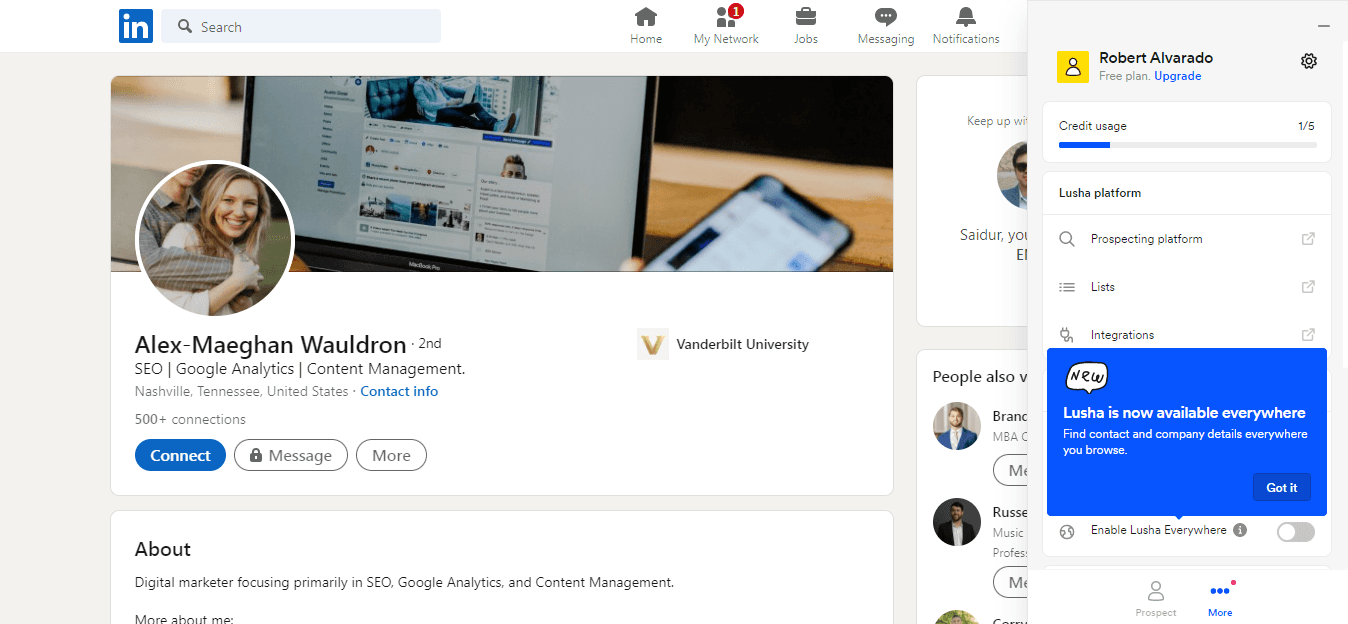
Lusha's Chrome extension is really good. Like, genuinely impressive.
You're browsing LinkedIn, you click the extension, and boom — email and phone number pop up. It works on company websites too. The whole experience feels seamless.
One thing we like: the extension shows you how many credits you'll use before you reveal the info. So no surprises.
Users on G2 consistently mention the Chrome extension as Lusha's best feature. One reviewer said: "This is a MUST to anyone who is doing any type of cold calling. Lusha was able to find about 80% of the contact details we were looking for."
The data quality for phone numbers is solid. Emails are generally good too, though we've seen some bounces.
⭐️ Rating: 4.5/5 stars
RocketReach
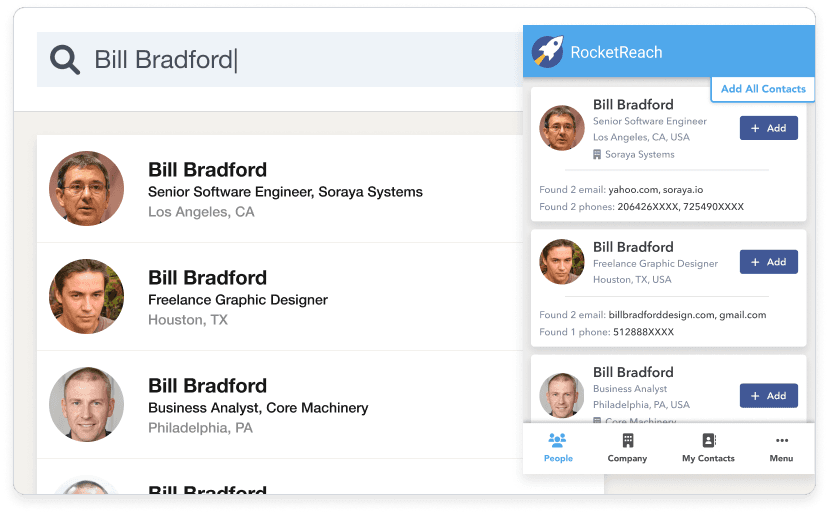
RocketReach also has a Chrome extension. It works on LinkedIn and company websites.
But here's the thing — it's not as smooth as Lusha's. The interface feels a bit clunkier, and the experience isn't quite as polished.
We've also seen some users report that LinkedIn blocked their accounts for using the RocketReach extension. That's... not great.
The extension does give you more info per lookup though — social profiles, company data, that kind of thing. So there's a trade-off.
⭐️ Rating: 3.5/5 stars
Database Size & Search Capabilities
If you're building prospect lists from scratch (not just enriching people you find on LinkedIn), database size and search filters matter a lot.
Lusha
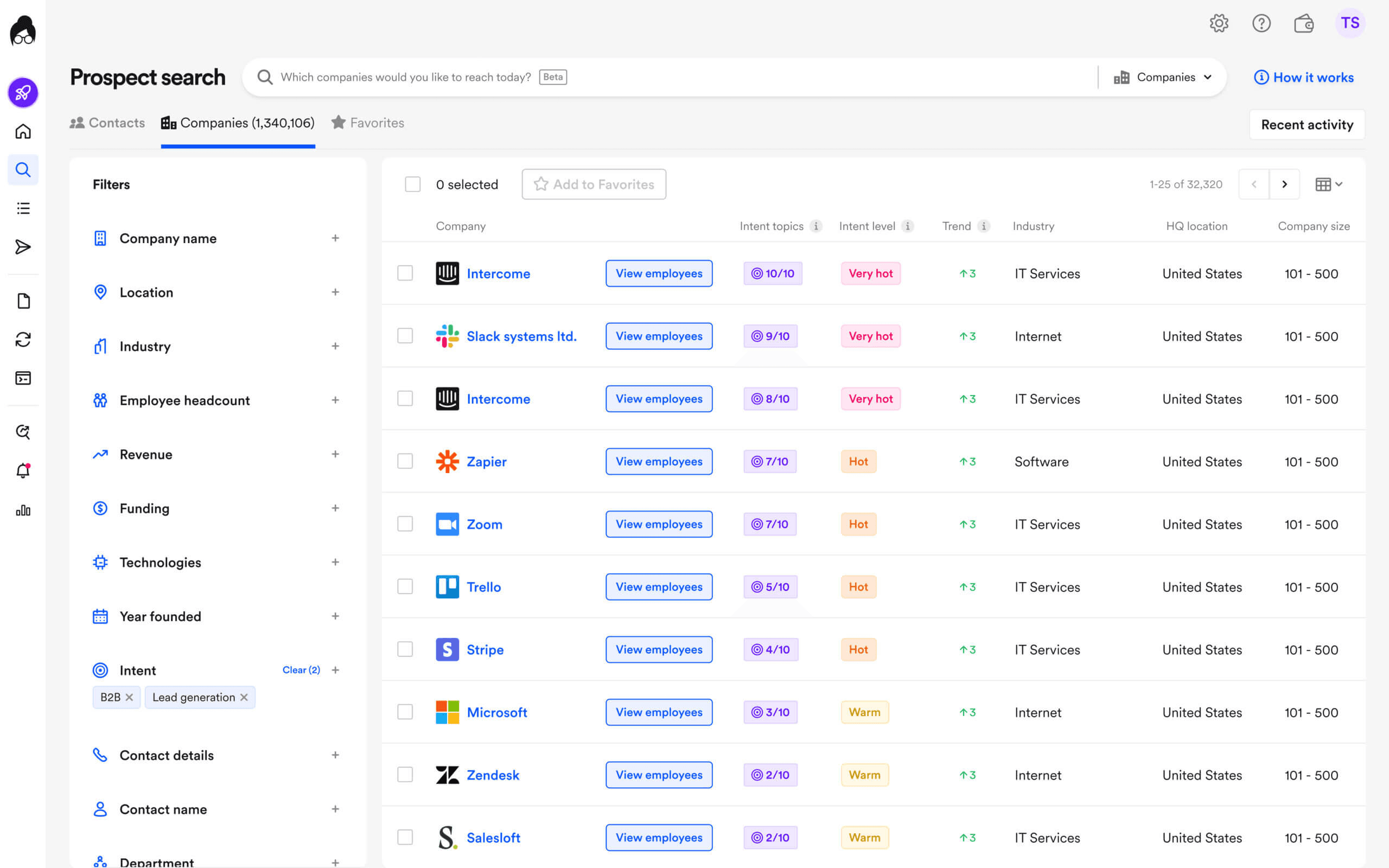
Lusha has a solid database, but they don't publicly share exact numbers. They claim coverage of "millions" of contacts.
The search functionality is decent. You can filter by company size, location, job title, industry, and department. It covers most use cases for targeted prospecting.
But if you need really granular filters — like technographics or specific company attributes — you'll hit the limits pretty quickly.
Advanced features like intent signals and job-change alerts are locked behind higher-tier plans. So keep that in mind.
⭐️ Rating: 3.5/5 stars
RocketReach
This is where RocketReach shines.
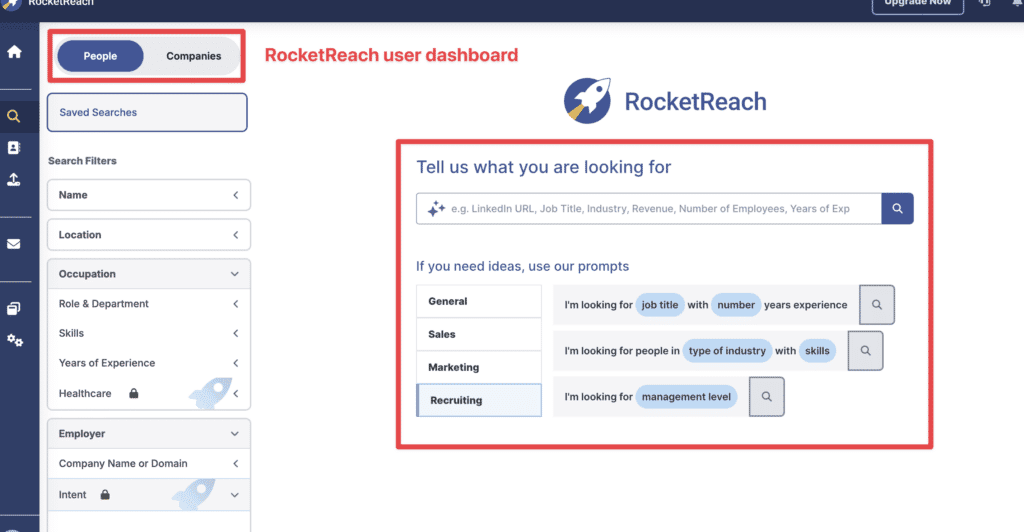
700 million professional profiles. 35 million companies. Over 100 search filters.
You can search by job title, skills, education, company size, revenue, location, industry... the list goes on. It's genuinely powerful for research and bulk list building.
The platform is heavily reliant on LinkedIn data though. So if someone isn't active on LinkedIn, you might not find them.
For recruiters and researchers who need to build large, targeted lists, RocketReach's search is really good.
⭐️ Rating: 4.5/5 stars
Data Accuracy
Okay, let's talk about the thing everyone cares about: is the data actually accurate?
This is something we think about a lot at FullEnrich. Data accuracy is literally our business.
Lusha
Lusha claims around 81% data accuracy. That's... okay. Not amazing, but not terrible either.
In practice, phone numbers are usually solid. Direct dials work more often than not. Emails are a bit more hit-or-miss.
Some users report issues with outdated data, especially for niche roles or smaller companies. And if you're prospecting outside North America, accuracy seems to drop.
One G2 reviewer mentioned: "The data accuracy is generally strong, but some contacts are outdated for smaller firms."
⭐️ Rating: 3.5/5 stars
RocketReach
RocketReach claims 85-97% accuracy on verified emails. In practice? Results vary.
Some users report great results. Others report bounce rates of 20-30%. One Trustpilot reviewer called the data "mostly wrong and outdated."
The platform shows confidence levels for each email (verified, likely, etc.), which is helpful. But the inconsistency is frustrating.
G2 reviews mention "outdated contacts" as one of the most common complaints. The data quality seems to be better for larger companies and worse for smaller ones.
⭐️ Rating: 3/5 stars
Why does accuracy vary so much?
Here's what most people don't realize: every single-source database has gaps. Lusha might be great for US tech companies but weak in EMEA. RocketReach might nail enterprise contacts but miss SMBs.
That's exactly why we built FullEnrich to query 15+ data sources instead of relying on just one. If the first provider doesn't have the contact, we check the next. Then the next. And so on.
The result? Our users typically see 80-85% match rates instead of 40-50%.
See how waterfall enrichment works →
Pricing
Let's talk money. Both platforms use credit-based pricing, which can get confusing.
Lusha
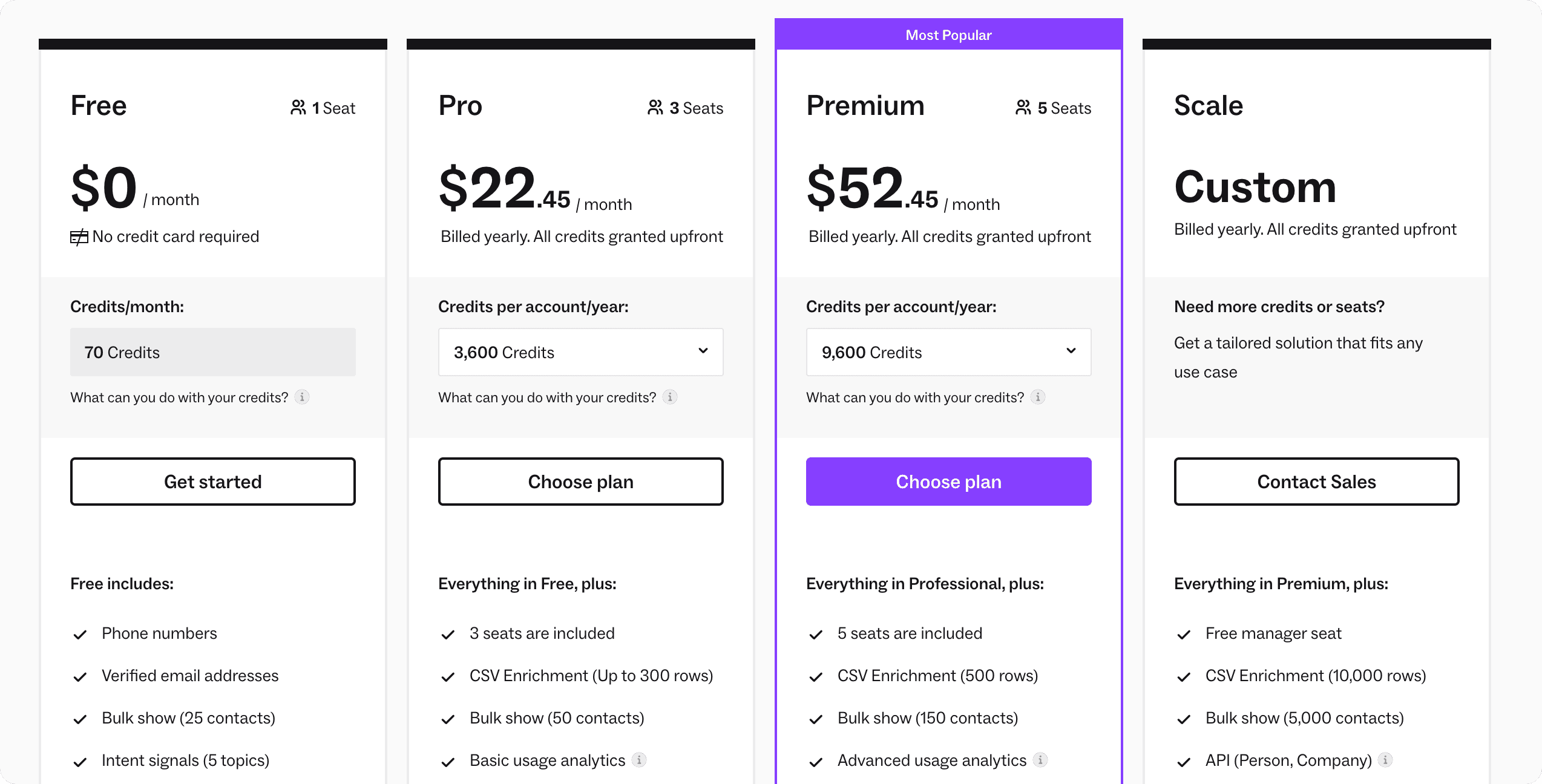
Lusha's pricing is published on their website, which we appreciate.
Here's the breakdown:
- Free: 70 credits/month (but phone numbers cost 5 credits each, so that's like 14 phone reveals)
- Pro: $22.45/user/month (billed annually), 3,000 credits/year
- Premium: $52.45/user/month (billed annually), 7,200 credits/year
- Scale: Custom pricing
The catch? Credits disappear fast when you're revealing phone numbers. And the good integrations (Salesforce, intent data) are locked behind higher tiers.
Users frequently mention that credits deplete faster than expected. One reviewer said: "Credits can deplete quickly, especially when revealing phone numbers."
⭐️ Rating: 3.5/5 stars
RocketReach
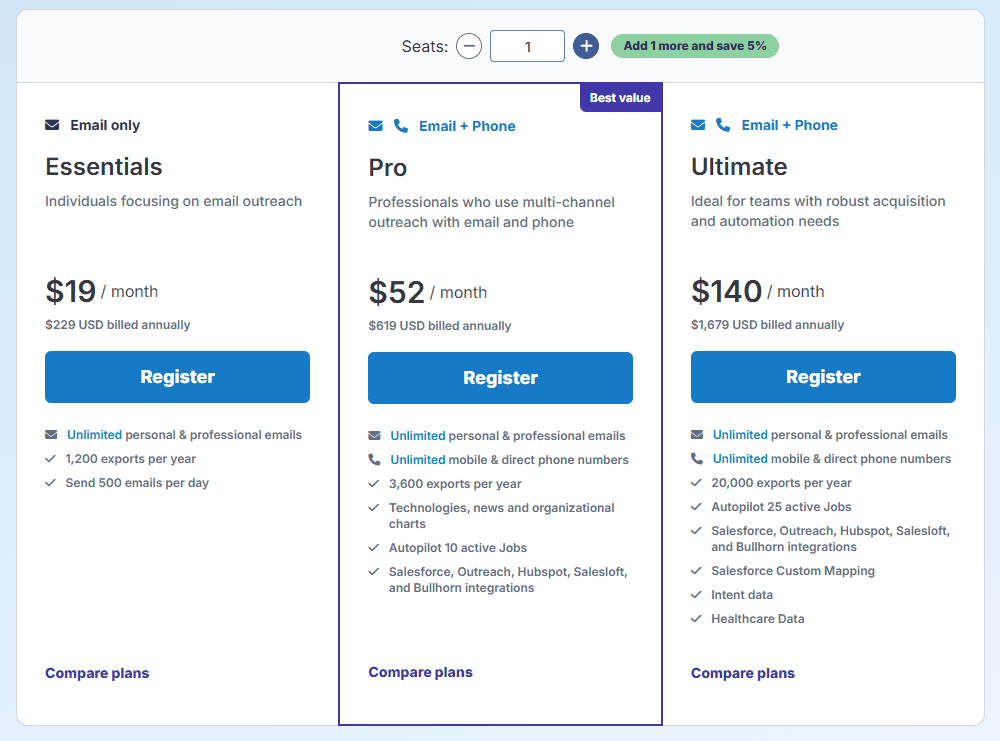
RocketReach is more expensive at the entry level:
- Free: 5 lookups/month (basically useless)
- Essentials: $69/month or $399/year (100 lookups/month, email only)
- Pro: $119/month or $899/year (250 lookups/month, email + phone)
- Ultimate: $209/month or $2,099/year (1,000 lookups/month, API, intent data)
Here's the annoying part: credits don't roll over. If you don't use them, you lose them.
👉 Learn more about Rocketreach pricing and plans
And the auto-renewal situation is rough. Multiple Trustpilot reviewers mention getting charged without warning: "Be very careful with the automated renewal system... they don't send any reminder about the renewal."
⭐️ Rating: 2.5/5 stars
How we think about pricing differently
Both Lusha and RocketReach charge you whether you get results or not. That's always felt backwards to us.
At FullEnrich, we only charge for successful enrichments. If we can't find the contact, you don't pay. Simple as that.
Our plans start at $29/month for 500 credits, and credits roll over for 3-12 months depending on your plan.
CRM Integrations
Can you actually get this data into your CRM without copying and pasting? Let's see.
Lusha
Lusha integrates with Salesforce, HubSpot, Zoho, Pipedrive, Outreach, and Salesloft.
The integration quality is pretty good. You can push contacts directly to your CRM with one click.
But here's the catch — the Salesforce integration is only available on the Scale plan (custom pricing). So if you're on Pro or Premium, you're stuck with manual export or Zapier.
⭐️ Rating: 3.5/5 stars
RocketReach
RocketReach offers Salesforce and HubSpot integrations on higher tiers. API access is available on Ultimate.
The integrations work, but they're not as seamless as Lusha's. You'll probably end up using CSV exports more than direct syncs.
Zapier support is available, which opens up more possibilities if you're willing to build workflows.
⭐️ Rating: 3/5 stars
User Experience
How easy is it to actually use these tools day-to-day?
Lusha
Lusha is really easy to use. Like, surprisingly easy.
The interface is clean and modern. You can get productive in about 10 minutes. The Chrome extension works smoothly.
G2 gives Lusha a 9.2/10 ease-of-use score. That's legitimately good.
New SDRs can start using Lusha on day one without much training. That matters if you're scaling a team.
⭐️ Rating: 4.5/5 stars
RocketReach
RocketReach has more features, which means more complexity.
The interface is functional but feels a bit dated compared to newer tools. There's a learning curve to figure out all the search filters and features.
Power users will appreciate the depth. But if you just want to find contact info quickly, it can feel like overkill.
Customer support is a consistent complaint in reviews. G2 mentions "unresponsive chatbots" and difficulty getting help with cancellations.
⭐️ Rating: 3/5 stars
Lusha: Pros and Cons
Let's break down what we actually like and don't like about Lusha.
What we like about Lusha
- Chrome extension is excellent. Best-in-class for LinkedIn prospecting.
- Really easy to use. Minimal learning curve.
- Good phone number accuracy. Direct dials actually work most of the time.
- Clean, modern interface. Feels like a tool built in 2024, not 2014.
- Quick setup. You can be productive in minutes.
What we don't like about Lusha
- Credits burn fast. Phone numbers cost 5 credits each. That adds up.
- Good integrations locked behind expensive tiers. Salesforce requires Scale plan.
- Data accuracy varies. Especially outside North America.
- Privacy concerns. Trustpilot is full of complaints from people whose data was scraped without consent.
- Intent data and advanced features cost extra. The base plans are pretty limited.
👉 Discover Lusha alternatives
RocketReach: Pros and Cons
Now let's do the same for RocketReach.
What we like about RocketReach
- Massive database. 700M+ profiles gives you serious coverage.
- Advanced search filters. Great for building targeted lists from scratch.
- Good for recruiters. The search capabilities work really well for recruiting use cases.
- API access available. If you need programmatic access, it's there.
- Lower cost per lookup on annual plans. If you commit to a year, the math works out okay.
What we don't like about RocketReach
- Data accuracy is inconsistent. Too many bounced emails and outdated contacts.
- Credits don't roll over. Use them or lose them.
- Auto-renewal is aggressive. Multiple users report getting charged without warning.
- Customer support is weak. Getting help or canceling is frustrating.
- Chrome extension isn't as good as Lusha's. The LinkedIn experience is clunkier.
- Privacy complaints. Similar issues to Lusha with data being scraped without consent.
👉 Discover Rocketreach alternatives
The Problem Both Tools Share
Okay, here's where we need to get real with you.
Both Lusha and RocketReach have the same fundamental limitation: they're single-source databases.
What does that mean for you?
When their database doesn't have the contact you need, you've burned a credit with nothing to show for it. You're betting everything on one provider's coverage matching your ICP.
B2B contact data decays at 30-40% per year. People change jobs, companies restructure, emails get deactivated. Even if a tool claims 90% accuracy, that means 1 in 10 contacts is wrong. And in practice, it's often worse.
The credit systems make this more painful. You pay whether the data is good or not. Run out of credits mid-campaign? Pay overage fees or wait until next month.
This isn't just a Lusha or RocketReach problem. It's a structural limitation of relying on any single data source.
We've talked to hundreds of sales teams who hit this wall. They try Lusha, get 50% match rates, switch to RocketReach, get similar results. Then they try Apollo, then Cognism, then whatever's next.
The problem isn't which single-source tool you're using. It's using a single-source tool at all.
How We Solve This at FullEnrich
We built FullEnrich specifically to solve the single-source problem.
Instead of relying on one database, we use waterfall enrichment — querying 15+ premium data sources sequentially until we find valid contact info.
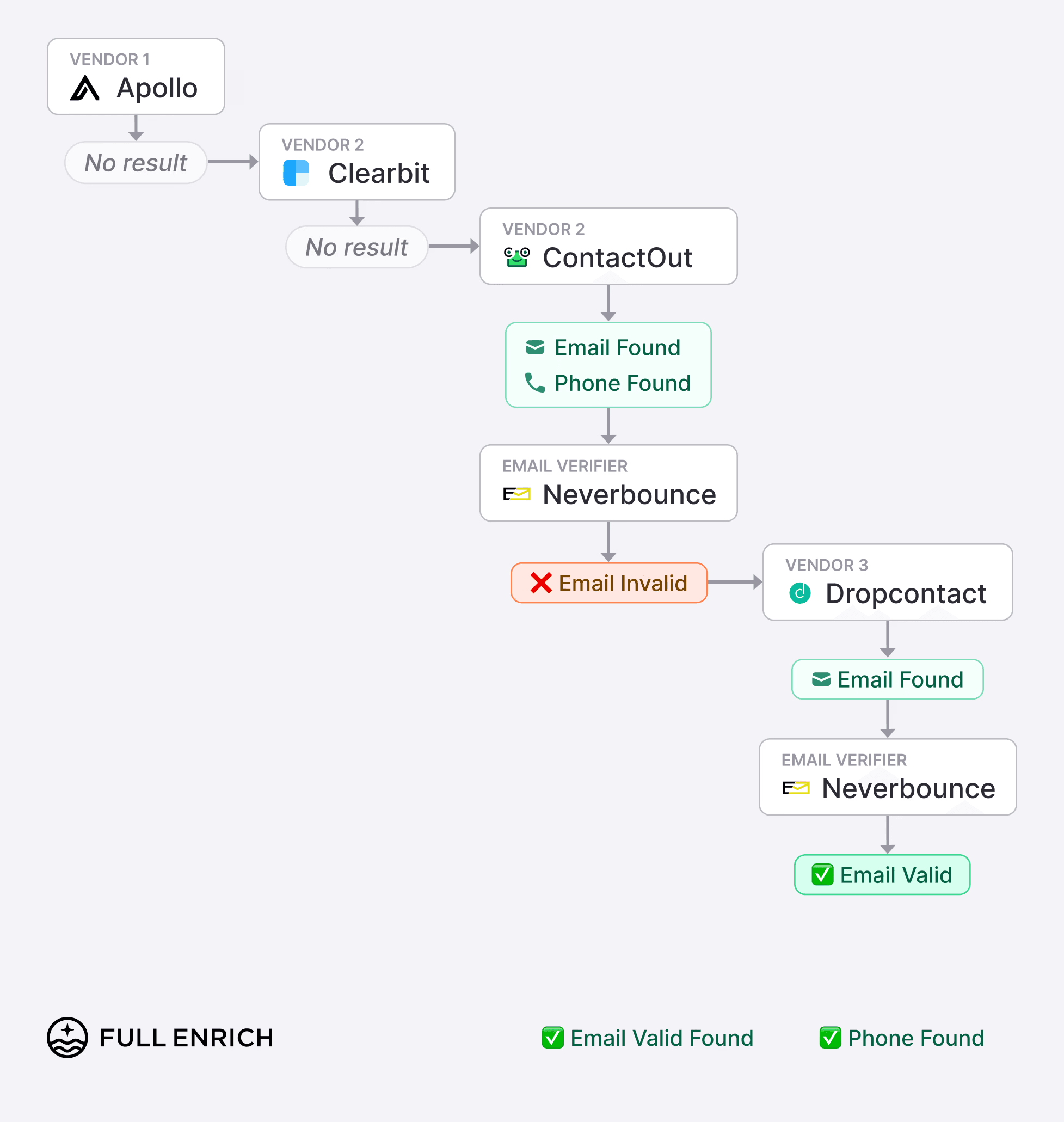
Here's how it works:
- You upload a list of prospects (or connect via API)
- We query each data source in sequence
- The first valid result gets returned
- Every email is triple-verified before delivery
- You only pay for successful enrichments
If the first provider doesn't have the contact, we check the next. Then the next. And the next.
The result? Our users typically find contact info for 80-85% of leads, compared to 40-50% with single-source tools like Lusha or RocketReach.
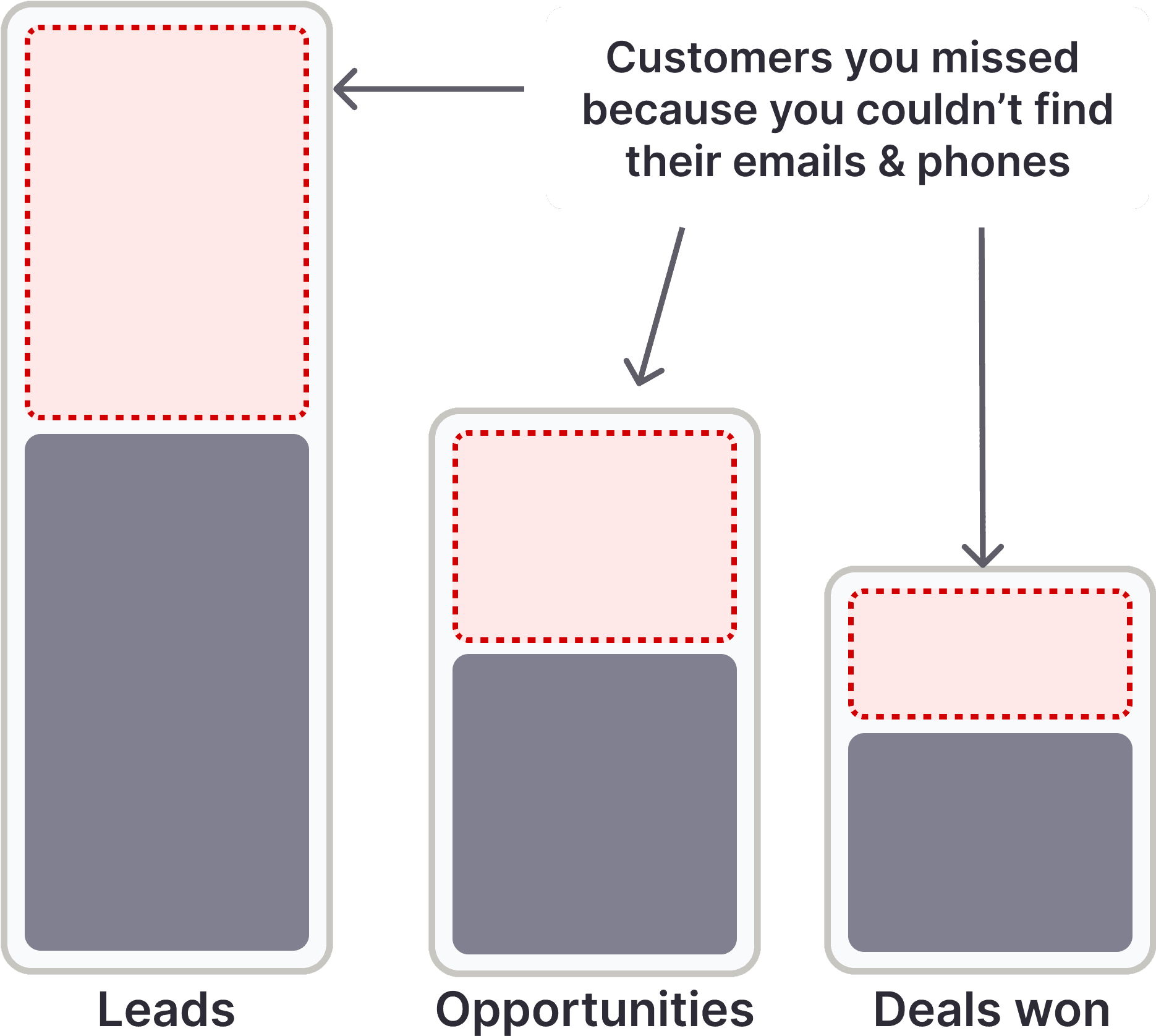
What you get with FullEnrich:
✅ Waterfall enrichment across 15+ data sources
✅ Pay-per-success (no credits burned on "not found")
✅ Triple email verification (bounce rates under 2%)
✅ Credits roll over for 3-12 months
✅ Starts at $29/month for 500 credits
✅ API access on all plans
✅ GDPR and CCPA compliant
The math is simple. Instead of paying $69/month for 100 lookups that might not return valid data, you're paying $29/month for 500 successful enrichments with verified emails.
Try FullEnrich free — 50 credits, no credit card →
Quick Comparison: Lusha vs RocketReach vs FullEnrich
Lusha | RocketReach | FullEnrich | |
|---|---|---|---|
Best for | LinkedIn prospecting | Bulk research & recruiting | Maximum coverage |
Data sources | Single source | Single source | 15+ sources (waterfall) |
Starting price | $22.45/mo | $69/mo | $29/mo |
Match rates | ~50-60% | ~40-50% | ~80-85% |
Pay for "not found"? | Yes | Yes | No |
Credits roll over? | Limited | No | Yes (3-12 months) |
Email verification | Basic | Basic | Triple verification |
Which Should You Choose?
Let us make this easy.
Choose Lusha if:
- You prospect primarily on LinkedIn
- You need phone numbers (direct dials) quickly
- Ease of use matters more than advanced features
- You're an SDR or small sales team
- You're okay with 50-60% match rates
Choose RocketReach if:
- You need to build large prospect lists from scratch
- Advanced search filters are important to you
- You're a recruiter or researcher
- Database depth matters more than speed
- You can handle a steeper learning curve
Choose FullEnrich if:
- You're frustrated with low match rates
- You want to pay only for successful enrichments
- You prospect across multiple countries and industries
- Verified emails with low bounce rates matter
- You want predictable, transparent pricing
The Verdict
Look, both Lusha and RocketReach are legitimate tools that thousands of sales teams use every day.
Lusha is the better choice if you live in LinkedIn and need a fast, easy way to get phone numbers and emails while you prospect. The Chrome extension is genuinely good, and the user experience is top-notch.
RocketReach is better if you need to do research-style prospecting with advanced filters and large list building. The database is massive, and the search capabilities are powerful.
But here's the honest truth: both tools have the same core limitation. Single-source data means inconsistent coverage, wasted credits, and the frustration of "not found" results.
If you're hitting low match rates and burning credits on bad data, the problem isn't which single-source tool you're using.
It's using a single-source tool at all.
We built FullEnrich to solve exactly this problem. Waterfall enrichment across 15+ sources. Pay only for successful results. Triple-verified emails.
Start with 50 free credits. No credit card required.
Your bounce rates will thank you.
FAQ
Is Lusha or RocketReach better for small teams?
Lusha. The lower price point ($22.45/month vs $69/month) and simpler interface make it more accessible for small teams getting started with outbound.
Which has more accurate data?
It depends. Lusha tends to be better for phone numbers. RocketReach has broader coverage but more inconsistent email accuracy. Neither consistently hits the 90%+ accuracy they claim. That's why we built FullEnrich to query multiple sources.
Can I use both tools together?
You can, but it gets expensive fast. FullEnrich is a more cost-effective way to access multiple data sources through a single platform.
How is FullEnrich different from Lusha and RocketReach?
We're not a database — we're an aggregator. We query 15+ data providers and return the best result. You only pay when we find valid data.
Do credits roll over?
Lusha: Limited rollover on monthly plans. RocketReach: No rollover. FullEnrich: Yes, 3-12 months depending on plan.