
ai-solutions-for-gtm-enrichmentCRM enrichment is the automated process of continuously appending missing data, updating existing data, or integrating third-party data directly into the native objects of your sales database. It serves as the orchestration layer between your static CRM records and your buyers' real-world movements.
In my experience building revenue operations, I have watched sales teams completely abandon their tools because they no longer trust the information inside them. The reality of the B2B market is that people move fast. They receive promotions, switch companies, or their organizations restructure overnight. Because of this constant velocity, standard B2B contact data decays at an estimated rate of 25% to 30% per year.
When your database goes stale, your outbound engine breaks. Reps stop dialling. They start spending hours manually scraping LinkedIn profiles just to verify a job title or find a working phone number. I will walk you through exactly how this operational process differs from one-off list enrichment.
And will cover the four specific data layers you must capture, how to configure strict overwrite rules to protect manual rep entry, and how this infrastructure directly accelerates your pipeline velocity.
CRM Enrichment vs. Data Enrichment
Revenue teams frequently confuse these two terms. Treating them interchangeably leads directly to broken outbound pipelines and wasted software budgets.
Data enrichment is a broad, static event. Running standard data enrichment typically involves taking a raw CSV file and pushing it through a third-party vendor’s platform to append missing columns.
It is a manual batch process built for a specific, one-off marketing campaign. Once an operator downloads the enriched list, the data immediately begins to decay again because it remains disconnected from the core infrastructure.
CRM enrichment is a dynamic, structural integration. It operates strictly within the system of record. Instead of requiring manual list uploads, this process utilizes webhooks and bi-directional API endpoints to automatically ping external databases the exact second a new lead hits Salesforce or HubSpot.
It maps those fresh data points directly to native Lead, Contact, and Account objects in real-time. One is a temporary administrative task.
How does CRM enrichment work?
The mechanics of CRM enrichment rely on automated data routing rather than manual human intervention. The process functions as a continuous feedback loop between the internal sales database and external data vendors.
1. The Ingestion Trigger
The cycle initiates the exact moment a new record enters the system. When an inbound prospect submits a form with just an email address, the CRM generates a new Lead object. This creation event instantly fires a webhook. The webhook sends a small data payload to the enrichment engine signaling that a record requires immediate completion.
2. The External API Query
The enrichment platform receives the webhook and isolates the primary identifier. This identifier is typically the corporate email domain or a LinkedIn URL. The platform uses that domain to ping a series of external B2B databases via API. If the primary database lacks the required information, a waterfall routing architecture automatically queries secondary and tertiary providers until it finds a match.
3. Payload Resolution and Mapping
Once a match occurs, the external vendor returns a structured JSON payload. This file contains the missing firmographics, technographics, or contact details. The enrichment engine parses this JSON file. It then maps the newly acquired data points to the corresponding custom fields within the CRM architecture.
4. The Write-Back Execution
The final step physically alters the database. The system pushes the formatted data back into Salesforce or HubSpot. During this write-back phase, the integration strictly obeys predefined overwrite rules and field-level security protocols. If a sales representative manually entered a direct dial yesterday, the system detects that human touch and actively blocks the update for that specific field. It only fills empty fields or overwrites the designated metrics.
Also read: 6 Best CRM Data Enrichment Tools (Free & Paid) To Try in 2026
What are the 4 layers of CRM data?
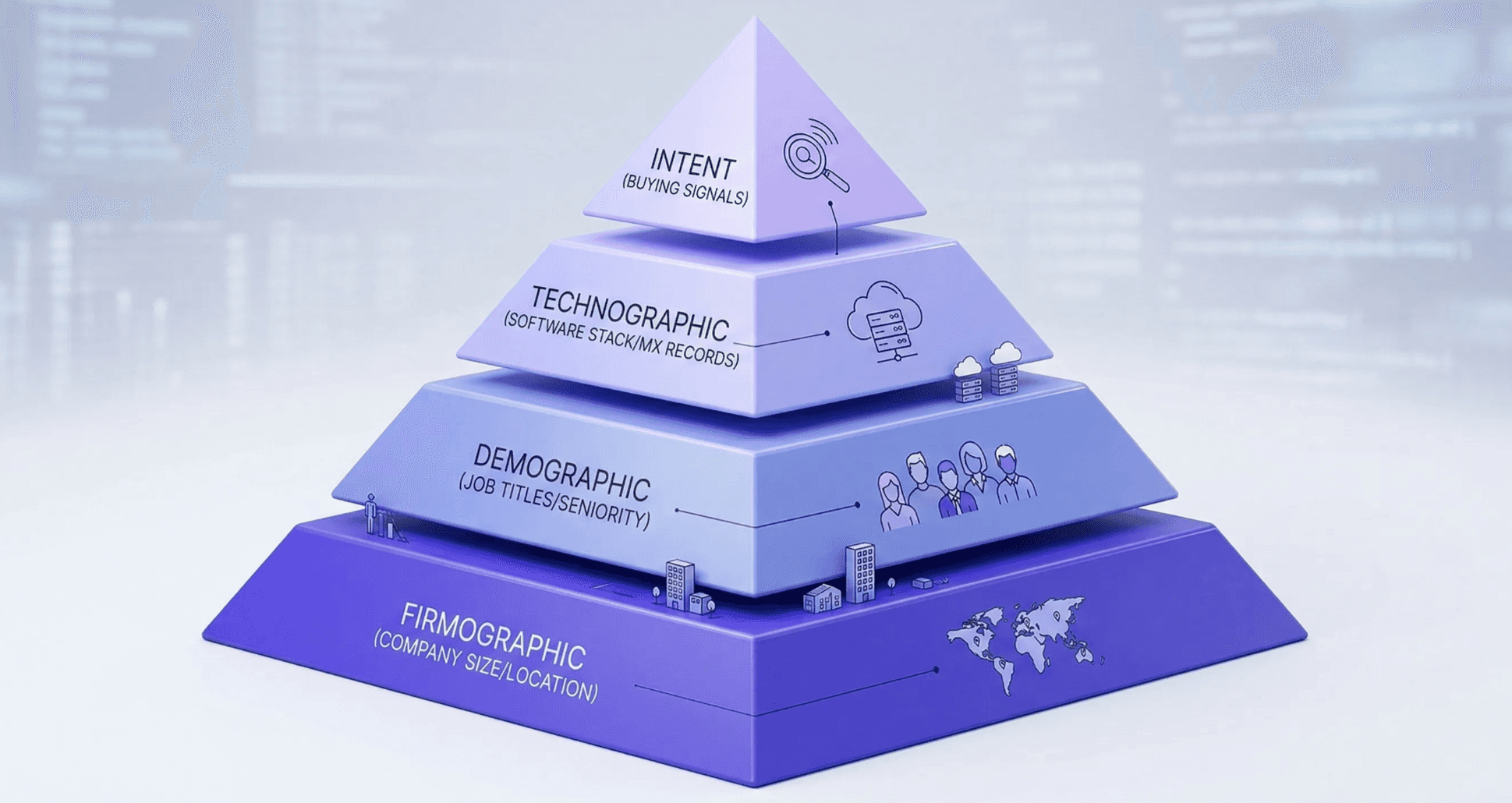
A properly engineered CRM does not treat data as a flat list of contacts. It structures information into a multi-dimensional schema. Dividing data into these four specific layers allows routing engines to prioritize API calls and manage payload costs efficiently.
1. The Demographic Layer (Contact Metrics)
This layer captures the specific human element. It goes far beyond basic names and email addresses. Advanced enrichment standardizes job titles into uniform hierarchies to trigger precise routing rules. It also utilizes SMTP validation and mobile carrier pinging to verify direct dials.
2. The Firmographic Layer (Account Metrics)
Firmographics define the structural reality of the target company. This includes mapping parent-child corporate hierarchies and standardizing NAICS or SIC industry codes. High-tier enrichment APIs also track dynamic account metrics, such as month-over-month headcount growth velocity and recent capital raises, directly from SEC filings.
3. The Technographic Layer (Infrastructure Metrics)
This layer reveals a prospect's hidden technological footprint. Enrichment platforms do not simply guess what software a company uses. They scrape HTML headers, analyze MX records, and monitor DNS changes to deduce backend infrastructure. They also parse public job postings on job boards. If a company aggressively hires engineers with Snowflake certifications, the CRM automatically logs Snowflake as an active technographic attribute.
4. The Intent Layer (Behavioral Metrics)
Intent data represents the active buying cycle. It shifts the CRM from a static ledger to a predictive engine. Enrichment tools aggregate bidstream data and deanonymize IP addresses from B2B content networks. When an account experiences a massive surge in article reads on specific software categories, the system pushes an intent score directly to the CRM. This triggers immediate automated alerts for the assigned account executive.
How to use Enrichment to Drive Sales
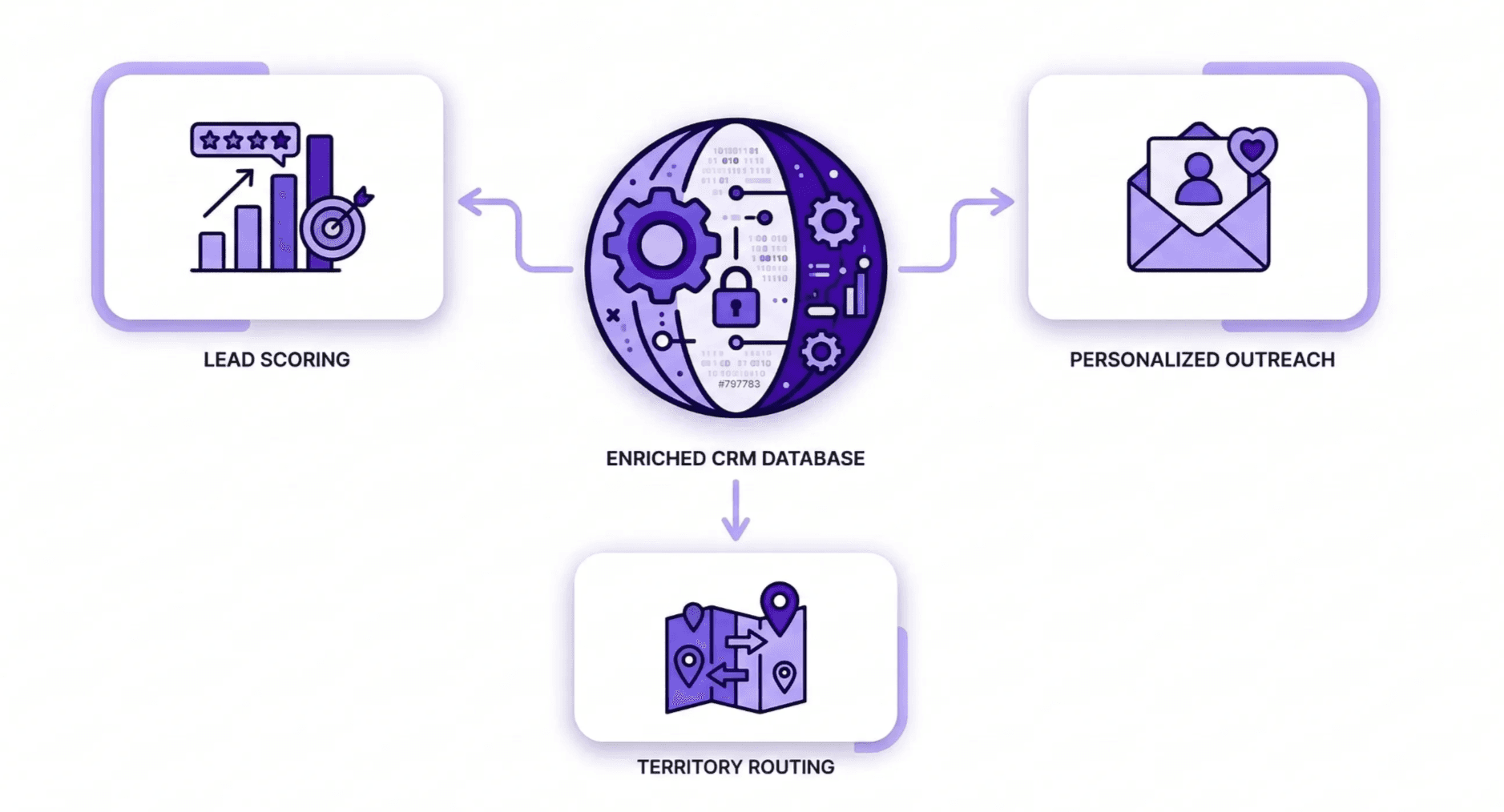
High-fidelity CRM enrichment converts a static database into an active revenue engine by automating lead qualification and providing the technical triggers required for high-velocity outreach.
This infrastructure allows sales teams to bypass manual prospect research and focus entirely on conversion through three primary mechanical levers: automated lead scoring, dynamic personalization, and intelligent territory routing.
1. Automated Lead Scoring and Prioritization
Enrichment provides the raw inputs for weighted lead scoring algorithms. Instead of relying on the limited information a prospect provides in a web form, the system automatically appends critical qualifying metrics, such as annual revenue thresholds, employee growth velocity, and recent funding rounds. If a lead enters the system with a generic email address, enrichment identifies the corporate domain and assigns a score based on the target account’s ideal customer profile (ICP) fit.
2. Dynamic Personalization at Scale
Data enrichment provides the specific "hooks" needed for relevant outreach without requiring a rep to spend thirty minutes on a prospect's LinkedIn profile. By pulling in technographic data such as a recent switch to a competitor's software or intent surges related to a specific product category, sales teams can build hyper-personalized messaging templates.
3. Intelligent Territory Routing and Distribution
A primary cause of friction in sales organizations is the manual distribution of leads. Enrichment solves this by normalizing geographic and industry data points as soon as a record is created. The system maps a prospect’s physical headquarters to internal territory definitions and ensures the record is routed to the correct account executive based on industry expertise or regional assignment.
Also Read: Best CRM: Top Solutions and Features for Sales Reps’ Success
Managing the Human Side of Data
Maintaining data integrity requires a strategic balance between algorithmic speed and human intuition. Automated systems must respect manual research to prevent data collisions.
- Field-Level Overwrite Rules: Operators configure the CRM to recognize the source of every data point. If a field contains a manual entry tag, the enrichment engine remains in a fill-only state. This logic protects a direct line obtained during a discovery call from being replaced by a generic corporate number.
- Shadow Fields: Advanced configurations utilize shadow fields to hold new information for review. If the system detects a discrepancy, it triggers a notification for the account owner.
- Suggestion Engines: Strategic deployments often position enrichment as a supporting research tool. The system surfaces new data points within a research pane. Representatives can then accept or reject new data with a single click.
What are the Benefits of CRM Enrichment?
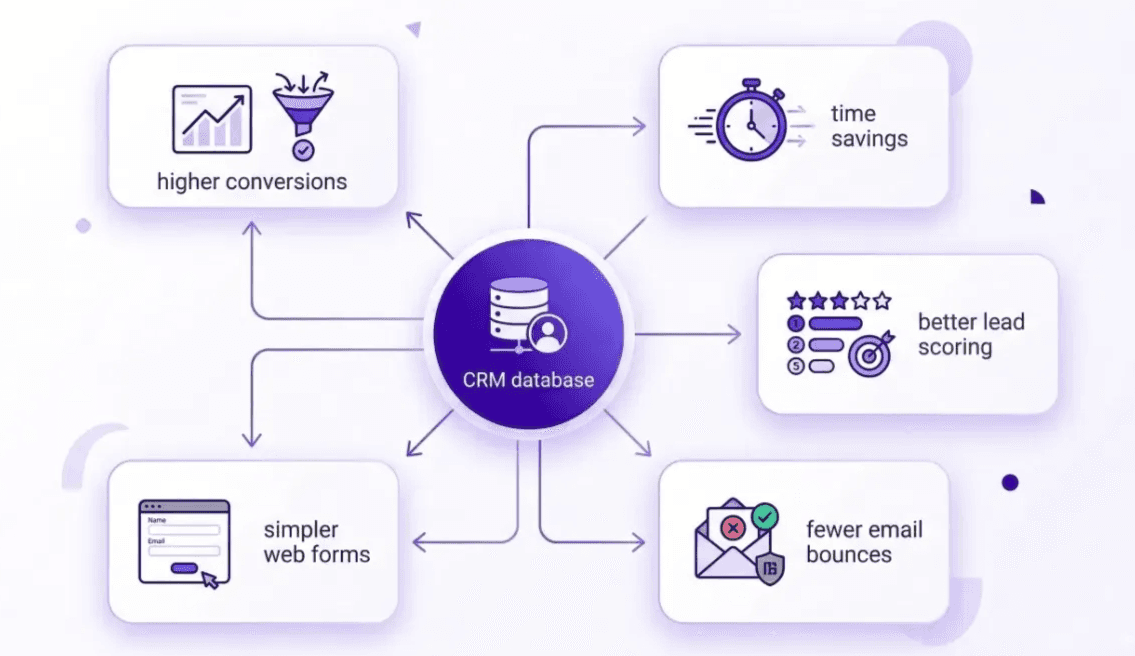
Keeping your CRM up to date manually is a losing battle. By automating that process through enrichment, you aren't just cleaning up a database; you’re giving your entire Go-To-Market team a massive head start. Here are the primary advantages:
- Higher Conversion Rates: When your reps have the right context, like a lead’s recent promotion or their current tech stack, they can write messages that actually get a response.
- Massive Time Savings: Sales reps can spend up to 28% of their week just researching leads. Enrichment gives them that time back.
- Better Lead Scoring: You can instantly prioritize leads based on real data (such as company revenue) rather than guesswork.
- Reduced Email Bounces: By verifying email addresses before they enter your system, you protect your sender reputation and ensure your outreach reaches the inbox.
- Frictionless Web Forms: You can ask for less information on your website forms (just an email) and let enrichment fill in the rest.
Turning your CRM into a Profit Center
A CRM is only as valuable as the data inside it. If your records are out of date, your sales engine will eventually stall. By making CRM enrichment a core part of your strategy, you turn a static list into a proactive profit center.
Using FullEnrich to Strengthen Your Sales Outreach
If you are ready to stop wasting time on "dead" leads and start working with data you can actually trust, FullEnrich is built to help. It specializes in deep CRM enrichment using a powerful waterfall engine that queries over 20+ premium sources to find the direct mobile numbers and verified emails that other tools miss. Our goal is to make sure your HubSpot or Salesforce records are always fresh and actionable.
Getting started is as simple as it gets. You can sign up today and get [50 free leads] to run a "health check" on your existing CRM data. Whether you want to refresh old accounts or enrich new leads as they come in, you’ll see the difference that high-accuracy data makes in your daily sales activity.
Frequently Asked Questions (FAQs)
Will CRM enrichment create duplicate leads in my database?
A well-configured tool will not. Most platforms use a "Unique Identifier," usually an email address or a LinkedIn URL, to match the new data to the existing record. Instead of creating a new lead, it simply fills in the empty fields on the one you already have.
How often should I "refresh" my CRM data?
For active accounts and "hot" leads, a quarterly refresh is the standard for 2026. Since B2B data decays at about 3% per month, waiting a full year to update your records means nearly a third of your database could be wrong by the time you reach out.
Can I enrich historical leads that have been sitting in my CRM for years?
Yes, and this is one of the best ways to find "hidden" revenue. By running a batch enrichment on old leads, you might discover that a contact who ignored you three years ago has moved to a new company that is currently a perfect fit for your product.
Does CRM enrichment work for international (EMEA or APAC) records?
It does, though coverage varies by provider. The best approach for international GTM is to use a "waterfall" provider like FullEnrich, which pulls from multiple regional databases to ensure high match rates outside of North America.
What is the difference between "Batch" and "Real-Time" CRM enrichment?
Real-time enrichment happens the second a lead is created (ideal for fast follow-ups). Batch enrichment is done in large groups (ideal for cleaning up your entire database or preparing for a big marketing campaign).
Will my sales reps see the enriched data immediately?
Yes. Most modern integrations push the data directly into your CRM fields in seconds. Your reps don't have to leave their HubSpot or Salesforce screen to see the new phone numbers or company insights.
How does enrichment help with automated lead scoring?
If a lead only provides their email, your scoring model might assign them a low score. Enrichment adds data like "Company Revenue" or "Tech Stack." If the AI sees they are a billion-dollar company using a competitor's tool, it can automatically "fast-track" that lead to a senior rep.
Can I use enrichment to find only phone numbers?
You can. Most tools allow you to "map" only the specific fields you care about. If your CRM is already great but you're missing direct dials, you can set the tool to only search for and fill in mobile numbers.
What if my sales rep already manually entered a phone number?
This is where "Overwrite Rules" come in. You can set your CRM to "Protect" certain fields so that if a human has already entered data, the AI is blocked from changing it. This keeps your reps' manual work safe.
Is CRM enrichment expensive for small sales teams?
Actually, it often saves money. For a small team, time is the most expensive resource. If enrichment costs $50 a month but saves your only salesperson 10 hours of manual research, the ROI is immediate.