
Data enrichment is the process of adding missing information to records you already have, from internal, public or third-party sources. Think of a verified work email, a mobile number, a job title or a company's headcount.
In B2B sales and RevOps, those records are contacts and accounts in a CRM. Enrichment turns a badge scan with a name and a company into a person a rep can call, email and route.
The catch: an enriched record is only worth the fields you can trust and use. Coverage comes from asking many sources. Quality comes from verifying every answer. Value comes from keeping records fresh, because people keep moving.
Key Takeaways
Data enrichment adds missing fields to records you already hold, using your own systems, public sources or third-party data providers.
B2B teams enrich six kinds of data. Contact data (a verified work email and mobile) comes first, then professional, firmographic, technographic, geographic and intent data.
Enrichment matches an identifier, such as a LinkedIn URL or an email, against data sources, verifies the results and writes only usable fields back.
No single provider covers a full list. Coverage shifts by region, seniority and channel, so a waterfall asks several providers in turn.
Refresh active contacts every 30 to 90 days. US median job tenure was 4.1 years in January 2026, and 20.6% of wage and salary workers had a year or less with their employer (BLS).
What is data enrichment?
Data enrichment adds the information a record is missing, drawn from internal systems, public sources or third-party providers. In B2B, it usually means completing contact and company records in a CRM.
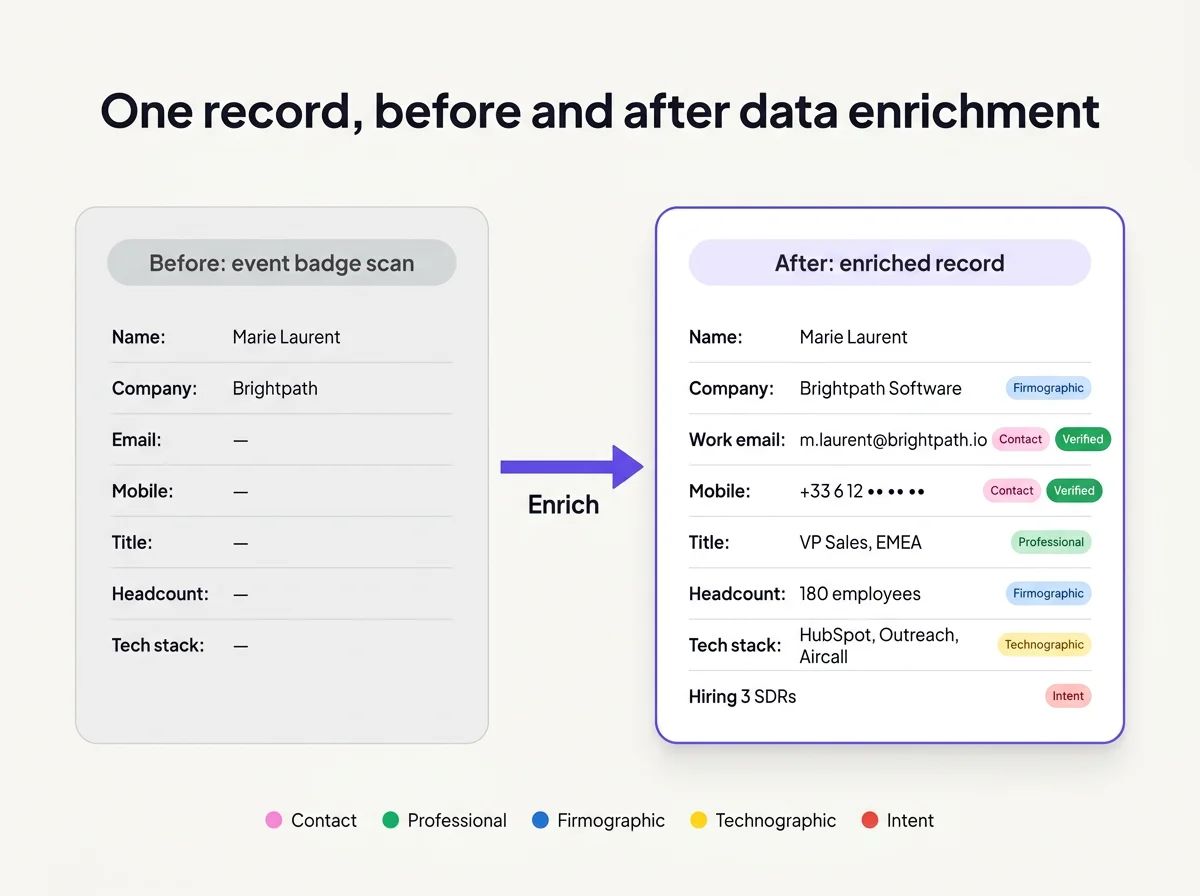
One badge scan, five kinds of data. Each tag shows which type of enrichment filled the gap.
The idea is older than sales software. Logistics teams geocode delivery addresses. Fraud teams attach device reputation to transactions. Analysts join regional attributes onto customer tables. A record with gaps goes in, and a fuller record comes out.
You'll also hear it called data append, and older direct-marketing shops said list append. The names differ, the mechanism doesn't. A record gets matched against a source, and the fields it lacks get added.
B2B data enrichment is the narrower and more urgent version. Sales and RevOps teams hold names they can't reach and accounts they can't score. Enrichment closes that gap one field at a time.
Here's the badge scan from the illustration as a CRM record (names and values invented):
Field | Before enrichment | After enrichment |
|---|---|---|
Full name | Marie Laurent | Marie Laurent |
Company | "Brightpath" (badge scan) | Brightpath Software |
Work email | empty | m.laurent@brightpath.io (verified deliverable) |
Mobile | empty | +33 6 12 xx xx xx (verified active line) |
Title | empty | VP Sales, EMEA |
Headcount | empty | 180 employees |
Tech stack | empty | HubSpot, Outreach, Aircall |
The left column is what plenty of CRMs hold after an event. The right column is someone a rep can call, email, route and score. Lead-specific flows, such as inbound forms and free-trial signups, get their own treatment in the guide to lead enrichment.
What types of data can you enrich?
B2B teams enrich six kinds of data: contact, professional, firmographic, technographic, geographic, and behavioral and intent data. Contact data is the one reps feel first. A missing mobile stops a call today. A missing industry code only bites when someone builds a report.
Type | Fields added | What it's for |
|---|---|---|
Contact | Verified work email, mobile number, LinkedIn URL | Reaching the person directly |
Professional | Job title, seniority, department, time in role | Qualifying the person and tailoring the message |
Firmographic | Company name, domain, industry, headcount, headquarters, funding stage | ICP scoring, segments and territory design |
Technographic | CRM, sales engagement tool, phone system and other software in use | Integration and replacement plays |
Geographic | Country, region, time zone, standardized address | Territory assignment and call timing |
Behavioral and intent | Product usage, site visits, hiring, funding news | Deciding who to contact now |
The six split into two jobs. Firmographic and geographic fields drive routing: which rep owns the account, which segment it lands in, whether it fits at all. Contact and professional fields drive outreach: who to call, at which number, with which angle.
Technographic data sits between the two. It tells you whether an account runs the tools your product works with, which makes it a scoring input and a talking point.
Behavioral data is mostly an internal join, product usage matched onto CRM accounts, so it's cheap and often the most predictive. Intent data is the noisiest type. It helps rank accounts, but it's a weak basis for claims in a first email.
Each side has its own guide. Person-level fields are covered in contact data enrichment, and account-level fields in company enrichment.
How does data enrichment work?
Enrichment matches an identifier you already hold against one or more data sources, verifies what comes back, and writes the usable fields to your record. Everything else in the pipeline exists to make that match reliable and the result trustworthy.
Five steps cover it:
- Normalizing the input. Emails get lowercased and trimmed, and company names resolve to domains. A formatting error causes a miss that has nothing to do with coverage.
- Matching. The identifier goes to an internal table, a public lookup or a provider. A waterfall sends it to several providers in turn.
- Appending. Results arrive in different shapes. The pipeline maps each value onto the right CRM field.
- Verifying. An SMTP check confirms whether a mailbox accepts mail. Catch-all domains accept everything, so they need their own resolution step. Mobiles get a line-type check (mobile vs landline or VoIP) and an active-line check.
- Writing back with rules. New values fill blank fields first. Fields a rep edited by hand stay untouched. Each value keeps its source and the date it was found.
Step five is where many setups quietly fail. An automated refresh that overwrites a mobile a rep confirmed on a call teaches the whole team to distrust the CRM. Logging source and date per field fixes the other half of the problem. Anyone can see where a value came from and how old it is.
Verification also sits before write-back for a reason. Data that fails a check should never reach the record. Cleaning up a wrong mobile after reps have dialled it costs far more than discarding it upstream.
Which identifier gives the best match?
A LinkedIn URL or an email address gives the best match, because each one points to exactly one person. Everything else involves some guessing.
A name plus a company domain comes close. The domain pins down the employer, and the name usually narrows it to one person. A name plus a company name is the weakest input. "Acme" can describe dozens of companies, and the provider has to pick one.
With an exact identifier, matching is deterministic: the person is in the source or isn't. Without one, matching turns probabilistic. Candidates get scored on name, company, location and role, and the best one is accepted above a confidence threshold. That adds coverage and adds risk, which is one more reason verification is its own step.
An email on its own still works. A reverse email lookup returns the person and company behind a work or personal address. That's how inbound teams identify a signup who left nothing but an email.
Where does enriched data come from?
Enriched data comes from three places: your own systems, public sources, and third-party providers that build their own databases. Most working setups mix all three.
Source | Examples | Watch out for |
|---|---|---|
Your own systems (first-party) | CRM history, billing, product usage, support tickets, form fills | Silos: the data exists but lives in another tool |
Public sources | Company websites, business registries, filings, press releases, job listings | Freshness and format, since nobody maintains it for you |
Third-party providers | Commercial contact, firmographic and technographic databases | Stale fields, unclear sourcing and how consent is documented |
The first row is the one teams forget. Joining product usage onto CRM accounts is enrichment, and it needs no vendor at all.
Third-party providers fill what you could never collect yourself. That means a work email for someone who never filled in your form, or the headcount of a company that never spoke to you.
Data Providers build their data in four main ways. Public records and registries supply company facts. Opt-in contributor networks share contact details seen in business email, such as signatures. Web crawling picks up company pages, job posts and traces of the software a company runs. Partnerships and licensing fill the rest, and many providers combine all four.
AI-generated attributes are a fifth input now. A model can classify an industry or summarize a company page. Treat its output as a claim with a source attached, never as a checked fact.
The label "third-party" says nothing about quality on its own. Judge each field by where it came from and when it was last checked. A mobile verified last week and a mobile copied from an old export look identical in a CRM. Only the source and the date tell them apart.
Why can't one provider cover your whole list?
Every provider sees part of the market, so a single source leaves gaps that a second or third source fills. The gaps aren't random. They follow three lines.
- Region. A provider built around US tech companies can be thin on European industrials, and another can be the reverse.
- Seniority. Executives leave more public traces than individual contributors, so some sources lean toward one group.
- Channel. Strong work-email coverage says little about mobile coverage. Emails and mobiles are different collection problems.
What I see from aggregating 20+ providers is that the best source changes from one contact to the next. The provider that finds a sales leader in the US can come back empty on an engineer in France. Nobody can pick the right single vendor in advance, because the right vendor differs row by row.
Across our 2026 lookups, work-email find rates typically land anywhere from 60% to 95%, depending on geography and persona. That spread is the point. The same setup can look excellent on one list and mediocre on the next.
Catch-all domains add another split. They accept any address, so a basic check can't tell whether a mailbox exists. We resolve about 50% of the catch-all domains we meet.
Just as telling is how much comes back wrong. We discard roughly 30% of the data providers return before it ever reaches a customer. A filled field and a field you can use are two different counts.
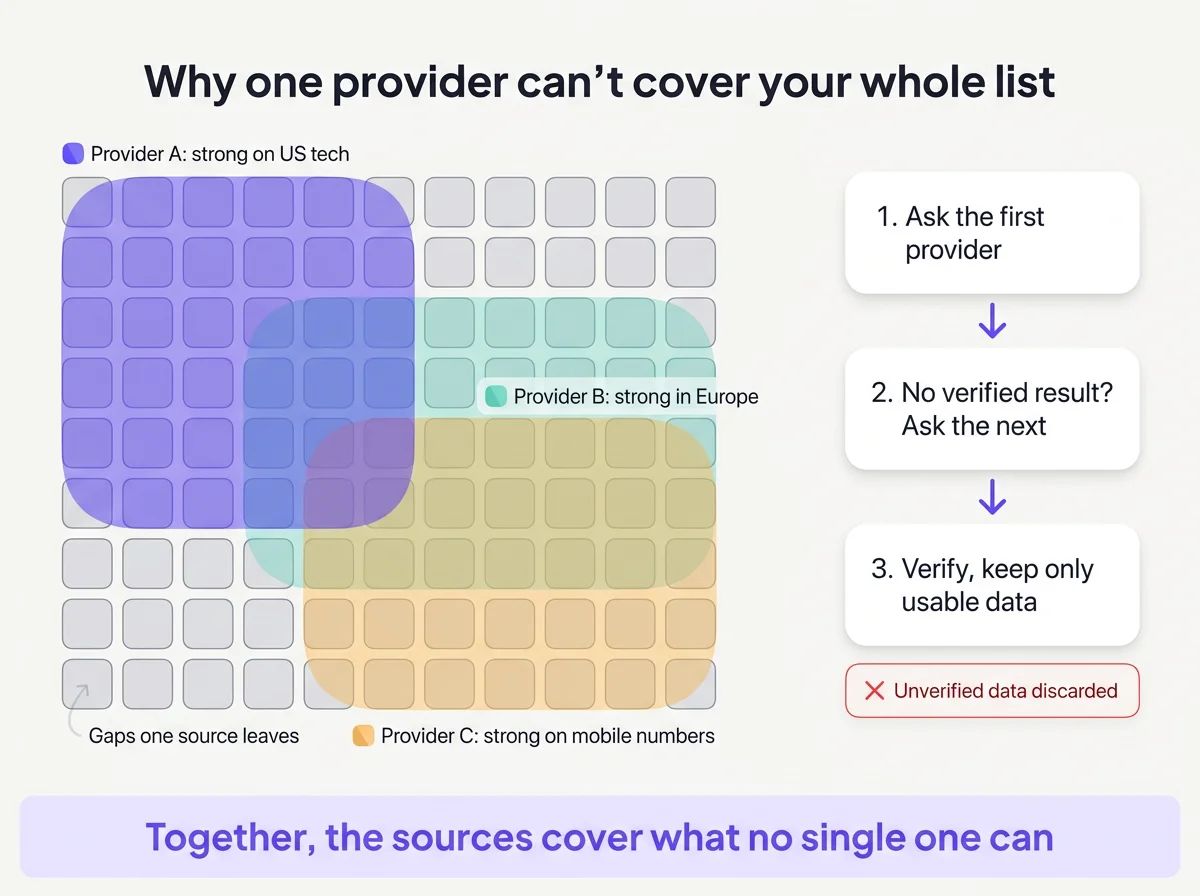
Each provider covers its own patch of the list. Together they fill most of it, and verification drops what fails.
That's the case for a waterfall. A waterfall enrichment setup asks one provider, moves to the next only when there's no verified result, and drops data that fails verification. Failed results get dropped instead of landing in your CRM. With FullEnrich, you spend credits only when data is found, and a miss costs nothing.
Provider ordering, conflict rules and the trade-offs are explained in how waterfall enrichment works.
The whole category comes down to one idea. Enrichment is worth only the data you can use: many sources for coverage, verification for quality, and refreshes for lasting value.
How is data enrichment different from cleansing, enhancement and append?
Data cleansing fixes what's wrong, data enrichment adds what's missing, data enhancement sharpens vague fields, and data append is another name for enrichment. Clean first, then enrich. The four terms get blurred because vendors bundle them, so it helps to see each one on the same record.
Term | What it does | Example on the Brightpath record |
|---|---|---|
Data cleansing | Corrects existing fields: duplicates, typos, formats | brigthpath.io repaired to brightpath.io, duplicate removed |
Data enrichment | Adds fields the record never had | Work email, mobile and job title added |
Data enhancement | Sharpens a field that exists but is vague | Title "Sales" becomes "VP Sales, EMEA" |
Data append | Another name for enrichment | New columns added from an outside source |
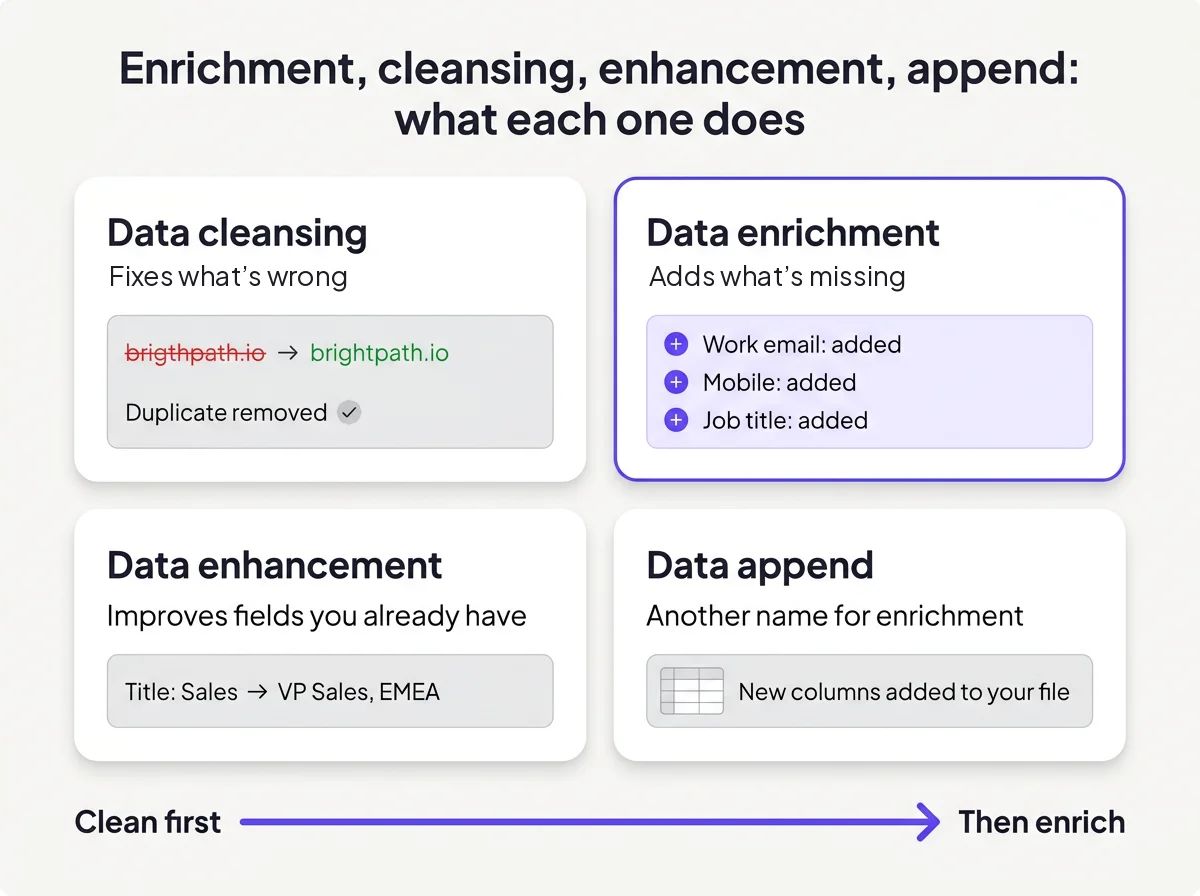
Four terms, one record. Cleansing repairs it, enrichment and append add to it, enhancement sharpens what's already there.
The order matters for money as much as accuracy. A provider can't match a misspelled domain. A duplicate record means you enrich, and pay for, the same person twice.
Enrichment also differs from prospecting. Enrichment starts from records you already have. Prospecting finds people you don't know yet. "I know who, but I can't reach them" is an enrichment problem. "I don't know who to contact" is a list-building problem, solved by tools that find new contacts by title, industry, headcount and location.
In practice the two run in sequence. You build the list, then enrich it before anyone sends a message.
When should you enrich data, and how often?
Enrich when a record is created, refresh contacts every 30 to 90 days, and re-enrich whenever a bounce or job change says the data broke. Four triggers cover nearly every case.
- On create. A new form fill, import or badge scan gets enriched before routing, so it lands with the right owner.
- Scheduled refresh. Active contacts every 30 to 90 days, and firmographics and tech stack every quarter.
- Sales trigger. A job change or funding news is a reason to re-enrich the account and the people around it.
- Exception. A bounce or a wrong number flags one record for an immediate fix.
People are why contact data ages fastest. The US Bureau of Labor Statistics puts median employee tenure at 4.1 years in January 2026, up from 3.9 years in January 2024. In the same release, 20.6% of wage and salary workers had a year or less with their current employer.
So about one in five US workers has been with their employer a year or less. On a contact list, many of those rows still point to the previous job.
Company fields drift more slowly. Headcount, industry and funding stage change over months, so a quarterly pass keeps them honest.
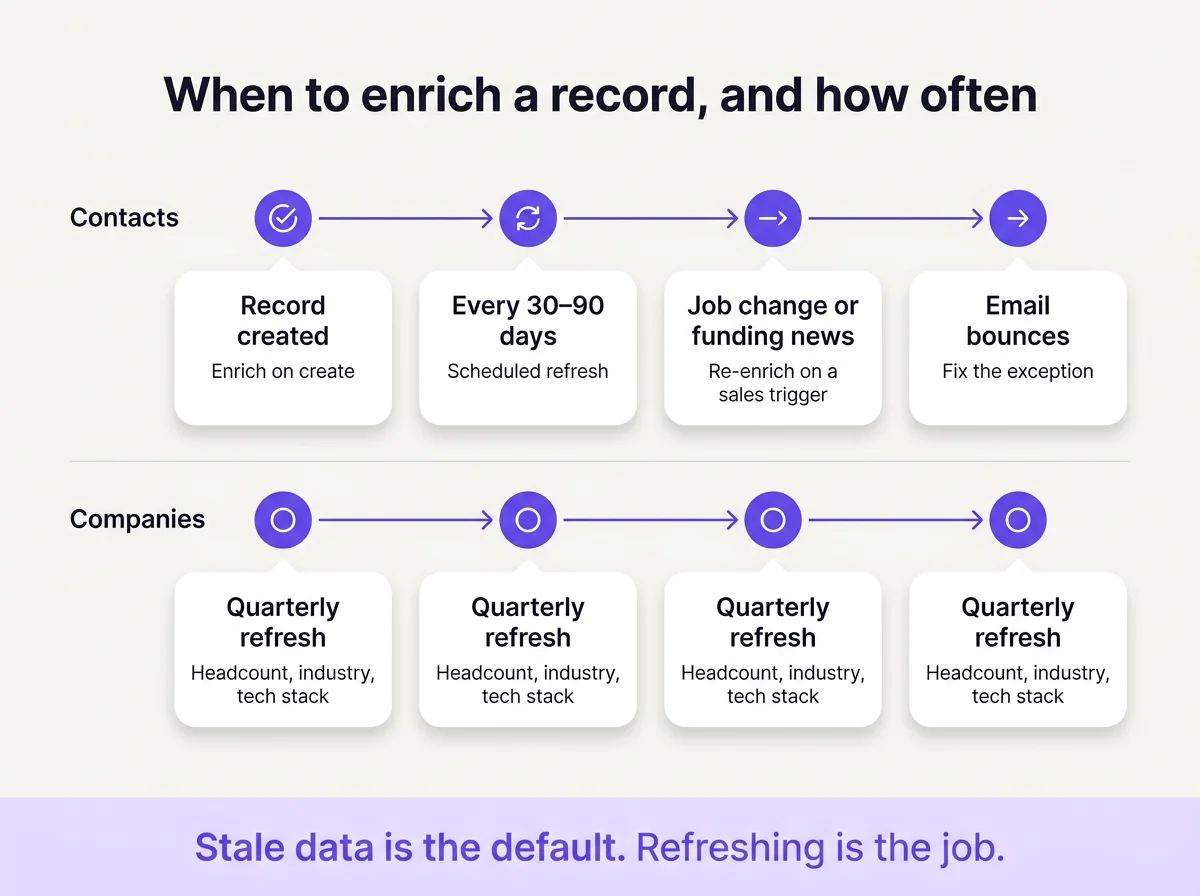
Contacts run on a short clock and company data on a slower one. Exceptions get fixed the day they show up.
Inside a CRM, these triggers become workflows and field rules, which CRM enrichment covers step by step. Fresh records repay the effort in fewer bounces, faster routing and less manual research, all laid out in the benefits of data enrichment.
Real-time, batch or AI agents: which enrichment mode fits?
Use real-time enrichment for inbound leads, batch for lists and CRM refreshes, and AI agents when the enrichment is one step in a bigger task. Each mode trades something different: speed, cost control or review.
Real-time enrichment fires the moment a record is created: a form submit, a signup, a CRM insert. It exists for speed. A lead you can't score or route waits in a queue, and waiting leads go cold. The trade-off is control, since every submission triggers a lookup. Filtering obvious junk before enrichment runs keeps that in check.
Batch enrichment processes a list or a CRM segment on a schedule. It's the main defence against decay: a refresh before a campaign, a quarterly sweep of accounts, a pass over open pipeline. Batch gives you the most cost control. You choose the rows, see the volume and review results before anything syncs.
AI agent enrichment runs inside a larger task. You ask an assistant to find a type of buyer, enrich them and summarize the result, and it calls enrichment as one tool among several. The trade-off is review. Agents move fast and act on loose instructions, so a human check belongs before anything writes to the CRM or sends.
Web-browsing agents can also research a single account in depth. That suits a handful of high-value accounts. A full CRM refresh belongs to database lookups. Treat what they write as a sourced claim, never as a verified field.
Most mature teams run all three. Developers wiring enrichment into their own product, forms or pipelines usually start with a data enrichment API.
How do you enrich data with FullEnrich?
FullEnrich runs every lookup through a waterfall of 20+ providers, verifies the result, and spends credits only when it finds data. A miss costs nothing.
A work email costs 1 credit and a mobile costs 10. If a landline turns up instead of a mobile, that costs nothing either. Plans start at $29 a month, with unlimited users.
Example: how do you refresh stale CRM contacts from Claude?
You describe the job in plain words, and Claude does the search and the enrichment through the FullEnrich MCP server. The server works in Claude and other MCP clients. Search, enrichment and reverse email lookup become tools the assistant can call, at normal credit rates with no extra cost for MCP access.
Take a common job: finding sales leaders who just moved, before a competitor does. The walkthrough has four steps.
- The prompt. "Find VPs of Sales at software companies with 50 to 500 employees who changed jobs in the last 90 days, then enrich them with a work email and a mobile."
- The cost. Claude can check your credit balance before anything runs. Five contacts with an email and a mobile each can cost at most 55 credits.
- The go-ahead. You confirm the run, and the enrichment starts.
- The results. Claude returns the enriched contacts, and the full job also appears in the FullEnrich app.
The search step already shows the stale-CRM problem in miniature. Several profiles still carried the previous role in their headline, such as a senior sales consultant at the old employer. Their current position read VP of Sales somewhere new. A CRM fed from those headlines would hold the wrong job.
In one run of that prompt, all five came back: 5 of 5 work emails and 5 of 5 mobiles, for 55 credits. Every number passed the line-type check as a mobile and showed as an active line.
Verification depth differed by country. The two US contacts came back with deliverable emails and mobile ownership confirmed at carrier level. The three UK contacts sat on catch-all domains. Their emails came back as "probably valid", and their mobiles had no ownership confirmation.
Those catch-all emails still counted as found, so they used credits. Five contacts make a small example. The pattern is still worth knowing before you plan a UK call block.
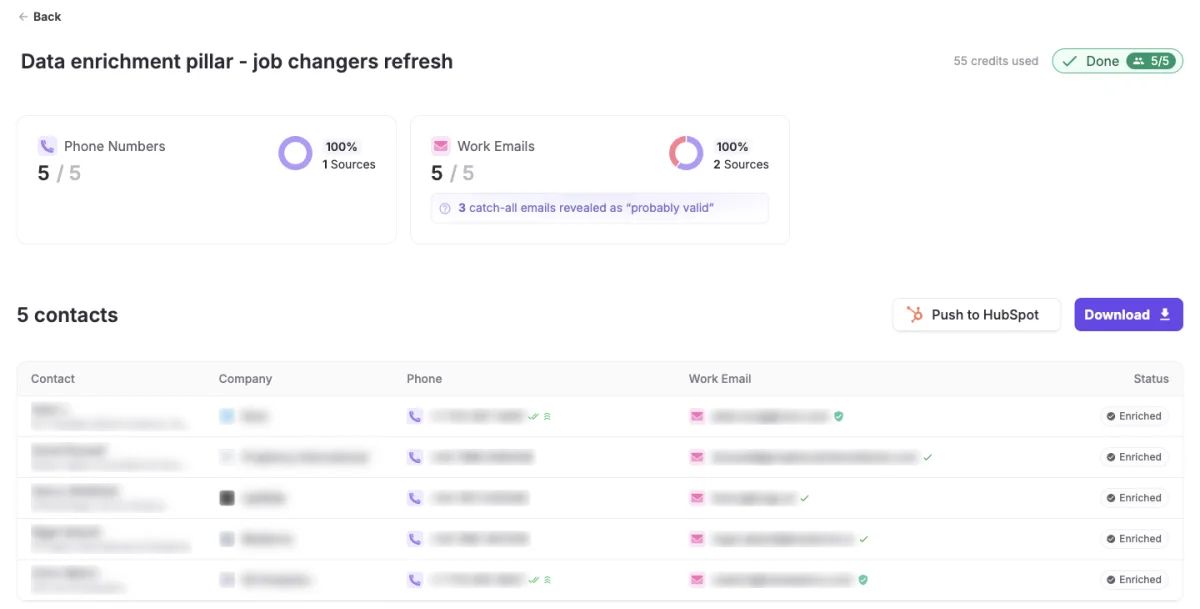
Five job changers, five mobiles, five work emails. Three of those emails sat on catch-all domains and came back as probably valid.
From the results page, a Push to HubSpot button sends the enriched contacts into HubSpot.
The CRM Refresh skill for Claude packages this whole job. It checks every contact in your CRM export and gives each one a status: still there, moved (with the new company), replaced (with the person now in the seat) or not found. The check runs on free FullEnrich search. Only new emails for movers and replacements cost credits, after you confirm. New values go in new columns, so your original data is never overwritten.
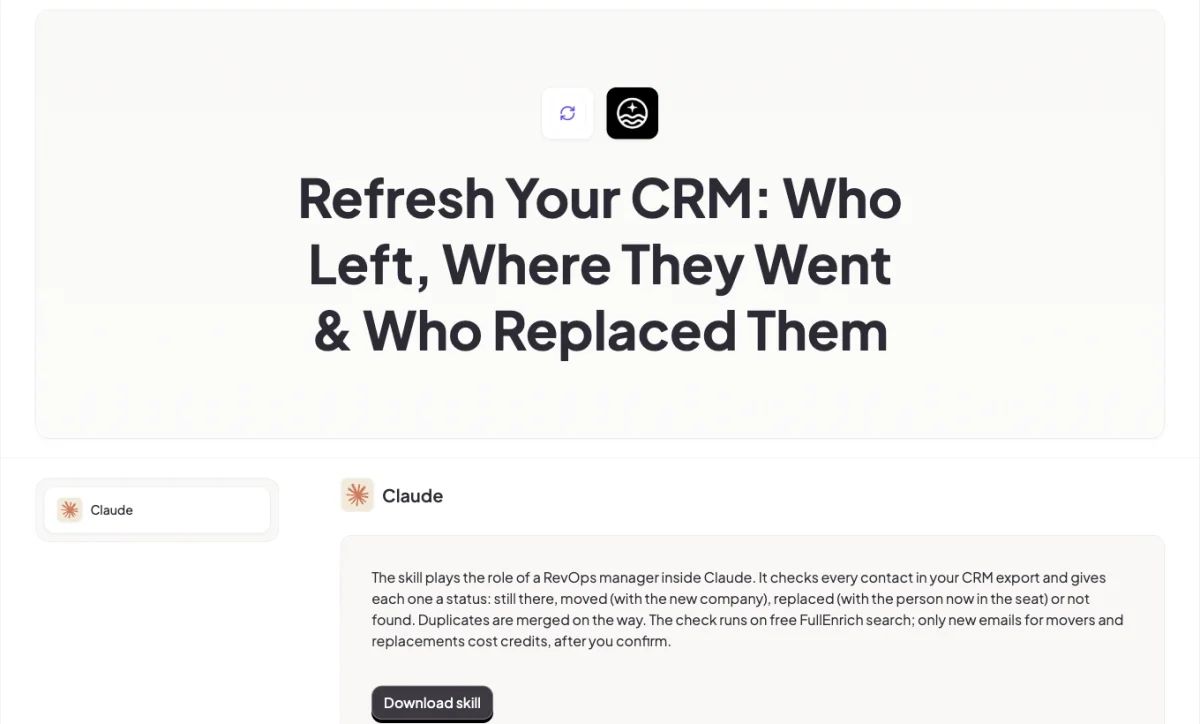
The CRM Refresh skill sorts every contact into still there, moved, replaced or not found before any email lookup is paid for.
Where else can you run FullEnrich?
You can run the same FullEnrich waterfall from wherever your data already lives. The entry point changes; the providers and the verification don't.
Entry point | Best for | Where to start |
|---|---|---|
App (LinkedIn URL or CSV) | One-off lookups and list uploads | Paste LinkedIn URLs or upload a CSV in the FullEnrich app |
HubSpot | Getting enriched contacts into your CRM | Push enriched contacts to HubSpot from the results page |
Clay | Enrichment as a column in a Clay table | The Clay template |
Zapier, Make, n8n | Enriching on a trigger, such as a new form fill | FullEnrich actions in your automation tool |
API | Your own product, forms or data pipeline | The FullEnrich API |
MCP | Enrichment as one step in an AI agent's task | The MCP server in Claude or another MCP client |
CLI | Coding agents and personal AI agents | The FullEnrich CLI |
The CLI suits teams who work through coding agents. You ask the agent, and it searches, enriches and exports verified contacts without leaving the conversation.
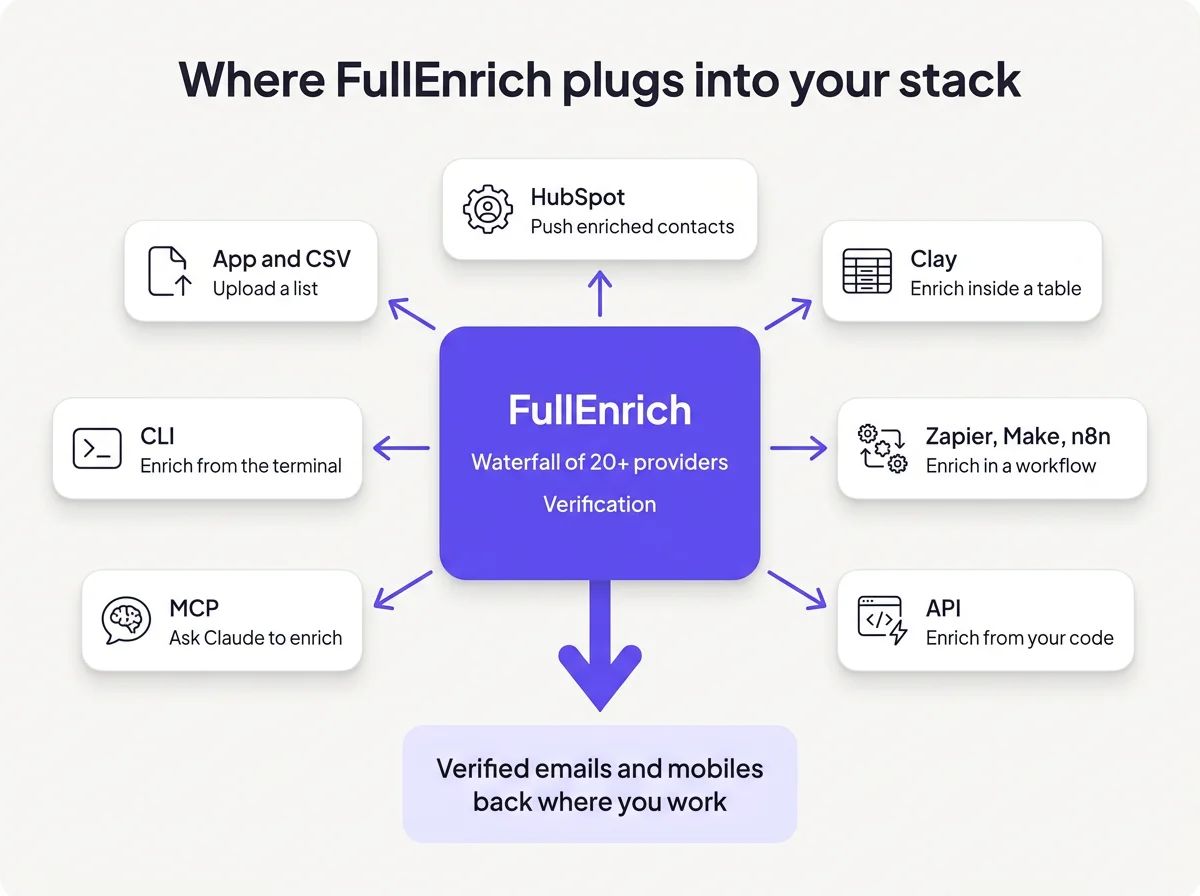
Every entry point runs the same waterfall and the same checks. Only the place you start from changes.
How do you know data enrichment is working?
Track match rate on your own list, field coverage, bounce rate and cost per usable contact, not the number of fields filled. A full-looking record can still be useless.
- Match rate: verified matches divided by eligible lookups, measured on your own list. Rows with no usable identifier stay out of the denominator, and duplicates count once.
- Critical-field coverage: the share of records holding the fields your process needs, like a verified email for sequences or a mobile for call blocks.
- Bounce rate: the share of enriched emails that bounce once sent. It's the plainest test of email verification.
- Connect rate: the share of dials that reach the intended person. Dead lines and switchboards show up here first.
- Cost per usable contact: what you spent, divided by the contacts a rep could actually work. Billed misses and bad data inflate it even when the per-record price looks low.
Unmatched records deserve a policy of their own. Re-run them with a stronger identifier, a LinkedIn URL instead of a company name, for example. If they still miss, send high-value accounts to manual research and suppress the rest until the next refresh. Provider coverage keeps changing, so today's miss can match next quarter.
What should you check when choosing a provider?
Check four things before choosing a data enrichment provider: how it bills misses, its coverage on your own sample, how fresh its data is, and its compliance.
- Billing on misses. A lookup that finds nothing shouldn't cost anything. Ask exactly what triggers a charge.
- Coverage on your own sample. Run a slice of your real records, in your regions and seniority mix, before you sign anything.
- Refresh. Find out whether data is pulled at request time or served from a stored copy, and how each field is dated.
- Compliance. Ask how the provider sources its data, which lawful basis it relies on and how it handles opt-outs.
Side-by-side options sit in the roundup of data enrichment tools.
Is data enrichment legal?
B2B data enrichment can be legal under GDPR when you can show a legitimate interest, keep fields minimal and honour opt-outs. You need to be able to show that interest on paper.
Legitimate interests may apply as a lawful basis for B2B contact data. The UK regulator frames it as a three-part test: a legitimate purpose, a real need for the processing, and a balance against the person's interests. Writing that assessment down before you enrich is the minimum.
Three habits keep enrichment defensible. Enrich only the fields you'll use. Keep the source and date of each value, since people can ask where you got their data. Make sure deletion and objection requests reach enriched fields too, not only what someone typed into a form.
Other regimes, such as the CCPA in California, follow a similar spirit with their own disclosure, deletion and opt-out rules.
Personal emails are the sharp edge. Reaching a candidate on a personal address in a recruiting context can be defensible. Putting personal emails into cold sales sequences is not. None of this is legal advice, and your counsel owns the final call.
Our final take on data enrichment
Data enrichment turns records you already own into people your team can reach, route and score. Its worth sits entirely in the fields you can use.
Ask many providers, because each one sees only part of the market. Verify every answer, so what fails never reaches your CRM. Refresh before people move, because the people on your list keep changing jobs.
FullEnrich runs that system for you: a waterfall of 20+ providers, verification on every result, and credits spent only when data is found. A miss costs nothing. Try FullEnrich with 50 free credits, no credit card required, on a slice of your own CRM.
Frequently asked questions
What is data enrichment in simple terms?
Data enrichment means filling the gaps in records you already have. A contact with only a name and a company gains a verified work email, a mobile, a job title and company details. The new information comes from your own systems, public sources or data providers, and good enrichment checks each value before writing it to your CRM.
What is an example of data enrichment?
A trade-show badge scan is a classic example. It gives you a name and a company, nothing more. Enrichment matches that pair against data providers and returns a verified work email, an active mobile, the current job title, the company's headcount and the tools it runs. A row in a spreadsheet becomes someone a rep can call today.
What's the difference between data enrichment and data cleansing?
Cleansing corrects data you already hold, while enrichment adds data you never had. Cleansing removes duplicates, fixes typos and standardizes formats. Enrichment appends new fields, such as a work email or a headcount. Run cleansing first. A misspelled domain blocks the match, and a duplicate gets enriched and billed twice.
What's the minimum information needed to enrich a record?
One solid identifier is enough. A LinkedIn URL or an email address matches most reliably, because each points to a single person. A name plus a company domain works well too. A name plus a company name alone is the weakest input, because many companies share similar names and the match becomes less certain.
How often should you re-enrich data?
Refresh active contacts every 30 to 90 days and company data every quarter. People change jobs often, so contact fields age fastest. Re-enrich on events as well: a bounce, a wrong number, a job change or a funding round. Records nobody plans to contact can wait until they're back in a campaign.
Is data enrichment GDPR compliant?
It can be, when you have a lawful basis and handle the data with care. For B2B contacts, legitimate interests may apply after a documented balancing test. Keep fields to what you'll actually use, record where each value came from, and honour objections and deletion requests. Personal emails suit recruiting outreach, never cold sales sequences.