Key Takeaways
API enrichment turns a partial record (a name and company, a LinkedIn URL, or an email) into verified contact and company data.
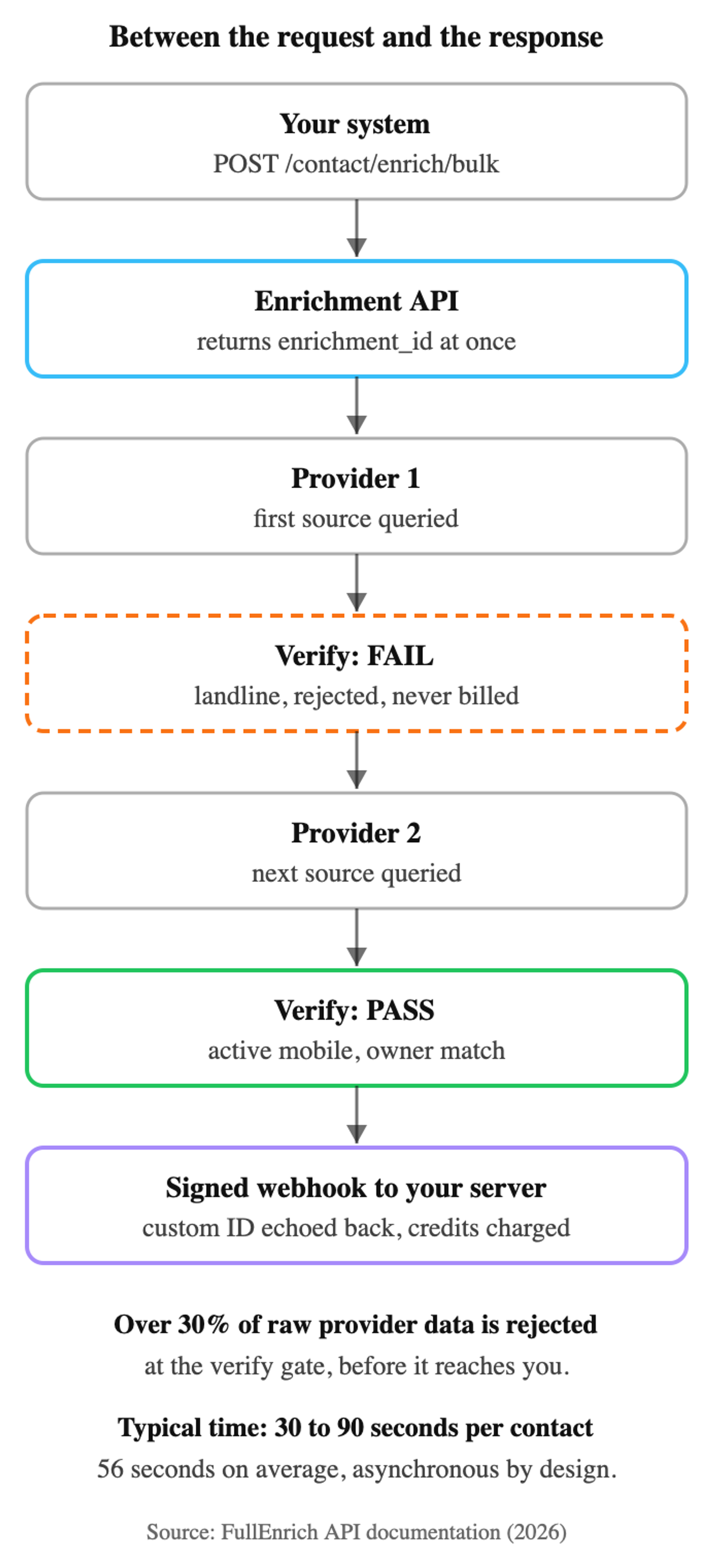
Quality is decided between request and response. FullEnrich's API documentation states that it rejects over 30% of the data its providers return before it reaches the customer.
"Real time" means event-triggered and hands-off, not instant. FullEnrich's docs put most enrichments at 30 to 90 seconds per contact.
A fast response with a value in it proves nothing. This guide calls that the 200 OK trap.
Judge an API on coverage on your own list, what it verifies, what a miss costs, and how it connects.
Data that waits for a person to fetch it arrives late.
That's the quiet flaw in most enrichment work. Someone exports a CSV, uploads it, waits, and imports the result. It works for one list. It doesn't work for a pipeline.
Meanwhile an inbound lead sits in the CRM as a bare email. The records you enriched last year keep aging as people change jobs.
An enrichment API takes the person out of that loop. Your systems ask for data when they need it, and the answer comes back on its own.
This guide covers what API enrichment is, how it works, what comes back, and how to choose one.
What Is API Enrichment?
API enrichment is a programmatic way to send a partial contact record and get back verified contact and company data. Your systems trigger it, so nobody uploads a file.
The input is small: a name and company, a LinkedIn URL, or an email address. The output is what your team acts on: a work email, a mobile number, a job title, a company profile.
You'll also see it called a contact enrichment API, a lead enrichment API, an email enrichment API, or a data enrichment API.
It exists because contact data ages. The US Bureau of Labor Statistics reported a median employee tenure of 3.9 years in January 2024. Each job change makes a title, an employer, and a work email wrong at once.
How API Enrichment Works?
An enrichment API works in four steps: you send an identifier, it queries one or more providers, it checks what they return, and it sends back what passed. The middle two steps decide quality.
The examples use FullEnrich's public API, so you can check each detail against its documentation.
1. Send a Contact Identifier to the API
The request starts with an identifier for one person. FullEnrich's Enrich API accepts a first name, last name, and company domain or name. It also accepts a LinkedIn URL, including Sales Navigator URLs.
FullEnrich's endpoint documentation states that a LinkedIn URL can improve enrichment rates by +5 to 20% for emails and +10 to 60% for mobile numbers.
Authentication is a Bearer API key. One request carries up to 100 contacts, and a single contact is a list of one.
curl -X POST https://app.fullenrich.com/api/v2/contact/enrich/bulk \
  -H "Authorization: Bearer YOUR_API_KEY" \
  -H "Content-Type: application/json" \
  -d '{
    "name": "Inbound demo request",
    "webhook_url": "https://your-server.com/webhook",
    "data": [{
      "first_name": "John",
      "last_name": "Snow",
      "domain": "example.com",
      "enrich_fields": ["contact.work_emails", "contact.phones"],
      "custom": { "crm_contact_id": "abc-123" }
    }]
  }'
The response is short:
{ "enrichment_id": "<uuid>" }
That's an ID, not a result. The result arrives later on your webhook.
2. The API Queries a Data Provider or Waterfall of Providers
What happens next depends on what sits behind the endpoint. A single-database API runs one lookup against its own records. If the person isn't there, you get nothing.
A waterfall API tries providers in sequence until a result passes its checks. FullEnrich queries 25+ providers this way, because different providers are strong in different geographies. If one is down, it's skipped and the next is tried.
The ordering logic has its own guide on waterfall enrichment.
3. Verification and Quality Checks Run
Verification is the step that decides whether the data is usable, and it's the one a status code can't show you.
A 200 OK means the server answered. A single-database API is rewarded for returning something, because an empty field looks like failure. The status says success while the number rings a switchboard. That's the 200 OK trap: a fast answer with a value tells you nothing about whether the value is usable.
FullEnrich's docs describe the phone sequence. The API checks that the format is valid and the carrier is real. It checks that the line is in service, that it's a mobile, and that it belongs to the prospect. On any failure, it starts again with the next provider. "Sometimes we go through 5, 10, 15 sources," the docs say.
Emails get what the docs call triple verification, and each returns with a status. Per FullEnrich's email status documentation, DELIVERABLE carries about a 2% bounce rate and HIGH_PROBABILITY about 9%. CATCH_ALL runs higher, and INVALID results are excluded. For comparison, Validity's 2025 Email Deliverability Benchmark Report puts bounce rates for permission-based email at around 1.5%.
FullEnrich's API documentation states that it rejects over 30% of the data its providers return. This step is also where the time goes. The same docs say most enrichments finish in 30 to 90 seconds per contact, averaging 56 seconds. They put a static-database lookup at 5 to 15 seconds, fast "precisely because there's no real work happening". Latency is the visible price of verification.
4. The API Returns Enriched Fields
Results come back asynchronously, by webhook. In enrichment, "real time" means event-triggered and hands-off. It doesn't mean sub-second.
FullEnrich sends two signals. The webhook_url fires when the whole batch finishes, runs out of credits, or is canceled. The contact_finished event fires per contact, as each one completes. Polling exists, and the docs call it not recommended.
So build for webhooks instead of a held connection. Per-contact events make an asynchronous API feel live inside a product or a routing flow.
The custom field does quiet work. Whatever you send in it comes back with the result, so a CRM contact ID maps each result to its record.
A miss is part of the mechanics too. FullEnrich's credit documentation states that credits are only consumed when a result is found.
What Data an Enrichment API Returns?
An enrichment API returns contact channels, the verification signals attached to them, and the person and company context around them.
Per its docs, FullEnrich's API returns:
- Work email with a status: DELIVERABLE, HIGH_PROBABILITY, or CATCH_ALL, so you choose which statuses enter a sequence.
- Mobile phone with verification fields: line type, line status, and ownership match, so reps dial active mobiles tied to the prospect.
- Personal email: for recruiting outreach only. It isn't for cold prospecting or ad targeting.
- Person profile: headline, location, employment history, education, and skills, the context a rep or a scoring model needs.
- Company details: industry and location, plus headcount when the full profile is returned, enough to route and segment.
A LinkedIn URL as input returns the full person and company profile.
Here's a trimmed phone object, with illustrative values:
{
  "contact_info": {
    "most_probable_phone": {
      "number": "+15550100199",
      "region": "US",
      "line_type": "MOBILE",
      "line_status": "ACTIVE",
      "ownership_match": "CONFIRMED",
      "ownership_match_confidence": 90,
      "connect_rate": "HIGHEST"
    }
  }
}
Five of those seven fields describe the quality of the number.
API Enrichment vs Batch and DaaS Enrichment
The three models differ on one question: what triggers the enrichment. An API is triggered by an event, a batch upload by a person, and DaaS delivery by the vendor's schedule.
Enrichment API | CSV or batch upload | DaaS or licensed database | |
|---|---|---|---|
Trigger | An event in your systems | A person uploading a file | The vendor's delivery schedule |
Freshness | Live lookup at request time | As fresh as the last upload | As fresh as the vendor's last refresh |
Latency | Seconds to about 90 seconds per contact | Whenever someone runs it | Already at rest in your warehouse |
Maintenance | One integration to monitor | Repeated manual work | Pipelines, storage, and deduplication |
Best for | Routing, CRM triggers, product features, agents | One-off lists | Analytics and market sizing |
Batch and DaaS are fine tools for the jobs they fit: one-off lists and analytics. The API wins when data must arrive without a person in the loop.
What are The Benefits of Using an Enrichment API?
An enrichment API removes the person from the loop, and a waterfall behind it removes dependence on one source.
- Coverage: FullEnrich reports 30% to 200% more coverage than any single provider, depending on geography, seniority level, and list composition.
- Deliverability: FullEnrich reports resolving roughly 50% of catch-all domains to a valid or invalid status. Google's sender guidelines tell bulk senders to keep user-reported spam rates below 0.1% and never reach 0.3%. That's a spam-complaint threshold, and it leaves little room for careless lists.
- No human bottleneck: enrichment runs when the event happens, so leads stop waiting on an upload. The 2011 Harvard Business Review study cited below shows what that wait costs.
- Cost follows results: a miss costs nothing. FullEnrich also rejects over 30% of provider data and absorbs that cost itself.
- One integration instead of several contracts: a hand-built waterfall means multiple contracts, mismatched credit models, and maintenance with every provider change. One API moves that work to the vendor.
Common Use Cases for Enrichment APIs
Enrichment APIs fit wherever a record appears with nobody watching. Five patterns cover most builds.
CRM Record Enrichment
A new record triggers the enrichment, and the result writes back on its own.
The need is measurable. In Validity's State of CRM Data Management in 2025, 76% of 602 respondents said less than half of their CRM data is accurate and complete.
The path differs by CRM. FullEnrich has a native HubSpot integration that checks for existing records before it pushes. Salesforce is reached through the API, or through Zapier, Make, or n8n. Our guides to CRM enrichment and HubSpot enrichment go deeper.
Inbound Lead Enrichment and Routing
A form submit or demo request triggers enrichment, then scoring and routing. Speed matters here.
A Harvard Business Review study from 2011 measured the cost of waiting. Firms that tried to contact a lead within an hour were nearly seven times as likely to qualify it. The comparison group waited even an hour longer.
A 30 to 90 second enrichment sits comfortably inside that hour. It doesn't fit inside a form response. So route after the webhook: thank the visitor, enrich in the background, and let the rule fire when the result lands. Our lead enrichment guide covers the rest.
Outbound Prospecting Automation
A prospect list goes in, outreach-ready contacts come out, and nobody touches a CSV. FullEnrich has native actions in n8n, Make, and Zapier, and Clay connects with an API key.
If you don't have the list yet, the Search API builds it first. It's synchronous, so results return immediately.
Reverse Email Lookup for Signups
Reverse email lookup turns a bare email into a person and a company.
FullEnrich's reverse email lookup works on professional and personal emails. The second case is the valuable one. A Gmail signup looks like a consumer and gets deprioritized. Behind it may be a VP evaluating tools outside work. The lookup is API only, and it costs 1 credit when the person is found.
AI Agent Data Infrastructure
Agents need verified contact data as a tool they can call, and MCP is how they get it. FullEnrich's MCP server gives Claude, Cursor, or a custom agent three tools: search, enrichment, and reverse email lookup.
In Salesforce's State of Sales report from February 2026, 54% of the 4,050 sales professionals surveyed said they've used AI agents.
Some practitioners now hand-build agent waterfalls. One widely shared walkthrough orders providers cheapest and highest hit rate first. An agent acts on whatever a tool returns. Set the quality bar first, then sort by cost.
What to Look For in an Enrichment API?
Judge an enrichment API on four things: coverage on your own contacts, what it verifies, what a miss costs, and how it connects.
Coverage Across Geographies and Personas
Coverage only means something on your list. Run 500 to 1,000 of your own contacts through each API you're considering. Split the results by region and by seniority, because providers are uneven. Count verified, usable results and ignore raw fill rate.
Email and Phone Verification
This is where you catch the 200 OK trap. Ask each vendor what's checked between lookup and response: line type, line status, ownership, email status. Then ask what share of raw provider data they throw away.
Our own documentation on speed and quality states that we reject over 30% of what our providers return. Treat that as a reference point, then ask every vendor for theirs. A vendor that rejects nothing is either perfect or not checking.
Credit Model and Failed Match Pricing
Pricing models hide different costs per usable result. Per-seat pricing charges for people. Per-request pricing charges for attempts, misses included. Per-verified-result pricing charges only when data passes.
Ask what a failed match costs and what a duplicate costs. Then compute cost per usable contact on your test list.
Native Integrations With Automation Tools
An API that's hard to wire in won't get used. The signals are webhooks with per-record events, signed payloads so your receiver can trust the sender, and no-code actions in Zapier, Make, or n8n. If agents are on your roadmap, add an MCP server to the list.
How to Get Started With an Enrichment API?
Getting started takes a key, one test contact, and a webhook receiver. The specifics below come from FullEnrich's API docs.
- Get an API key. Signup is free, and the key lives in the app.
- Send one test contact. The docs publish a test contact that costs 0 credits.
- Point
webhook_urlat a test receiver. Then verify the signature in theX-Signature-SHA1header. - Map your
customIDs. Send your CRM record ID, and write results back by it. - Set a low-credit alert before production. Automations stop when credits run out.
Plan around one limit: 60 API calls per minute, with up to 100 contacts per call.
Start Enriching With FullEnrich
FullEnrich is an enrichment API built on the ideas in this guide. Each request runs through a waterfall of 25+ providers. By our own documentation's count, we reject over 30% of the raw data they return before it reaches you. Credits are consumed only when a result is found. Plans start at $29/month with no annual commitment, and team seats are free.
Try it with 50 leads for free, on your own list.
A good API is measured by what it refuses to return.
Frequently Asked Questions About API Enrichment
what is the difference between an enrichment API and a data provider?
A data provider owns a dataset. An enrichment API is the interface that answers your request, and it may sit on one dataset or many. A single-database API is a provider with an endpoint. A waterfall API queries several providers in sequence and verifies what they return.
can enrichment APIs return personal emails in addition to work emails?
Some can. FullEnrich's API returns personal emails through a separate contact.personal_emails field, at 3 credits per valid result. They're for recruiting outreach only, where candidates prefer to keep a job conversation out of their work inbox. They aren't for cold prospecting or ad targeting.
how fast is a typical enrichment API response?
Slower than you expect, if it verifies anything. FullEnrich's Quality Over Speed documentation puts a static-database lookup at 5 to 15 seconds. It puts a waterfall enrichment at 30 to 90 seconds per contact, averaging 56 seconds. The instant answer is where the 200 OK trap lives.
do I get charged when no data is found?
Depends on the billing model, so ask before you sign. Per-request APIs charge for the attempt, found or not. FullEnrich doesn't: its docs state that credits are only consumed when a result is found. It also rejects over 30% of provider data and absorbs that cost.