
Data cleansing fixes what's wrong with the data you already have. Data enrichment adds what's missing. One makes your CRM accurate, the other makes it complete.
People mix them up for a good reason. Vendors sell both under either name, and with B2B contact data the two jobs overlap. A dead email is a cleansing problem, but fixing it takes outside data.
Getting it wrong costs money. Validity surveyed 500 marketers for its 2026 State of CRM Data Management report, and 62% said their organization loses revenue directly because of poor CRM data quality.
I co-founded FullEnrich. We check every contact against a waterfall of 20+ data providers and throw out the data that fails verification, so we see both jobs every day.
Key Takeaways
- Data cleansing fixes the records you already have: duplicates, bad formats, invalid emails, outdated contacts. Data enrichment adds what's missing: job title, company size, work email, mobile.
- Clean the structure first (duplicates and formats), so you don't pay to enrich the same person twice.
- The two overlap on contact accuracy. Your CRM can't tell you an email died until you send to it, or that a contact left, so that part of cleansing needs outside data.
- Contact data goes stale fast. ZeroBounce found that at least 23% of an email list decays within a year (2025 data), so treat both steps as a loop you repeat.
- FullEnrich covers the overlap: it merges duplicates, checks who moved or was replaced, and only charges for verified emails and phones.
What is data cleansing?
Data cleansing is finding and fixing, or removing, records that are wrong, duplicated, badly formatted or out of date. You'll also hear it called data cleaning or data scrubbing. The goal is a CRM your team can trust.
In a B2B CRM, cleansing usually comes down to five jobs:
- Merge duplicates: combine two records for the same contact or account.
- Standardize formats: write phone numbers, countries and job titles one way.
- Remove bad emails: drop addresses that are invalid or have already bounced.
- Flag leavers: mark contacts who've left the company.
- Flag gaps: mark records missing a field your team requires, like a country or an owner.
The need is common. In Validity's 2025 CRM data survey, 76% of 602 CRM users and stakeholders said less than half of their company's CRM data is accurate and complete.
Here's what that looks like on one contact. Jane Smith sits in the CRM twice, once as "VP Sales" and once as "vp of sales." Her Northwind email bounced last month. Her phone number shows up three ways: (415) 555 0142, 4155550142 and +1 415 555 0142.
In-house cleansing merges the two Janes, fixes the title and phone format, and flags the dead email. Finding out where she went takes outside data. That's where the two jobs start to blur.
What is data enrichment, and what can it add to a contact?
Data enrichment is adding fields you don't have to records you already hold. The new data can come from your own tools, like product usage, or from outside providers. Our guide to what data enrichment is covers the basics.
The fields you can add fall into five groups:
- Contact: work email, mobile number.
- Role: job title, seniority, department.
- Firmographic: industry, headcount, location.
- Technographic: the tools a company uses.
- Signals: hiring, funding and other changes that hint at timing.
For sales teams, the missing field is usually the work email or the mobile. A lead with a perfect industry tag and no way to reach the person won't book a meeting.
Enrichment can also start from almost nothing. A reverse email lookup takes an email-only signup and returns the person and company behind it.
Back to Jane. Once cleansing shows she moved to Fabrikam, enrichment adds her new verified work email, a verified mobile and Fabrikam's company size. Same person, now reachable.
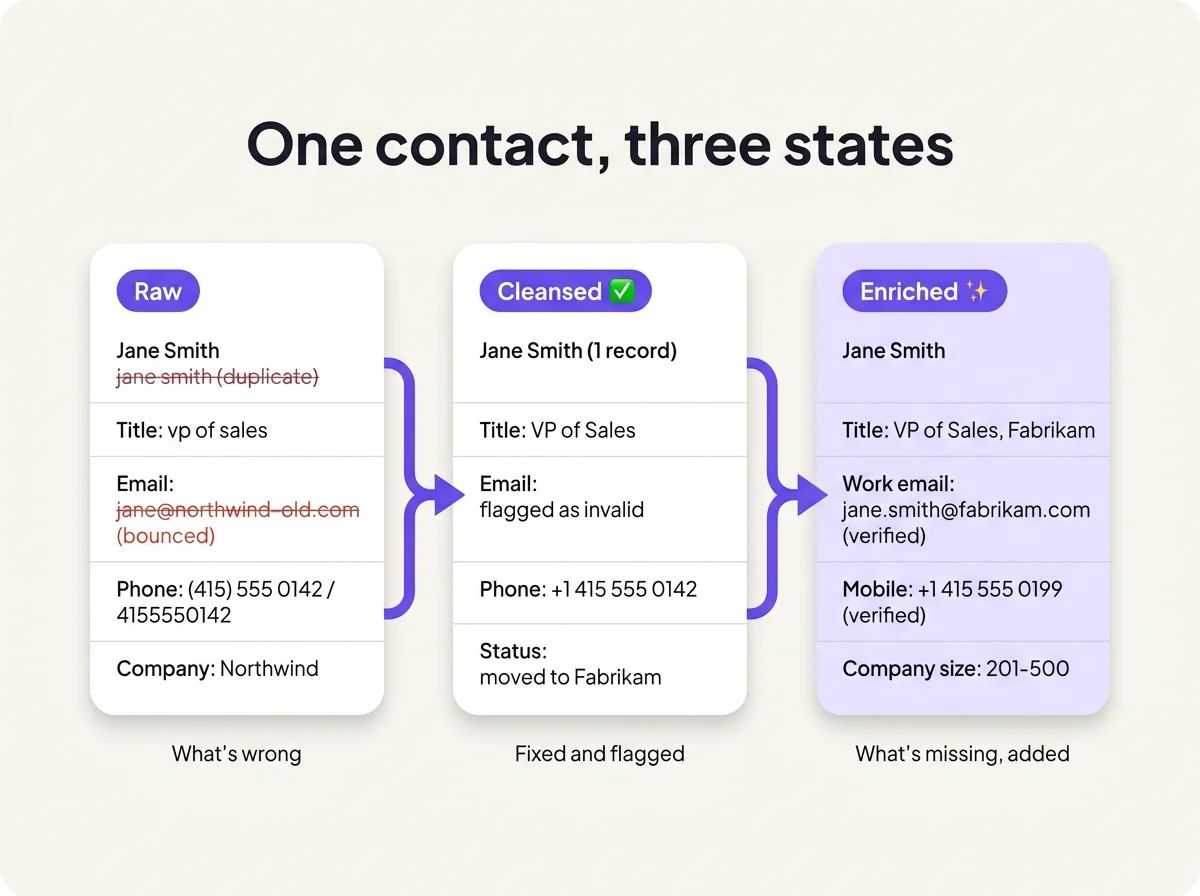
Jane Smith, Northwind and Fabrikam are made up for illustration.
How is data cleansing different from data enrichment?
The main difference between data cleansing and data enrichment is what they fix: cleansing fixes accuracy, and enrichment fixes completeness. Cleansing asks "is this record right?" Enrichment asks "what's missing from it?"
Data cleansing | Data enrichment | |
|---|---|---|
Goal | Make existing records accurate and consistent | Add the fields your records lack |
Question it answers | Is this record right? | What's missing from this record? |
Typical tasks | Merge duplicates, standardize formats, remove bad emails, flag leavers | Add work emails, mobiles, titles, company size and signals |
Data source | Mostly your own CRM, plus outside data to verify contacts | Mostly outside providers, plus your own product data |
Example | Two Jane Smith records become one | Jane's record gains a verified work email and mobile |
How you measure it | Duplicate rate, bounce rate | Fill rate on the fields your team uses |
Track the two separately. A CRM can have zero duplicates and still be half empty. It can also be full to the brim with fields that are wrong.
You need both, and the order matters. First, though, there's one place where the line between them gets fuzzy.
Where do cleansing and enrichment overlap?
Cleansing and enrichment overlap on contact accuracy. Nothing inside your CRM tells you an email died before you send to it, or that a contact changed jobs. So that part of cleansing needs outside data, the same kind enrichment uses.
That's the confusion behind a RevOps question on Reddit. The poster was rebuilding a RevOps stack. Enrichment vendors claimed to cleanse, cleansing vendors claimed to enrich, and they couldn't tell what they'd "actually need to buy vs what overlaps." A reply in the same thread drew a line we agree with: cleansing can use outside data to validate, but its goal stays the same. It corrects, standardizes and trims what you have.
What can you clean in-house?
You can fix structural problems in-house: duplicates, formats, required-field rules, unsubscribes and test records. Your CRM's own tools, a spreadsheet or an AI assistant can handle these on an export. None of it needs new facts about the person. It only needs your records to agree with each other.
What needs a data provider?
Anything about the real world needs a data provider. Does the email still work? Is the phone line live, and is it still a mobile? Did the contact change jobs, and if so, what's their new email and who took their seat?
People move a lot. BLS employee tenure data shows 20.6% of US wage and salary workers had been with their current employer a year or less in January 2026. A contact who was correct last year may not be correct now.
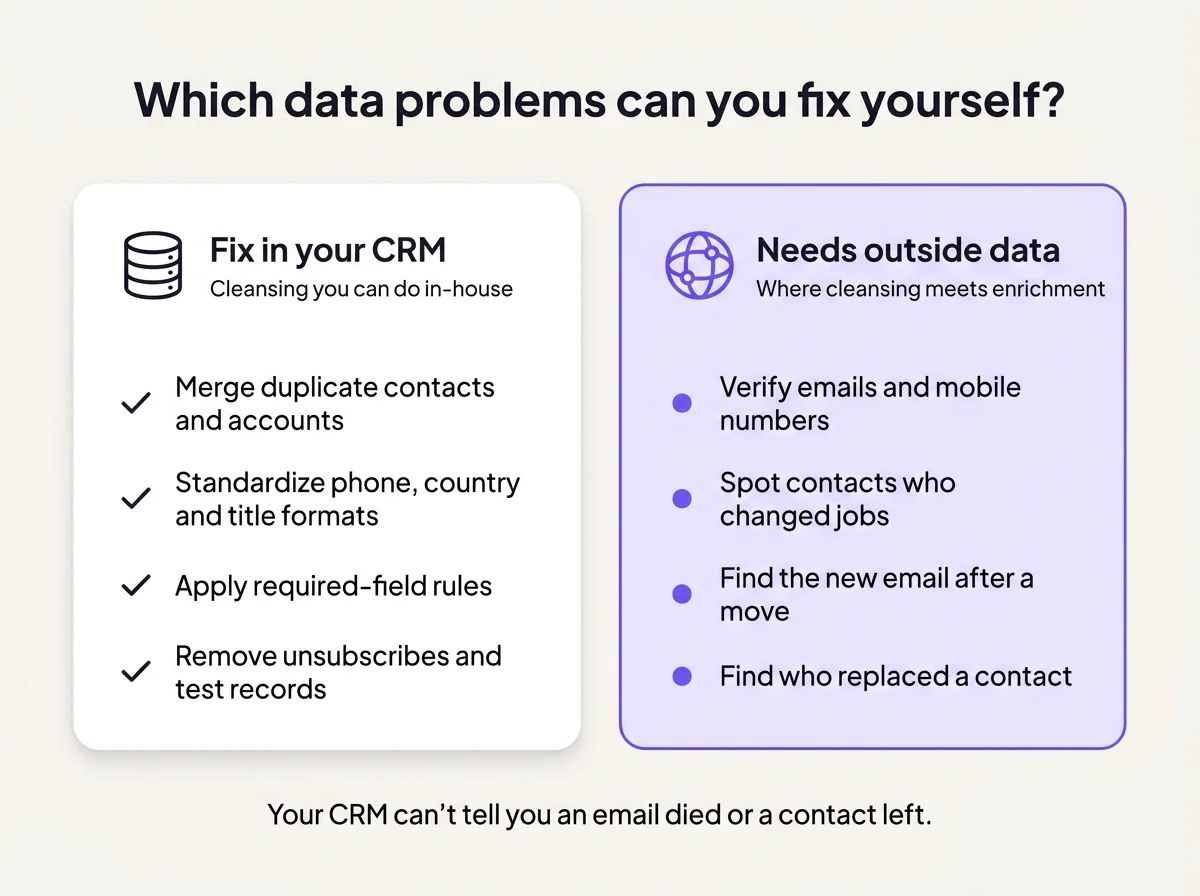
The left column is a process problem. The right column is where you'll spend money.
So when you shop, buy for the right-hand column. That's where enrichment tools also end up doing cleansing work.
Should you cleanse or enrich first, and how often?
Cleanse the structure first, then enrich, then re-check on a schedule. Merging duplicates and fixing formats before you enrich keeps you from paying for the same work twice.
Two examples make the order concrete. Enrich two copies of Jane, and you pay twice for one person. Enrich a contact who left two years ago, and you pay for the wrong person.
That's why the "who's still there?" check sits between the two steps. It's part cleansing, part enrichment, and it decides which records are worth enriching at all.
Then keep the loop going, because contact data doesn't stay clean. ZeroBounce's email list decay report puts the loss at 23% or more of an email list within a year. That's based on more than 11 billion addresses it processed in 2025.
A simple cadence looks like this:
- On entry: enrich new records as they arrive from a form or an import.
- On a schedule: refresh the whole base at a fixed interval you'll actually keep.
- On a trigger: act when a contact changes jobs or an email bounces.
Skipping the loop shows up in your pipeline. In the same Validity 2026 survey, 67% said poor data contributed, to some degree, to delayed or scrapped campaigns.
How do you clean and enrich CRM data?
You clean and enrich CRM data in five steps: audit, fix the structure, check who's still there, enrich what drives action, then automate.
- Export and audit. Pull a CRM export and count three things: duplicates, empty key fields and bounced emails. That's your baseline.
- Merge and standardize. Merge duplicate contacts and accounts. Pick one format for phones, countries and titles, and apply it everywhere.
- Check who's still there. Confirm each contact still works at the company on file. Flag the ones who moved, and find who replaced them in accounts you care about.
- Enrich only what drives action. Add the fields that change what your team does: route a lead, score it or reach the person. Start with work email and mobile.
- Automate. Enrich new records on entry, and re-run the check on a schedule so the base doesn't drift.
For step 4, our guide to CRM data enrichment goes deeper, and our roundup of CRM data enrichment tools compares your options.
AI raises the stakes. In Salesforce's 2026 State of Sales report, 74% of 4,050 sales professionals said they're focusing on data cleansing to get more from AI. An AI tool that writes emails or scores leads only works as well as the CRM behind it.
How does FullEnrich clean and enrich CRM data?
FullEnrich covers the overlap. It checks whether each contact is still in their role, then fills the gaps with verified emails and phones from 20+ providers.
How do you refresh your CRM in Claude?
You refresh your CRM in Claude with the CRM Refresh skill, which runs on the FullEnrich MCP. Upload a CSV, or paste rows from HubSpot, Salesforce, Attio or any other CRM. Claude maps your columns and shows the first five rows so you can confirm.
Then the skill does four things:
- Merges duplicates. They're listed separately in the output. Nothing gets deleted.
- Checks every contact for free. Each one comes back as still there, moved, replaced or not found. Moved shows the new company and title, and replaced shows who's in the seat now. When it can't confirm someone, it says not found and never guesses.
- Asks before spending. It offers new work emails for movers and replacements, shows the credit cost, and waits for your yes.
- Leaves your data alone. You get a CSV with a status column and an evidence column. New values go in new columns, and your original CRM values are never overwritten.
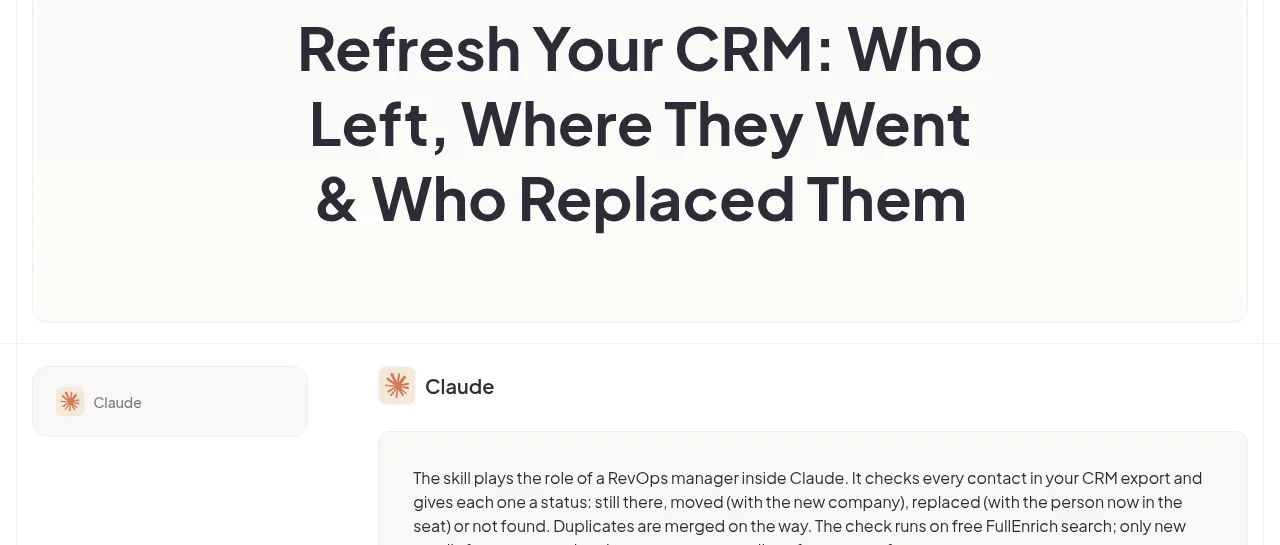
The CRM Refresh skill gives every contact in your export a status before you spend a credit.
How does FullEnrich fill in what's missing?
FullEnrich fills missing fields through waterfall enrichment: each request runs through 20+ providers until verified data comes back. Emails and phones are verified before delivery, and roughly 30% of the data providers return is thrown out.
Our email enrichment also handles catch-all domains, which accept any address, so a normal check can't confirm the mailbox. We resolve roughly half of them. Mobiles get checked for line type and active status. If we only find a landline, it costs you nothing.
You use credits only when verified data comes back: 1 for a work email, 10 for a mobile. No result, no charge.
Where you work | How | Good for |
|---|---|---|
FullEnrich app | Paste a LinkedIn URL or upload a CSV | Quick lookups and bulk list cleanups |
HubSpot | Push enriched contacts into HubSpot | Teams that run sales in HubSpot |
API | Send records from your own systems | Enriching every new record on entry |
Zapier, Make, n8n | Add an enrichment step to a workflow | Enriching form fills automatically |
MCP | Ask in Claude, ChatGPT, Gemini or Microsoft Copilot | CRM refreshes and lookups in chat |
CLI | Run enrichment from the terminal | Scripts and technical teams |
The HubSpot integration pushes enriched contacts into your CRM, and the FullEnrich CLI suits teams that script their own workflows.
What else do people ask about data cleansing and enrichment?
What's an example of data cleansing?
Merging two records for the same person is a classic example. Removing an email that already bounced is another. Both fix records you have without adding anything new.
What's an example of data enrichment?
An email-only signup that gains a verified mobile and a job title. The record already existed, and enrichment filled in what it lacked.
Can ChatGPT or Claude clean CRM data?
Yes, for duplicates and formats in an export. To check whether a contact is still in their role, the assistant needs a live data source, such as a data provider's MCP.
Does data cleansing fix data quality on its own?
No. Data quality is the goal: data that's accurate, complete and current. Cleansing is one way to get there, and enrichment is another.
Can you enrich data without cleansing it first?
You can, but it costs you. You'll enrich duplicates twice and spend on people who've already left. A quick merge and a job-change check first keep your spend on records worth reaching.
Where should you start cleaning and enriching your CRM?
Start with one CRM export. Merge the duplicates and fix the formats. Check who's still there, then enrich the fields your team acts on, work email and mobile first. Repeat it on a schedule, because the data won't hold still.
Cleansing keeps your CRM accurate, and enrichment fills in what it lacks. Do them in that order.
You can run the whole loop on a real export with 50 free credits, no card needed. If it sticks, paid plans start at $29 a month.