
Lead enrichment is the process of adding verified contact, company and role data to a lead record, so a rep can qualify and reach that person without manual research.
Judge it by one thing: usable data. An email that delivers. A mobile that rings the right person.
Inbound and outbound are two different jobs, and each needs its own setup.
I'm Benjamin Douablin, co-founder and CEO of FullEnrich. We pick from 20+ data providers for every contact, so we see every day where each one comes up short.
Key Takeaways
- Lead enrichment turns a name, email or LinkedIn URL into a complete lead record: title, company, headcount, industry, verified work email and verified mobile.
- Usable data is the bar. A found email that bounces, or a number that rings a switchboard, is worse than a blank, because reps act on it.
- Inbound enrichment identifies who just came to you, fast. Outbound enrichment finds working contact details for people you picked.
- Your input decides your results. In a 20-person list of sales leaders, a LinkedIn URL returned 19 work emails and name plus company name returned 16. Phone matches barely moved.
What is lead enrichment?
Lead enrichment is data enrichment applied to individual leads. You start with what the lead gave you. A provider fills in the rest.
A typical form gives you two fields: a name and a work email. That's enough to trigger enrichment. It's not enough to route, score or call anyone.
Here's what the same lead looks like before and after enrichment. The values are illustrative.
Field | Before (form submission) | After (enriched) |
|---|---|---|
Name | Jordan Lee | Jordan Lee |
Work email | jordan.lee@acme.io (unverified) | jordan.lee@acme.io (verified, deliverable) |
Job title | Empty | Head of Revenue Operations |
Company | Empty | Acme (acme.io) |
Headcount | Empty | 201-500 employees |
Industry | Empty | Software |
Mobile | Empty | +1 (555) 010-0142 (verified mobile, active line) |
Empty | linkedin.com/in/jordan-lee-example |
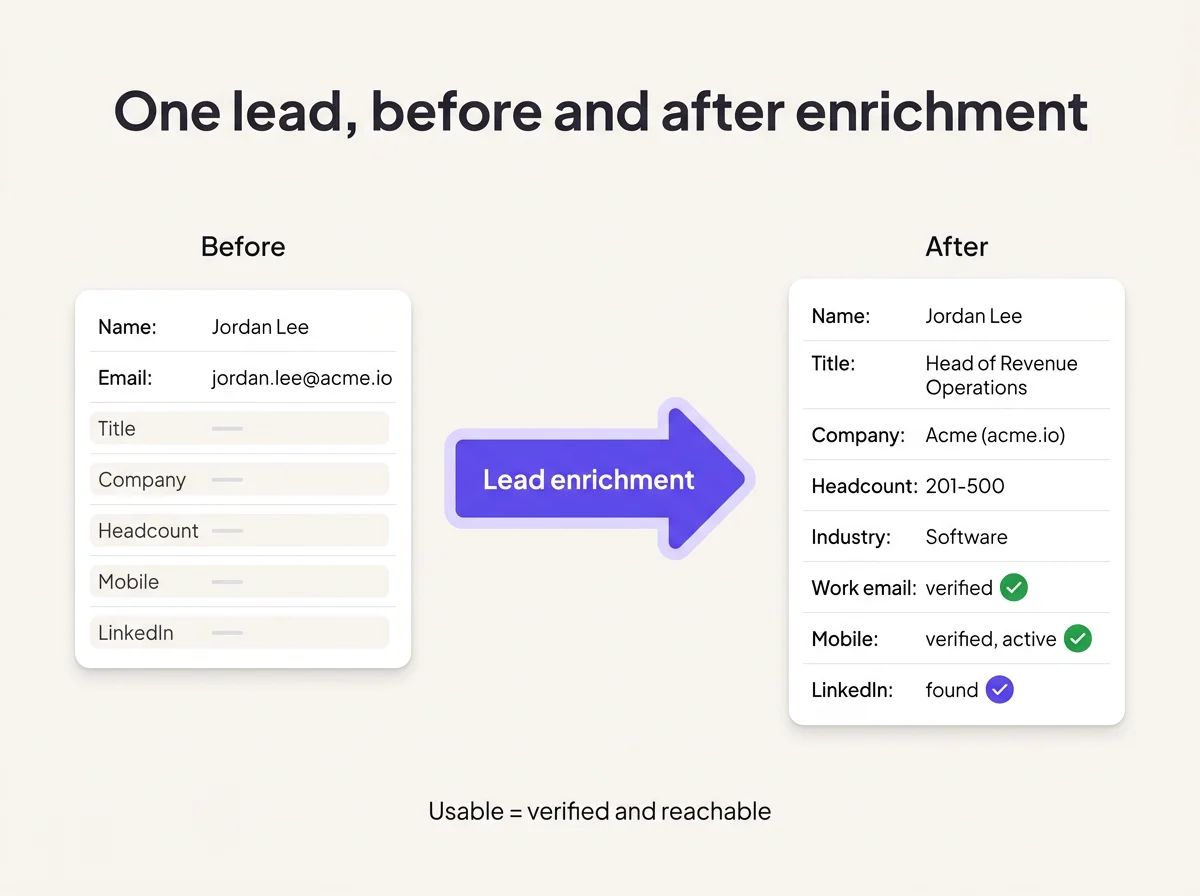
Same lead, before and after enrichment. Only the verified fields make it usable.
Lead enrichment sits between two processes people often confuse with it. Generation finds people. Enrichment describes them. Scoring ranks them.
Process | What it does | Typical output |
|---|---|---|
Lead generation | Finds new people to contact | A list of names and companies |
Lead enrichment | Completes and verifies what you know about each lead | Title, company data, verified email and mobile |
Lead scoring | Ranks leads by fit and timing | A score or priority tier |
Scoring is only as good as the fields enrichment fills. A score built on empty headcount and a guessed title is a coin flip.
What data does lead enrichment add?
Lead enrichment adds four layers of data. Contact data decides whether the other three matter.
Layer | What it adds | What it changes |
|---|---|---|
Contact and professional | Verified work email, verified mobile, LinkedIn URL, title, seniority | Reachability: can a rep contact this person? |
Firmographic | Company name, domain, industry, headcount, location | Fit: does this account match your ICP? |
Technographic | Tools the company already runs | Positioning: what do you lead with? |
Intent | Signals that the account is researching your category | Timing: should a rep reach out now? |
Start with contact data. Without a working email or mobile, fit and intent are trivia.
A perfect-fit VP showing strong intent, with a dead number and a bouncing email, is a nice row in a spreadsheet. Nobody can act on it.
Firmographics come next. They drive routing and qualification: which rep gets the lead, and whether it's worth a call at all.
Technographic and intent data sharpen the message and the timing. They pay off once a rep can actually reach the person.
How does lead enrichment work?
Lead enrichment works in four steps: take an input, match it across providers, verify what comes back, and write it to your CRM. The verification step is where most of the value lives.
1. Input: the identifier you start with. The stronger the identifier, the better the match. A LinkedIn URL matches best. Name plus company domain comes next. Name plus company name loses the most work emails. An email on its own tells you who the person is, through a reverse email lookup.
2. Match across providers. A single database either has your lead or it doesn't. A waterfall queries one provider, then the next, until it finds verified data. FullEnrich runs that waterfall across 20+ providers in real time. Depending on region, seniority and the list itself, that finds 30% to 200% more contacts than one provider alone.
3. Verify: found isn't usable. Providers return plenty of data that looks fine and fails in practice. Emails get a deliverability check. Catch-all domains accept any address, so a basic check can't confirm the mailbox. FullEnrich resolves roughly 50% of catch-all domains. Mobiles get checked for line type (mobile vs landline or VoIP), active status and carrier. Across all the data FullEnrich buys, 31.53% fails verification, and none of it reaches you or your invoice.
4. Write to the CRM. Enriched data only helps if it lands on the right record. FullEnrich pushes enriched contacts into HubSpot with three outcomes. An exact match updates the existing record. No match creates a new contact. An uncertain match goes to manual review, where you create, update, merge or skip.
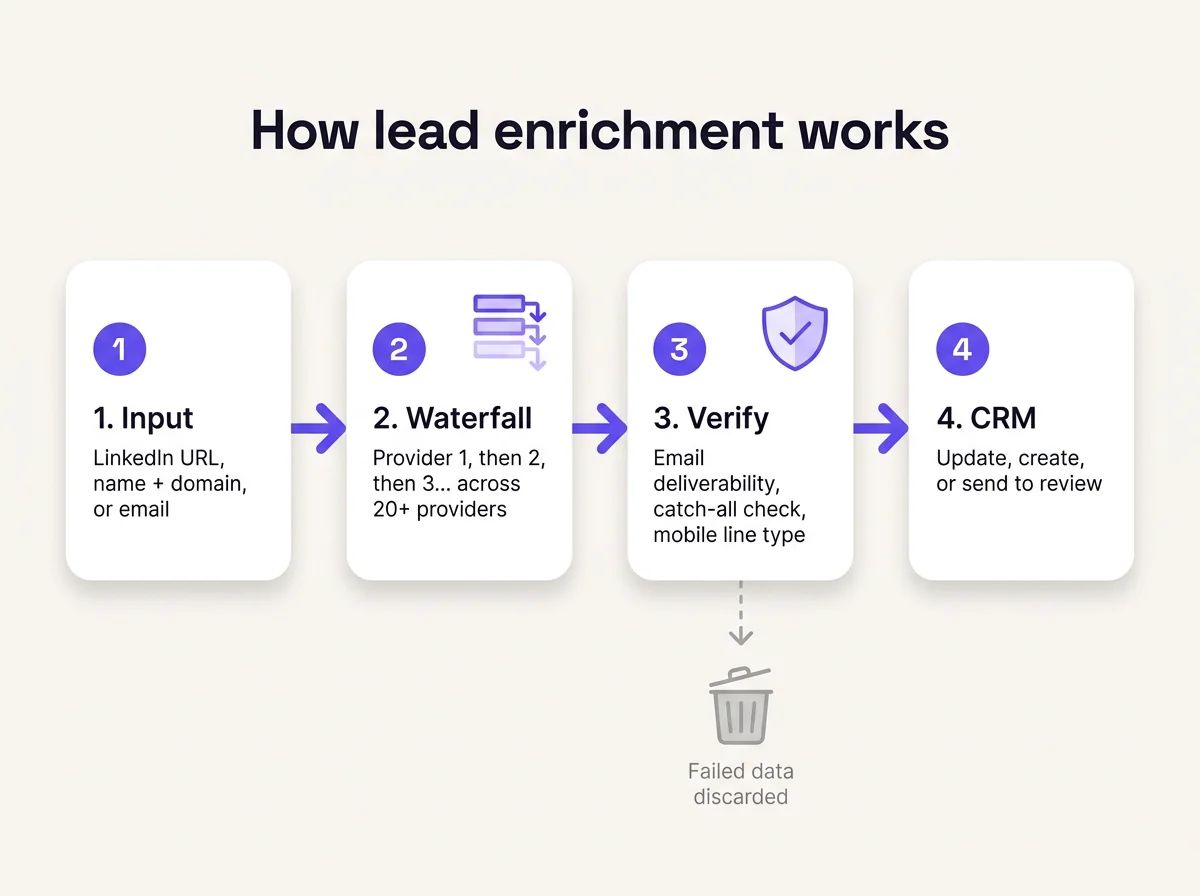
Input, waterfall, verification, CRM. Failed data stops at step three.
How is inbound lead enrichment different from outbound?
Inbound enrichment identifies someone who came to you. Outbound enrichment reaches people you picked. Same word, two jobs, two failure modes.
Inbound | Outbound | |
|---|---|---|
Starting input | An email from a form, demo request or free-trial signup, often a Gmail address | A list of LinkedIn URLs, or names plus companies |
Goal | Identify who this is and route it fast | Reach the people you chose |
Key data | Name, title, company, headcount, industry | Verified work email and verified mobile |
When it runs | On arrival, before routing | Right before a sequence goes live |
Main failure | Good leads ignored because nobody knows who they are | Bounces, dead numbers, wrong people |
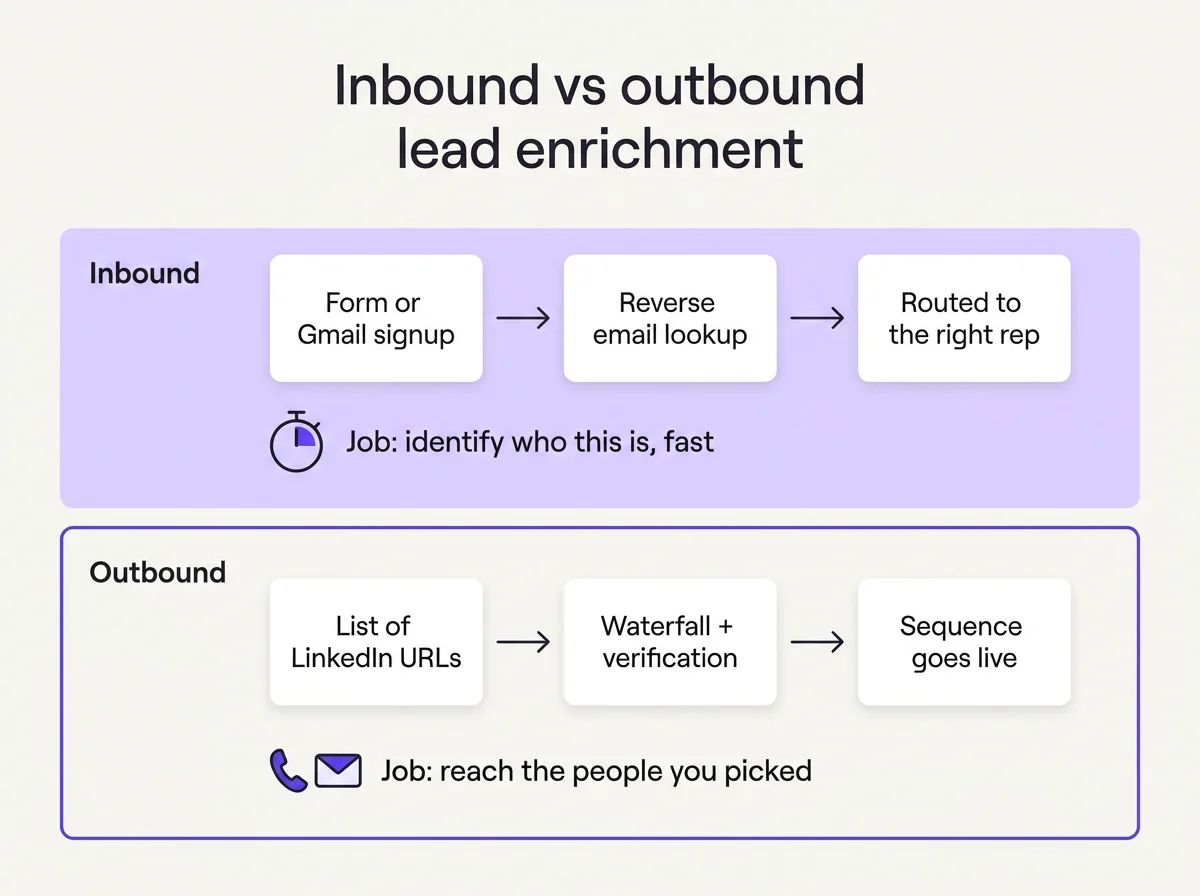
Inbound needs to know who. Outbound needs to reach them.
What should you do with free-trial and Gmail signups?
Enrich them with a reverse email lookup instead of disqualifying them. Many PLG companies auto-disqualify Gmail signups as consumers. Behind that address, there can be a VP testing your product outside work hours.
A reverse email lookup takes a work or personal email and returns the person behind it. Name, title, seniority, LinkedIn URL, company, domain, industry, headcount and location. Most tools return nothing on a Gmail or Outlook address.
Skipping this gets expensive. One RevOps team left 100 of 150 inbound leads a quarter unworked because their old tool couldn't enrich the email.
Can enrichment shorten your forms?
Yes. Ask for the email and let enrichment fill the rest. Marketing teams cut form fields and use reverse lookup to recover title, company and headcount after submission.
Personal emails are an inbound input only. They identify a lead who gave them to you. For cold outbound, stick to work emails and mobiles, and respect the right to object when someone asks to stop.
What changes for outbound lists?
Timing. Re-enrich right before a sequence goes live. People change jobs and companies, and a list built last quarter drifts.
On both sides, the test is the same: can a rep act on this record today? Only verified, reachable data passes.
What does lead enrichment look like in practice?
The identifier you start with decides how many emails come back.
Take 20 US heads of RevOps and VPs of Sales at software companies. Enrich them three times: by LinkedIn URL, by name plus company domain, and by name plus company name.
Input | Mobiles found | Work emails found |
|---|---|---|
LinkedIn URL | 19 of 20 | 19 of 20 |
Name + company domain | 18 of 19 (one contact had no domain on file) | 17 of 19 |
Name + company name | 19 of 20 | 16 of 20 |
Mobiles barely move with the input. Emails drop as the identifier weakens: 19, then 17, then 16. A weak or missing domain mostly costs you emails.
The app counts mobiles only. In the LinkedIn run, one contact had just a VoIP line, which shows as not found and costs nothing.
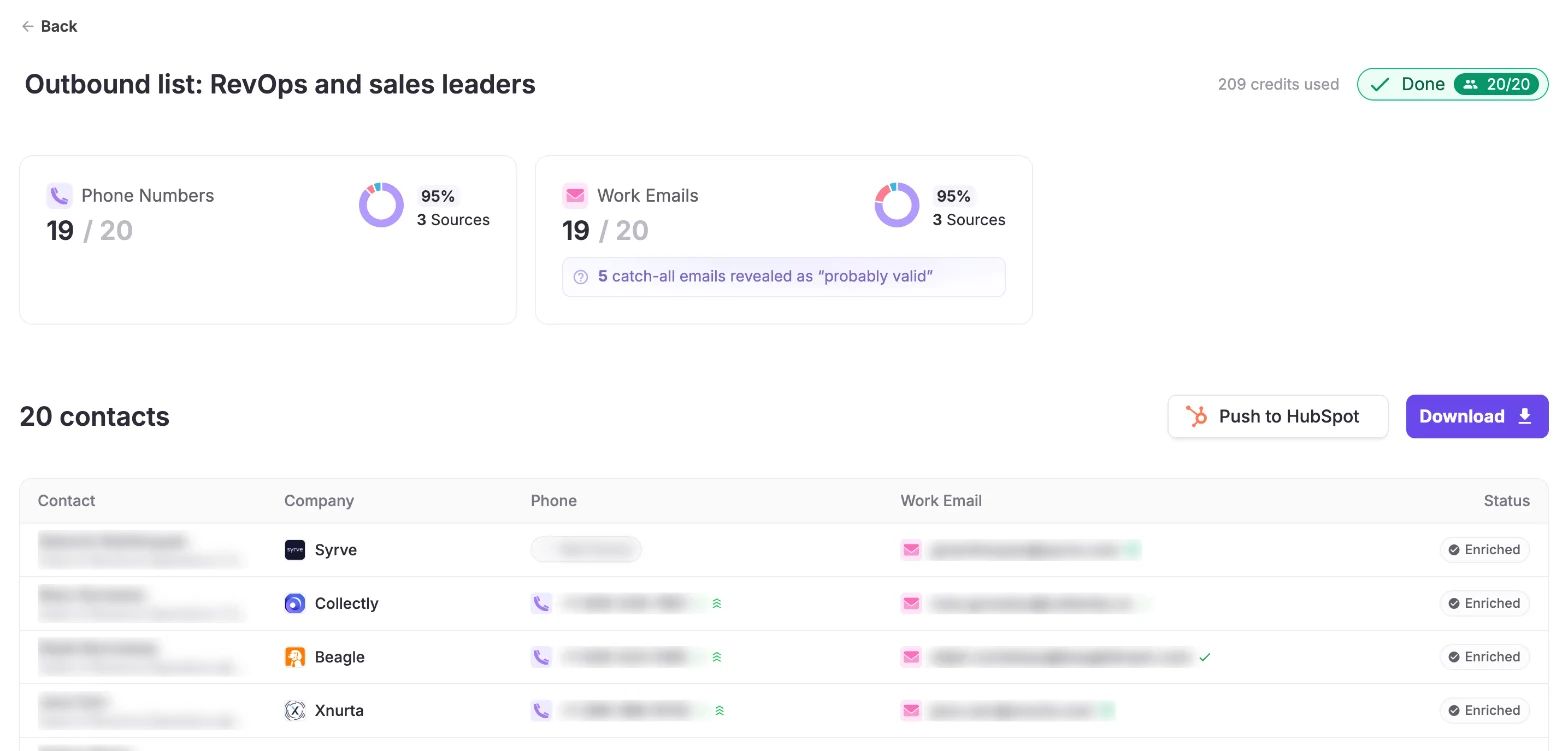
Twenty sales leaders enriched from LinkedIn URLs: 19 mobiles, 19 work emails, and five catch-all addresses resolved.
Five of these work emails sat on catch-all domains and came back as "probably valid" instead of dropped.
Two of the emails sat on a different domain than the company on file. One was a university side role. The other was a different employer. The company on file was out of date, or the person held two roles. That's exactly why uncertain matches should go to review before anything overwrites a record.
From there, push the list to HubSpot.
Run 18 of those work emails backwards through a reverse lookup: 17 come back as full profiles.
The inbound case is a Gmail address. Take greg.demoge@gmail.com, the personal address of Greg Démogé, FullEnrich's co-founder.
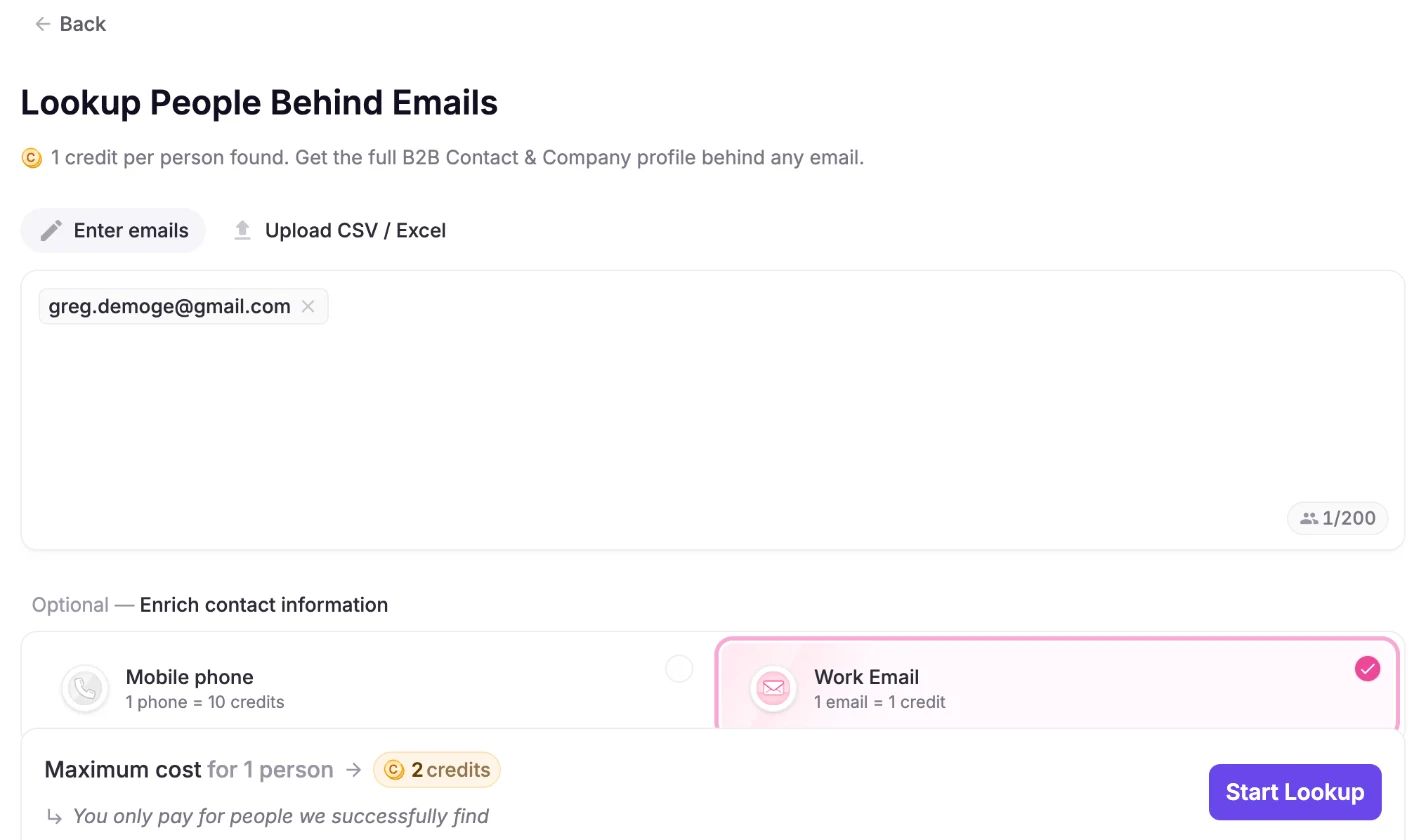
One Gmail address in, with the maximum cost shown before you start.
The cost shows up front: 2 credits maximum, one for the lookup and one for the work email. You only pay for people found.

The name and company land first, while the work email search keeps moving through the waterfall.
The Gmail resolves to his name and company first. The work email search keeps stepping through providers.
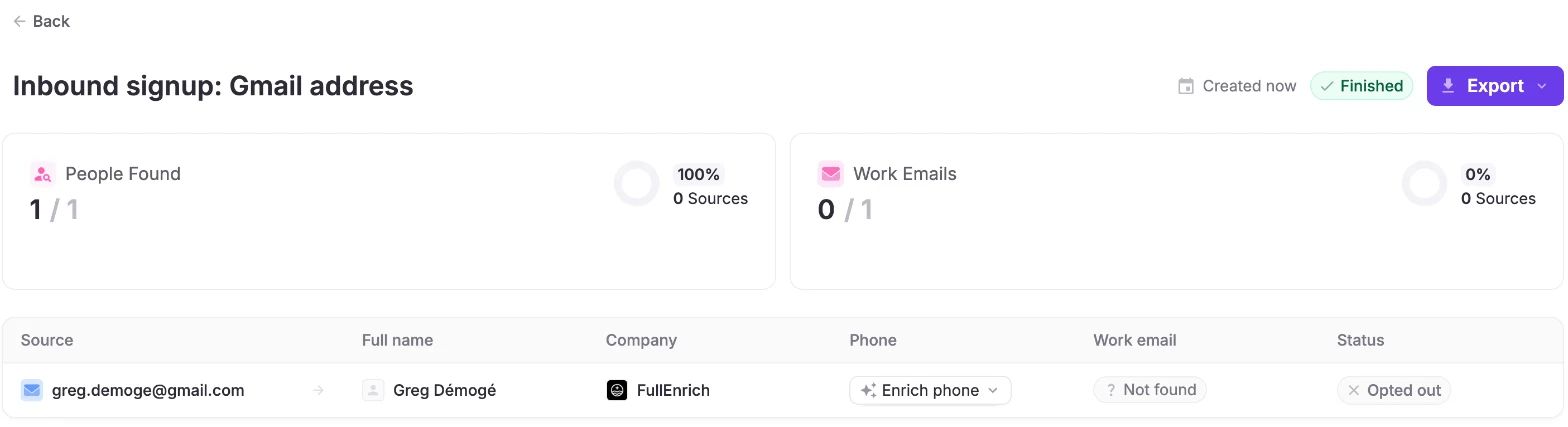
Identity found, work email withheld: the contact opted out.
The result: person found, company found, work email "Opted out". He opted out, so the work email isn't returned. Your inbound lead is identified and routable. The opt-out holds.
How do you set up lead enrichment in your stack?
Match each lead source to one enrichment route, then set three rules for how data lands in your CRM.
Where the lead comes from | How to enrich it | FullEnrich route |
|---|---|---|
Web form or demo request | Enrich on submit, before routing | API or a Zapier, Make or n8n action, or the Typeform + FullEnrich template |
Free-trial or Gmail signup | Reverse email lookup on the email | Reverse email lookup in the app or API |
New outbound list | Build the list, then enrich it | Search by title, industry and headcount, then enrich |
LinkedIn prospecting | Enrich by LinkedIn URL | Paste LinkedIn URLs or upload a CSV in the app |
Existing CRM records | Batch refresh, then push back | Enrich, then push to HubSpot |
AI agent or assistant | Enrich inside the conversation | MCP server in Claude, ChatGPT, Gemini or Copilot, or the MCP + HubSpot template |
Real-time enrichment runs on each new form or signup, through the API or an automation. Use it for inbound, where speed decides routing.
Batch enrichment runs on lists and CRM refreshes. Use it for outbound and cleanup.
Then set three rules:
- Fill blanks before overwriting. Keep data a rep verified on a call. Map the enriched email to its own field, separate from the form-submitted email.
- Review uncertain matches. A different domain can mean a job change or a side role. A human should decide before the record changes.
- Re-enrich on a schedule. Contact data goes stale as people move. Job changes and side roles show up as new domains, like the two above. Refresh active targets every 60 to 90 days, and always right before a sequence starts.
How do you know lead enrichment is working?
Measure what reps can use. Five metrics cover it:
- Match rate: the share of leads that come back with a verified email or mobile. Track it by input type and region.
- Bounce rate: the share of enriched emails that bounce once a sequence runs. This is your verification check.
- Connect rate: the share of dials that reach the actual person. Switchboards and dead lines show up here first.
- Speed-to-lead: the time from form submit to first touch. Inbound enrichment should shorten it, never add a queue.
- Cost per usable contact: total enrichment spend divided by contacts reps could actually use.
That last one exposes pricing models. If a tool charges per lookup, every miss inflates your cost per usable contact.
Misses shouldn't cost money. Pay for verified results, and your cost tracks what reps can act on.
How does FullEnrich handle lead enrichment?
FullEnrich runs a waterfall across 20+ data providers, verifies every result, and charges only when verified data comes back.
Each request pulls from providers in real time, at the moment you run it.
The find rate is 80%+ across email and phone. For work emails, that's 89% in the US and Canada, 84% in EMEA, and 78% in LATAM and APAC.
Verification decides what you see. Data that fails the checks gets discarded, and FullEnrich still pays the provider for it. You don't.
Credits are consumed only when verified data is returned. No verified contact, no charge. A work email costs 1 credit, a mobile 10, a reverse email lookup 1 per person found.
Pricing is credit-based, and seats are free, so your whole team can use it. Plans start at $29 a month with no annual commitment.
It works where your leads already are: the app, the API, Zapier, Make and n8n, the HubSpot push, and the FullEnrich MCP server for AI agents.
Judge enrichment by what a rep can actually reach.
A blank field costs you nothing. A wrong one costs you a rep's morning.
Frequently asked questions
What's the difference between lead enrichment and data enrichment?
Lead enrichment is data enrichment applied to individual leads. Data enrichment covers any record type: accounts, customer lists, product data. Lead enrichment focuses on one person and answers two questions. Who is this? How do I reach them? It returns title, company, headcount, a verified work email and a verified mobile, so a rep can qualify and contact the lead without research.
Is lead enrichment the same as lead generation?
No. Lead generation finds new people to contact. Lead enrichment completes the records of people you already have, from a form, a list or your CRM. Most teams run both in sequence. Search or prospecting builds the list. Enrichment then adds the verified emails, mobiles and company data your reps need to actually reach those people.
How often should you re-enrich leads?
Re-enrich right before a sequence goes live, and refresh active targets every 60 to 90 days. Contact data goes stale as people change jobs, titles and companies. Inbound leads get enriched once, on arrival, before routing. Dormant records can wait until someone plans to contact them again, since enriching records nobody will use only burns budget.
Can lead enrichment find mobile numbers?
Yes, and the useful ones are verified. A proper mobile check confirms the line type (mobile vs landline or VoIP), that the line is active, and the carrier. Skip those checks and reps end up calling switchboards and dead lines. At FullEnrich, a verified mobile costs 10 credits, and you pay nothing when no verified number is found.
Is lead enrichment GDPR compliant?
Yes, when you have a lawful basis and your provider respects opt-outs. For B2B outreach, that basis is usually legitimate interest, and people keep the right to object. Ask any vendor how they source data and how they handle people who object. FullEnrich pulls data from providers in real time, at the moment you request it. When someone has opted out, their work email comes back marked "Opted out" and isn't delivered. FullEnrich is GDPR and CCPA compliant and SOC 2 Type II certified.
How much does lead enrichment cost?
Misses decide the real cost. Per-seat contracts charge the same whether data is found or not, and some credit models charge per lookup. At FullEnrich, a verified work email is 1 credit, a verified mobile 10, and plans start at $29 a month. Compare tools on cost per usable contact, the verified data your reps can actually reach.