HubSpot enrichment is HubSpot's built-in Data Enrichment feature. It fills contact and company properties from HubSpot's commercial dataset, third-party providers, and public information. It comes with paid plans and doesn't use HubSpot Credits.
What it doesn't fill is a contact's email address or phone number. Neither one is on the list of contact properties HubSpot enriches. That's the gap you hit the moment a rep wants to call or email someone from HubSpot.
The gap has a cost. In Validity's State of CRM Data Management in 2026 report, published in August 2026, 62% of organizations said they lose revenue directly because of poor CRM data quality. The survey covered 500 marketers in the US, UK, Brazil, Australia, and New Zealand.
This guide covers what native enrichment fills, what it skips, and four ways to add emails and mobile numbers without creating duplicate records. For the same problem across any CRM, see the CRM enrichment guide.
TL;DR
- HubSpot's Data Enrichment comes with paid plans, uses no HubSpot Credits, and fills role, seniority, job title, location, and LinkedIn URL for contacts, plus firmographics for companies.
- Its contact property list has no email or phone field. The only phone it enriches is the company "Phone number."
- It skips contacts with a Gmail or Yahoo address.
- FullEnrich adds emails and mobile numbers four ways: push enriched contacts, enrich an existing HubSpot list, auto-enrich via Zapier, Make, or n8n, or use Claude via MCP.
What HubSpot's native Data Enrichment fills
HubSpot's Data Enrichment is included in paid plans at no extra cost. HubSpot's Data Enrichment product page puts it plainly: "no additional cost, no extra tools, and no integrations needed." HubSpot's getting-started guide adds that data enrichment "does not consume HubSpot Credits."
As of September 2026, it's available on Starter, Professional, and Enterprise plans of Marketing Hub, Sales Hub, Service Hub, Data Hub, and Content Hub. It's also on Professional and Enterprise plans of Smart CRM and Revenue Hub. HubSpot still uses the Breeze Intelligence name in parts of its knowledge base, for its commercial dataset and for some credit-based features covered in the cost section below. Enriching the records already in your CRM is the Data Enrichment feature described here.
HubSpot matches a contact on first name, last name, and work email. It matches a company on its domain.
It runs three ways:
- Automatic: a Super Admin turns it on for new records, and it fills blank properties. With continuous enrichment on, previously enriched records stay current "with the latest data from HubSpot."
- Manual: a user with the right permissions selects records. You choose whether to fill blanks only or overwrite existing values.
- Bulk: from an object's index page, a segment, an import, or a workflow.
Existing values stay put unless you overwrite them manually or turn on "Overwrite incorrect enrichment values" in your enrichment settings.
On contacts, HubSpot's enrichable property list covers 12 data fields. For role, that's Job Title, Employment Role, Employment Seniority, and Employment Sub Role. For identity and location, it's First Name, Last Name, LinkedIn URL, City, State/Region, State/Region Code, Country, and Country Code. Two more fields track opt-outs: Enrichment opt-out and its timestamp.
The company list goes deeper. It includes annual revenue, employee range, number of employees, industry, description, web technologies, total money raised, year founded, street address, social handles, and a company phone number.
Here's where native enrichment wins:
- Built in: nothing to install, connect, or maintain.
- No extra cost: it's part of your paid plan and uses no HubSpot Credits.
- Automatic and continuous: new records fill themselves, and enriched records stay current.
- Company depth: revenue, funding, headcount, and tech stack from a single domain.
Users rate the company side well. A G2 reviewer of Clearbit, May 2026, wrote that its enrichment "automatically fills in missing company details, job roles, industry classification, and firmographics." That review comes from G2's Clearbit listing: of its 60 newest reviews, 75% predate HubSpot's acquisition of Clearbit and 73% were vendor-invited or otherwise prompted.
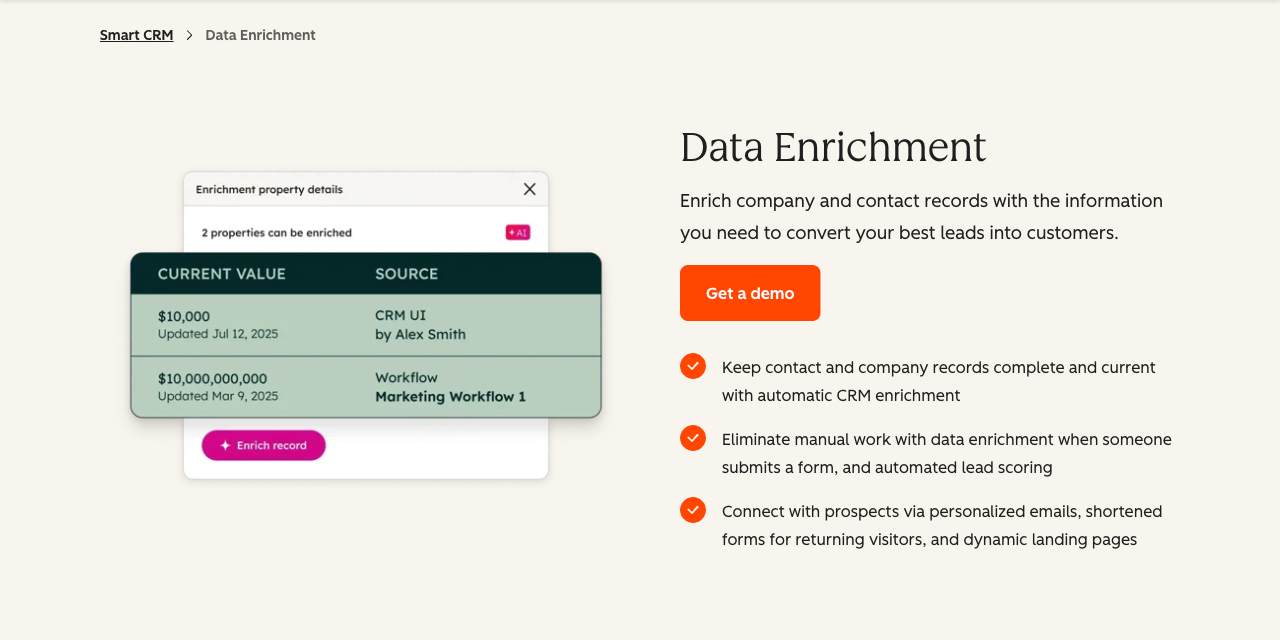
Source: HubSpot Data Enrichment product page (hubspot.com/products/crm/data-enrichment), captured 24 September 2026.
What it doesn't fill: the phone and email gap
Native enrichment fills no email or phone field on a contact record. Neither appears on HubSpot's list of enrichable contact properties, as of September 2026. The only phone field HubSpot enriches is "Phone number" on the company record.
A company phone number belongs to the company. It isn't the direct line of the person you want to reach.
Email works the same way. Work email is one of the inputs HubSpot uses to match a contact. It isn't an output. If the email field is empty, native enrichment won't find one for you.
Users draw the same line. A Reddit commenter in r/CRMSoftware, September 2026, wrote: "We used Breeze for this and it handled the names, titles and company side fine." The same comment says it stops at email and phone, and that finding them "ended up being a separate discovery and validation tool." That's one anecdote, but it matches HubSpot's own property list.
There's a second gap. HubSpot says contacts "must have a business email address. Personal addresses such as Gmail or Yahoo will not be enriched." So a signup that arrives with a Gmail address gets no role, no title, and no location from native enrichment.
The fields a rep needs to actually reach someone, a work email and a mobile number, have to come from outside HubSpot.
Four ways to add emails and phone numbers to HubSpot contacts
HubSpot contact enrichment, in practice, means filling the emails and phone numbers that native enrichment leaves blank. As of September 2026, FullEnrich has four live routes into HubSpot: push contacts you've already enriched, enrich an existing HubSpot list in place with CRM Enrichment, auto-enrich new contacts through Zapier, Make, or n8n, or enrich and push from Claude via MCP. The right one depends on where your contacts are now. Each route looks for work emails and mobile numbers, and some can add personal emails too.
1. Push contacts you've already enriched
Direct push is for contacts you've enriched in FullEnrich first, through a single lookup, a CSV upload, or Search. Select them, then push them through FullEnrich's HubSpot integration.
Before anything lands, FullEnrich looks for the contact in HubSpot. It compares first name, last name, company, LinkedIn URL, LinkedIn ID, phone number, and email address, per the HubSpot integration setup guide. Then one of three things happens:
- Exact match: the existing record is updated.
- No match: a new contact is created.
- Uncertain match: the contact is flagged, for example a partial name like "John D." You decide whether to create, update, merge, or skip.
That review isn't optional. FullEnrich's first-push guide says: "You must review all uncertain matches before pushing." The ambiguous cases wait for you instead of turning into silent duplicates or wrong merges.
The push sends mobile and work phone numbers, work email, LinkedIn URL, job title, and location. Company name, domain, size, industry, and HQ location go along too. The last step is choosing a destination list in HubSpot.
When you first connect, FullEnrich syncs your existing HubSpot data. That takes 20 to 50 minutes.
Source: FullEnrich HubSpot integration page (fullenrich.com/integrations/hubspot), captured 24 September 2026.
2. Enrich an existing HubSpot list in place (CRM Enrichment, beta)
The easiest way to add direct phone numbers to a HubSpot contact list you already have is CRM Enrichment. You pick the list from inside FullEnrich, and results write back to HubSpot on their own. FullEnrich's CRM Enrichment guide sums it up: "No exports, no re-imports."
- Connect your HubSpot account in FullEnrich.
- Set each field to "Complete if missing" or "Overwrite."
- Select one or more existing HubSpot lists.
- Choose what to search for: work email, mobile phone, personal email, or a combination.
- Click Enrich list.
Personal email enrichment is designed for recruiting outreach, not cold prospecting.
It's a beta, and the limits are real as of September 2026:
- Run size: up to 5,000 contacts per run, across one or more lists.
- Timing: each run is manual and one-off. Scheduled enrichment is on the roadmap.
- Targeting: no filter-based targeting and no preview before you enrich.
- Existing data: no re-check of emails or phone numbers already in HubSpot.
- Inside HubSpot: no single-contact enrichment button yet.
There's no FullEnrich app on the HubSpot Marketplace yet either. FullEnrich's HubSpot app setup guide says the application "is under development and is not yet available." CRM Enrichment uses standard credit pricing, with no separate plan.
3. Auto-enrich every new contact (Zapier, Make, n8n)
Zapier, Make, and n8n are the tools that sync enriched data back into HubSpot automatically, with no manual export. FullEnrich has a native app in each one. As of September 2026, this is the only fully automatic route for new contacts.
The pattern is the same everywhere. A contact is created in HubSpot. FullEnrich looks for the email and mobile. The workflow updates the HubSpot record.
- Zapier: a ready-made HubSpot and FullEnrich template runs "When a new contact is added in HubSpot." Its "Enrich Contacts" action needs a name for the enrichment run, plus each contact's first name, last name, and company name.
- Make: the main action in the FullEnrich app for Make enriches "a contact with email and / or mobile phone number."
- n8n: the FullEnrich node is built and maintained by FullEnrich and verified by n8n.
You'll need an account on the workflow tool and some setup time. After that, every new contact gets the same treatment without anyone touching it.
4. Enrich and push from an AI agent (Claude + MCP)
If your team works in Claude, you can run enrichment and the HubSpot push from one conversation. Connect the FullEnrich and HubSpot MCP servers to Claude, then install the Claude and HubSpot skill template. Setup asks two questions: which HubSpot static list to use, and whether to auto-push or confirm each time.
Then ask for what you need, for example: "Find 50 Heads of Sales at SaaS companies in Berlin, enrich them, and push the results to HubSpot."
Every push uses HubSpot's native upsert with email as the unique key, so the same contact never lands twice. Companies link through HubSpot's default contact-to-company association by email domain. If you'd rather build your own pipeline, FullEnrich's API covers the same enrichment.
A CSV export, enrichment, and re-import still works for a one-time clean. It doesn't scale for ongoing enrichment, and every manual import risks new duplicates.
Which method to use when
Pick the method by where your contacts are right now: already enriched, sitting in a HubSpot list, arriving as new records, or inside an AI workflow.
Method | Best for | How it runs today | Current limits |
|---|---|---|---|
Native Data Enrichment | Role, location, LinkedIn URL, and company firmographics | Automatic or manual, inside HubSpot | No contact email or phone; skips Gmail and Yahoo contacts |
Direct push | Contacts you've already enriched in FullEnrich | Manual push, per batch | Uncertain matches need review before pushing |
CRM Enrichment (beta) | Filling gaps in an existing HubSpot list | Manual, one-off runs of up to 5,000 contacts | No scheduling, no in-HubSpot button, no Marketplace app yet |
Zapier, Make, or n8n | Every new contact, automatically | Native FullEnrich app, triggered on contact creation | Needs a workflow-tool account and setup |
Claude + MCP | Ad hoc prospecting from an AI workflow | Per conversation, auto-push or confirm | Needs both MCP servers connected in Claude |
These routes aren't exclusive. Native enrichment can keep filling firmographics while one of the other routes adds emails and phones.
Field mapping: don't overwrite good data
Set email and phone fields to "complete if missing," and set job title to "overwrite." That's FullEnrich's own advice for CRM Enrichment: "Set emails and phone numbers to 'complete if missing' so you never overwrite good data, and set job title to 'overwrite' so it stays current."
The logic is simple. A working email or phone already on the record shouldn't be replaced by a new lookup. A job title changes when someone gets promoted or moves, so you want the latest one.
Direct push has the same two options. "Complete if missing" only updates empty HubSpot fields. "Override field" always overwrites with FullEnrich data.
If native enrichment and FullEnrich both write job title, decide which one owns that field.
What it costs: HubSpot vs. FullEnrich
HubSpot's Data Enrichment adds $0 to a paid plan and uses no HubSpot Credits, but it fills no contact email or phone. FullEnrich charges only when it finds an email or a mobile number. Compare what each one buys, not the price of a credit.
HubSpot: included enrichment, metered AI credits
Data Enrichment needs a paid hub, and the cheapest route in is a Starter hub. Sales Hub Starter lists at $20 per seat per month on HubSpot's Sales Hub pricing page, as of September 2026. Smart CRM includes Data Enrichment only from Professional up.
HubSpot Credits are a separate meter. HubSpot's product and services catalog includes 500 credits a month on Starter, 3,000 on Professional, and 5,000 on Enterprise, across Smart CRM and the hubs. Data Hub gets more at Professional and Enterprise. Extra credits cost $0.010 each, or $10 per 1,000-credit pack. HubSpot's credits and billing guide says credits reset every month, and unused ones don't roll over.
Those credits pay for AI actions. The catalog's rate sheet prices the first two:
- Prospecting Agent: 100 credits to recommend outreach for one lead, or $1.00 at the pay-as-you-go rate.
- Data Agent and smart properties: 10 credits per prompt per record, or $0.10.
- Net-new target accounts: HubSpot's target-accounts guide says "Breeze Intelligence credits are required to add net-new companies as target accounts." It publishes no per-company rate.
On that page, the Breeze line follows the words "HubSpot Credits required." HubSpot's current pricing pages don't list a separate Breeze Intelligence price, and third-party figures for the old add-on vary.
None of these actions is documented to return a contact's email or phone number. The Prospecting Agent drafts personalized outreach for leads, smart properties write AI-generated property values, and target accounts add company records.
FullEnrich: credits only when data is found
FullEnrich charges credits, and only when data is found. FullEnrich's pricing says: "Credits are spent only when data is found and passes verification. A lookup that returns nothing costs nothing." A landline returned instead of a mobile costs nothing too.
As of September 2026, the entry Pro tier is $29 a month for 500 credits, or $0.058 per credit:
- Work email found: 1 credit, $0.058.
- Personal email found: 3 credits, $0.174.
- Mobile number found: 10 credits, $0.58.
- Email and mobile found for one contact: 11 credits, $0.638.
At that tier, 500 credits cover 45 contacts where both an email and a mobile are found. The price per credit drops at higher volumes, and every plan includes unlimited users. Direct push and CRM Enrichment add nothing on top of credits.
Side by side: what each one charges for
What you're paying for | HubSpot | FullEnrich |
|---|---|---|
Entry price | Sales Hub Starter, $20 per seat per month | Pro, $29 a month for 500 credits |
Company firmographics | Included in Data Enrichment, no HubSpot Credits | Sent with each contact pushed to HubSpot |
Contact job title and location | Included in Data Enrichment, no HubSpot Credits | Sent with each contact pushed to HubSpot |
Contact work email | Not filled | 1 credit ($0.058) when found |
Contact mobile number | Not filled | 10 credits ($0.58) when found |
Extra usage | 500, 3,000, or 5,000 credits a month by tier, then $0.010 per credit, for AI actions | Price per credit drops with volume; nothing found costs 0 credits |
A HubSpot credit and a FullEnrich credit aren't the same unit, so their per-credit prices don't compare directly.
The two don't compete on the same fields. FullEnrich runs a provider waterfall for exactly the fields HubSpot leaves blank, across 25+ data sources according to its pricing page. If one provider has no match, the next one gets a shot.
Where HubSpot's data comes from, and who gets notified
HubSpot enriches records from "HubSpot's commercial dataset, third-party providers, and publicly available information from across the internet," according to its getting-started guide.
The people in that dataset have options. Some regions, like the EU, require HubSpot to email residents when they become part of the commercial dataset. Anyone can opt out by submitting HubSpot's Privacy Preferences form with the "Delete your data from HubSpot's commercial dataset" box selected, as HubSpot's opt-out notice guide explains.
In July 2026, HubSpot changed course on data sharing. On 1 July, it announced that "enrichment data such as business contact details, employer information, and email deliverability signals, may be shared with other customers." It reversed the change on 5 July, as CMSWire reported.
Dharmesh Shah, HubSpot's co-founder and CTO, wrote: "We made a mistake and have taken steps to correct it." Duncan Lennox, HubSpot's chief product and technology officer, committed that any future enrichment capability using customer data "will be fully and transparently opt-in."
Where your CRM data comes from matters more as AI tools start reading it. In Validity's 2026 report, just 21% of marketers said their CRM data is "very well prepared" to support AI.
FAQ
What is enrichment in HubSpot?
Enrichment in HubSpot is the built-in Data Enrichment feature. It fills contact and company properties from HubSpot's commercial dataset, third-party providers, and public information. For contacts, that means role, seniority, job title, location, and LinkedIn URL. For companies, it adds firmographics like revenue, headcount, and industry. It comes with paid plans and uses no HubSpot Credits.
How much does HubSpot data enrichment cost?
Nothing extra on a paid plan, and it uses no HubSpot Credits. The cheapest way in is a Starter hub, such as Sales Hub Starter at $20 per seat per month. It fills no contact email or phone, though. HubSpot Credits, $0.010 each beyond the monthly allowance, pay for AI actions, not contact lookups. At FullEnrich's $29, 500-credit Pro tier, as of September 2026, a work email found costs $0.058 and a mobile $0.58.
Does HubSpot's native enrichment find phone numbers?
Not for contacts. HubSpot's list of enrichable contact properties has no phone or mobile field. The only phone it enriches is "Phone number" on the company record, which belongs to the company, not the person. To add direct mobile numbers to contacts, you need an outside source that pushes or syncs them into HubSpot.
What tools automatically sync enriched contact data back into HubSpot without manual exports?
Zapier, Make, and n8n. FullEnrich has a native app in all three. A workflow triggers when a new contact is created in HubSpot, looks for the email and mobile, and updates the record. As of September 2026, it's the only fully automatic FullEnrich route. CRM Enrichment also writes back without exports, but you start each run by hand.
Is there a FullEnrich app inside the HubSpot Marketplace?
Not yet. FullEnrich's HubSpot Marketplace application is under development and isn't available. You connect HubSpot from inside FullEnrich instead, then push contacts or enrich existing lists from there. A single-contact enrichment button inside HubSpot is also planned but not live.
The bottom line
HubSpot's native enrichment is worth keeping on. It's included in paid plans, it runs on its own, and it's strong on company data. It stops at the two fields your reps need most: a contact's email and mobile number.
Pick your route by where the contacts are. Push what you've enriched, enrich a list in place, automate new contacts with Zapier, Make, or n8n, or run it from Claude. Start a free FullEnrich trial to fill the fields HubSpot leaves blank.