CRM data enrichment is the process of adding missing or updated information to the contact and company records already inside your CRM.
Instead of leaving a record with a name, company and a handful of empty fields, enrichment uses external data sources to find information such as a verified work email, mobile number, job title, LinkedIn profile or company details.
That data can then be mapped back into HubSpot, Salesforce or another CRM under rules that control what gets added and what existing information is protected.
The goal isn't to collect as much data as possible.
It's to make the records your sales and marketing teams actually use more complete, contactable and useful.
And the way you enrich those records matters. A traditional enrichment provider searches its own database. A waterfall enrichment platform can search multiple providers in sequence, giving each record more opportunities to find a usable result.
CRM data enrichment in 30 seconds
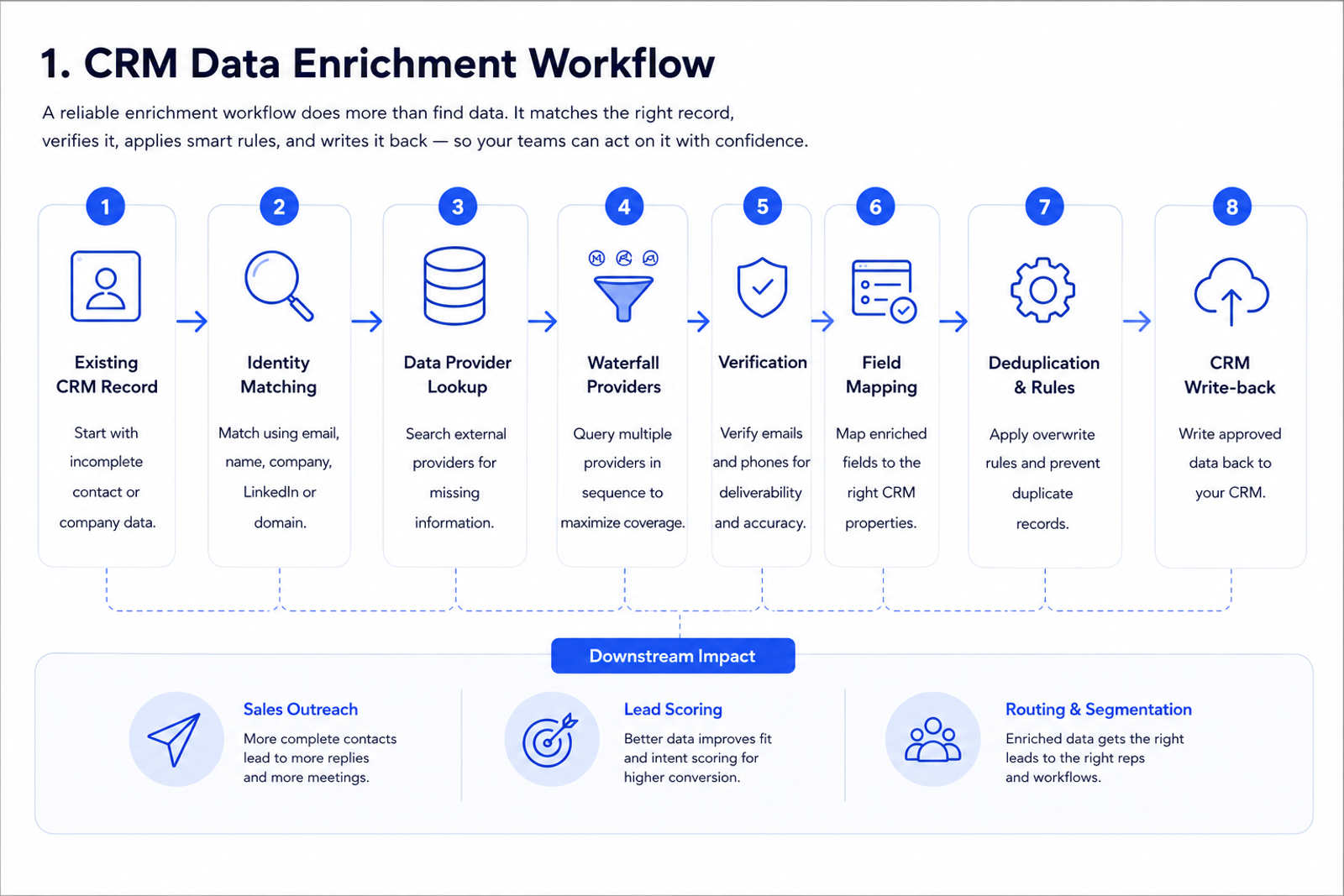
A typical CRM enrichment workflow looks like this:
- Start with an incomplete CRM contact or account.
- Match the record using identifiers such as a name, company, email address or LinkedIn profile.
- Search external data sources for the missing information.
- Verify the returned contact data where possible.
- Map each enriched field to the correct CRM property.
- Apply deduplication and overwrite rules.
- Write approved data back into the existing CRM record.
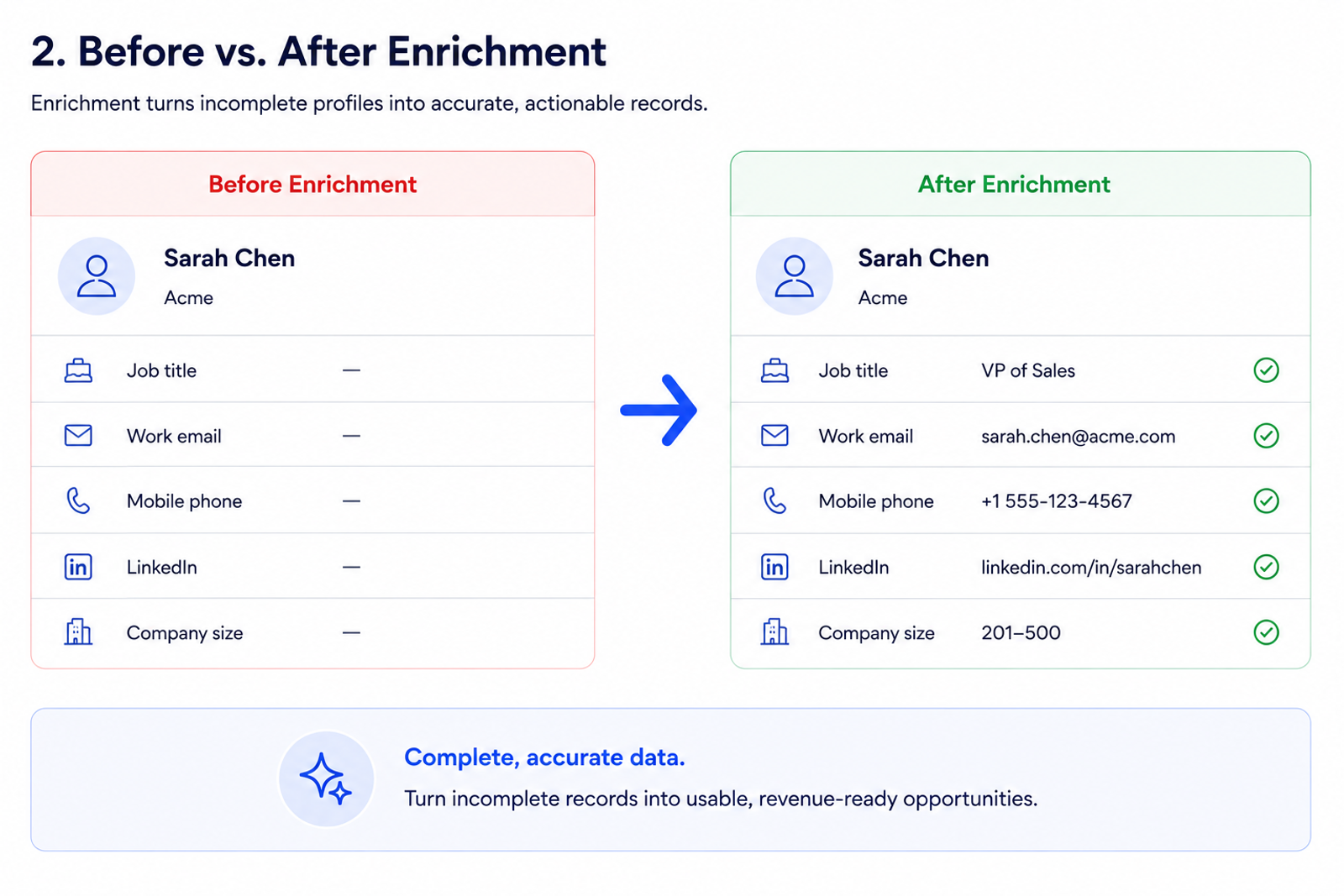
The result might turn this:
Field | Before |
|---|---|
Name | Sarah Chen |
Company | Acme |
Job title | — |
Work email | — |
Mobile phone | — |
— |
Into this:
Field | After enrichment |
|---|---|
Name | Sarah Chen |
Company | Acme |
Job title | VP of Sales |
Work email | Verified business email |
Mobile phone | Direct/mobile number |
Matching professional profile |
That difference is what allows the CRM to become useful for outbound, qualification, routing and segmentation rather than simply functioning as a database of names.
What is CRM data enrichment?
CRM data enrichment adds missing information to existing CRM records using external data sources.
The important word is existing.
You already have some information about the person or company. Enrichment takes what you know, uses it to identify the correct entity, and attempts to fill the gaps.
For a contact record, those gaps might include:
- Work email
- Mobile phone
- Job title
- Seniority
- Location
- LinkedIn profile
- Company
- Company domain
For a company record, enrichment might include:
- Industry
- Employee count
- Headquarters
- Company domain
- Company description
- Other firmographic information
CRM enrichment sits between raw data collection and the workflows that depend on that data.
A sales rep doesn't benefit from knowing that a contact exists if they have no way to reach them. A lead-scoring model isn't particularly useful when half of its qualifying fields are empty. And routing automation becomes unreliable when company or geographic data is inconsistent.
Enrichment exists to close those gaps.
Related: Data enrichment guide | Contact data enrichment
CRM enrichment vs data cleansing vs data appending
CRM enrichment, data cleaning and data verification solve related problems, but they aren't the same process.
Process | What it does | Example |
|---|---|---|
CRM data enrichment | Adds missing information to CRM records | Add a mobile number to an existing HubSpot contact |
Data cleansing | Corrects, removes or standardises bad data | Merge duplicate contacts |
Data validation | Checks whether existing information is usable | Verify whether an email address can receive mail |
Data appending | Adds additional fields to a dataset | Append industry and employee count |
CRM enrichment | Connects enrichment with CRM records and workflows | Find a missing email and write it back to the correct contact |
In practice, a good CRM enrichment workflow often touches several of these functions.
You might identify an existing contact, find a missing work email, verify that email, check whether the person already exists elsewhere in the CRM and only then write the value into the correct field.
That's why treating enrichment as "upload CSV, get more columns" misses most of the implementation problem.
Why CRM data becomes incomplete
CRM databases don't become messy because somebody forgot to buy enough software.
They become messy because the real world keeps changing while the database stays still.
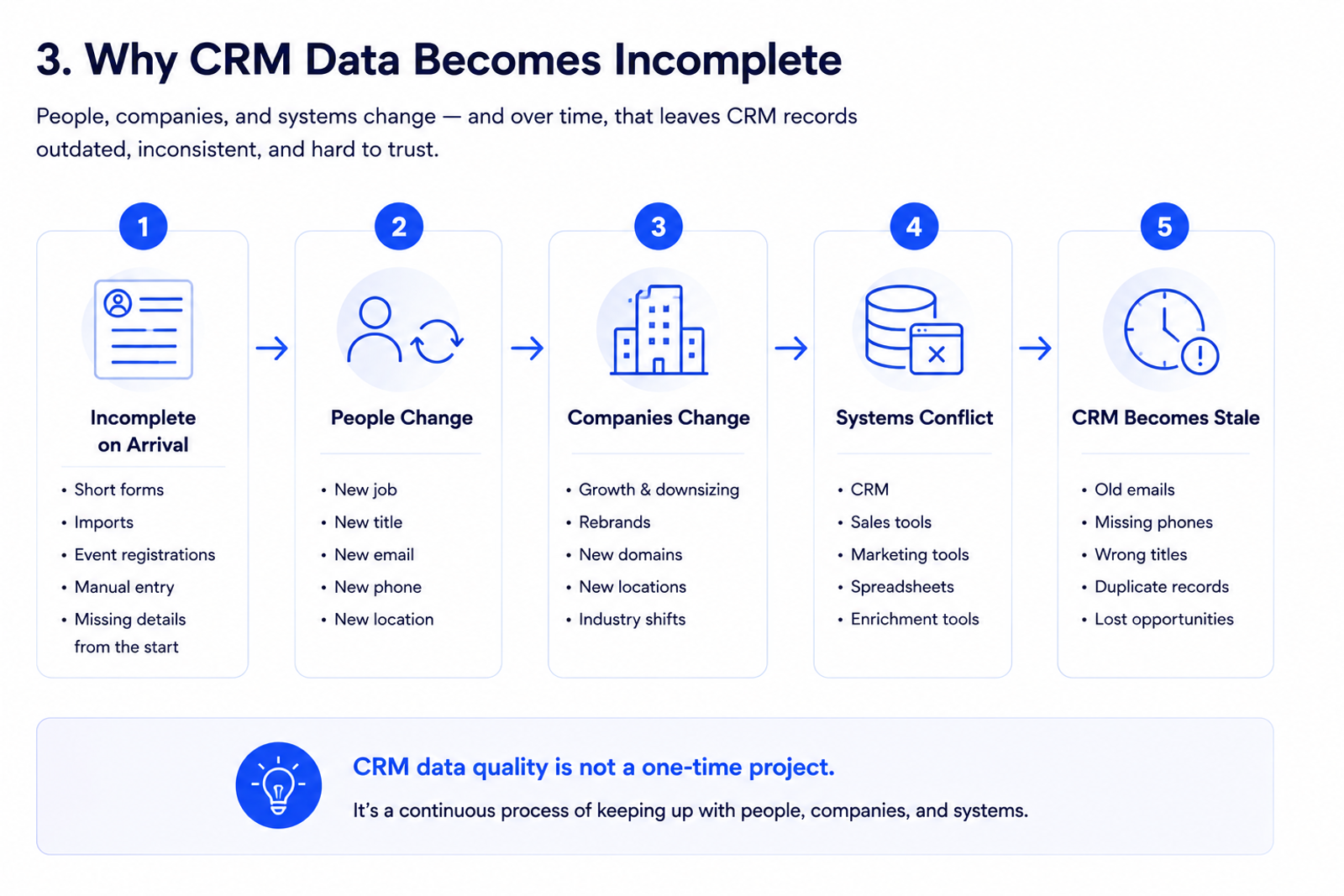
Records often enter the CRM incomplete
A new lead doesn't always arrive with ten beautifully populated fields.
Records can come from:
- Short inbound forms
- Product signups
- Webinars
- Events
- Imported prospect lists
- Referral programmes
- Sales reps manually creating contacts
Reducing form friction is often the right commercial decision, but it means you may capture only a name, email or company.
Enrichment can fill information after the lead enters your system rather than forcing the prospect to provide everything themselves.
People change jobs
A perfectly accurate contact can become stale when somebody:
- Changes employer
- Gets promoted
- Moves department
- Changes work email
- Changes phone number
- Moves location
The original record wasn't necessarily bad.
Reality changed.
Companies change too
Account-level information also moves.
A company can hire hundreds of employees, open a new office, rebrand, change domain or shift industry positioning while your CRM still reflects the state of the business when the account was originally created.
Multiple systems create conflicting data
Most B2B companies don't have one pristine database.
They have:
- A CRM
- Marketing automation software
- Sales-engagement tools
- Enrichment providers
- Spreadsheets
- Event exports
- Manually researched information
The more systems touching a contact, the more important identity matching and controlled write-back become.
Blindly dumping "newer" data on top of existing information is not CRM enrichment strategy.
It's how you wreck a CRM.
How does CRM data enrichment work?
CRM enrichment can be implemented in different ways, but the underlying process is straightforward.
1. Identify the record
The enrichment platform first needs enough information to work out which person or company it's looking for.
Common identifiers include:
- LinkedIn profile URL
- Existing email address
- Name and company
- Company domain
- Name and company domain
The stronger the identifier, the easier the match.
A LinkedIn profile pointing to one specific person provides more certainty than searching for "John Smith" with no company information.
When identity is ambiguous, the correct behaviour isn't to guess.
It's to reduce confidence, return no result, or ask for human review.
2. Query external data sources
Once the record has been identified, an enrichment provider searches its available sources for the requested information.
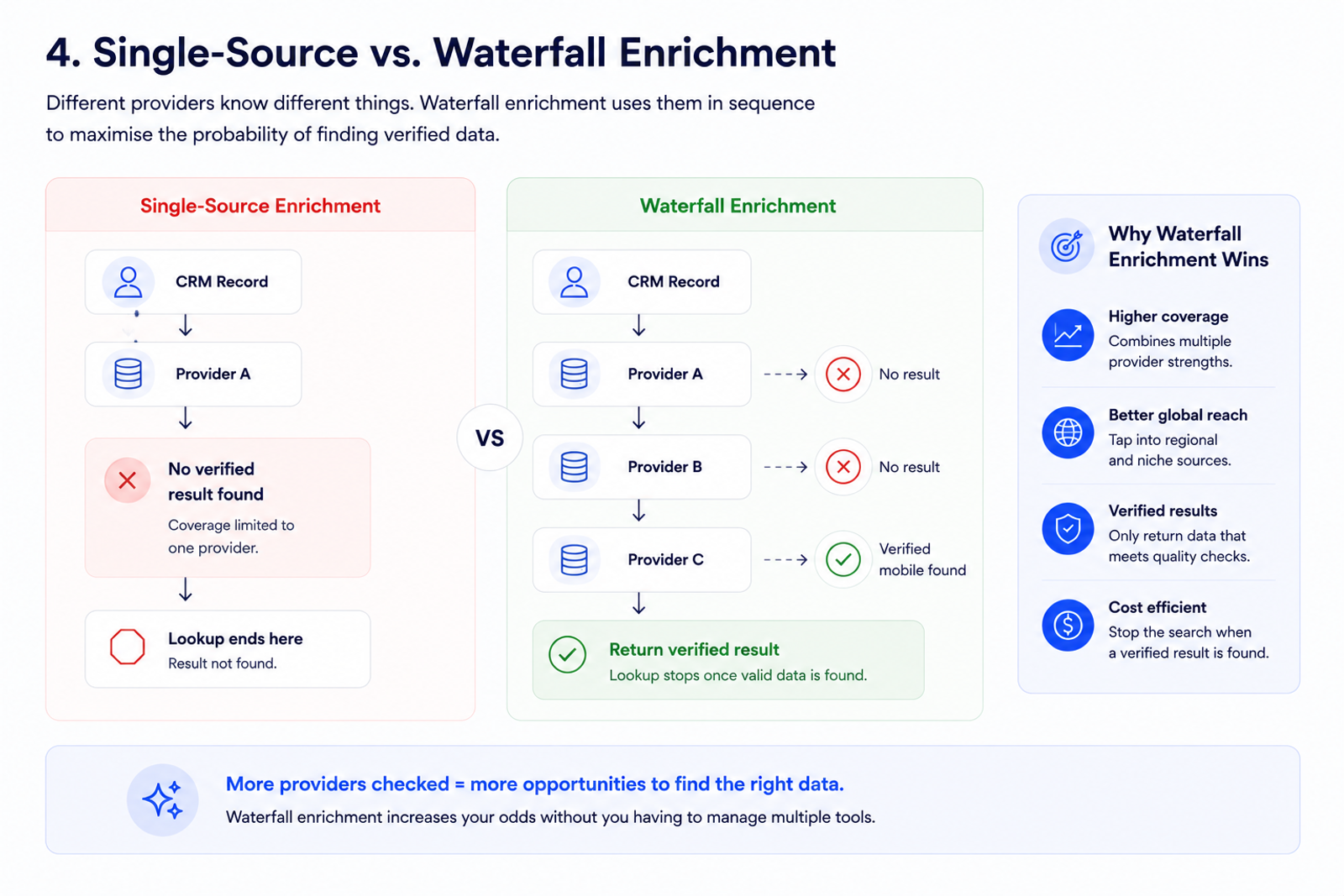
A single-source platform searches one underlying database.
If that database has the record, great.
If it doesn't, the lookup stops.
That creates an obvious coverage ceiling: no individual B2B database contains every accurate phone number and email address across every company, industry and country.
3. Run waterfall enrichment
Waterfall enrichment approaches the same problem differently.
Instead of relying on a single provider, the lookup can move through multiple providers in sequence.
For example:
Provider A → no mobile number
Provider B → no result
Provider C → mobile found
Verification → accepted
That matters because providers have different strengths.
One may have stronger North American coverage. Another may perform better in Europe. One may find a work email while another can find the mobile number the first provider missed.
FullEnrich currently aggregates more than 20 data sources into its waterfall rather than requiring users to manage each provider separately. FullEnrich reports an overall find rate above 80% for its waterfall product.
Related: How waterfall enrichment works
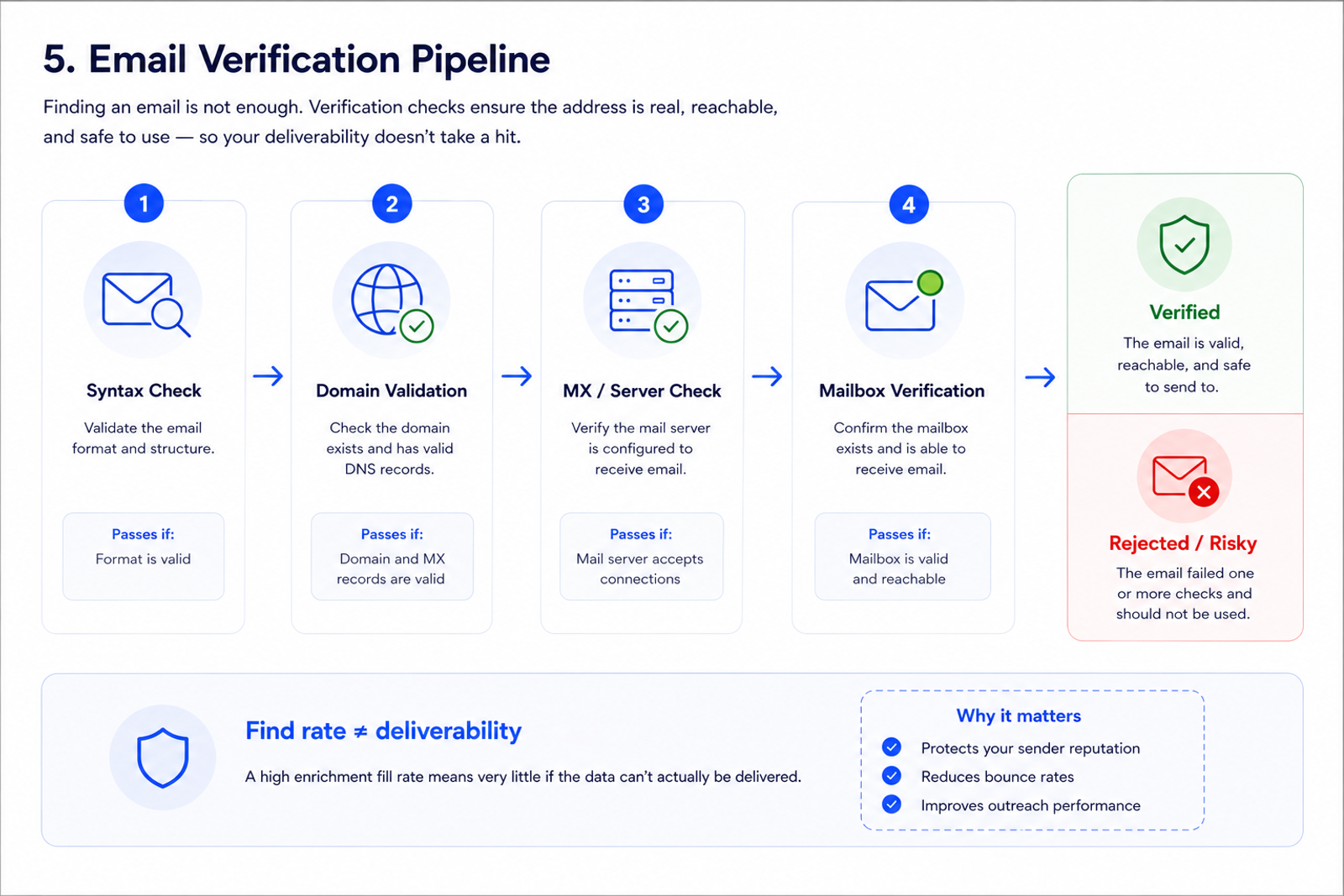
4. Verify the returned contact data
Finding a possible email is not the same as finding an email you should immediately put into an outbound sequence.
Contact information should be verified where the data type allows it.
Email verification can reduce the chance that a guessed, obsolete or invalid address enters your sending infrastructure.
Phone verification follows different mechanics, so avoid assuming every field can be validated in exactly the same way.
The principle is what matters:
Optimise for usable data, not the largest possible number of populated cells.
A false result can be worse than an empty field.
Reference: FullEnrich API documentation
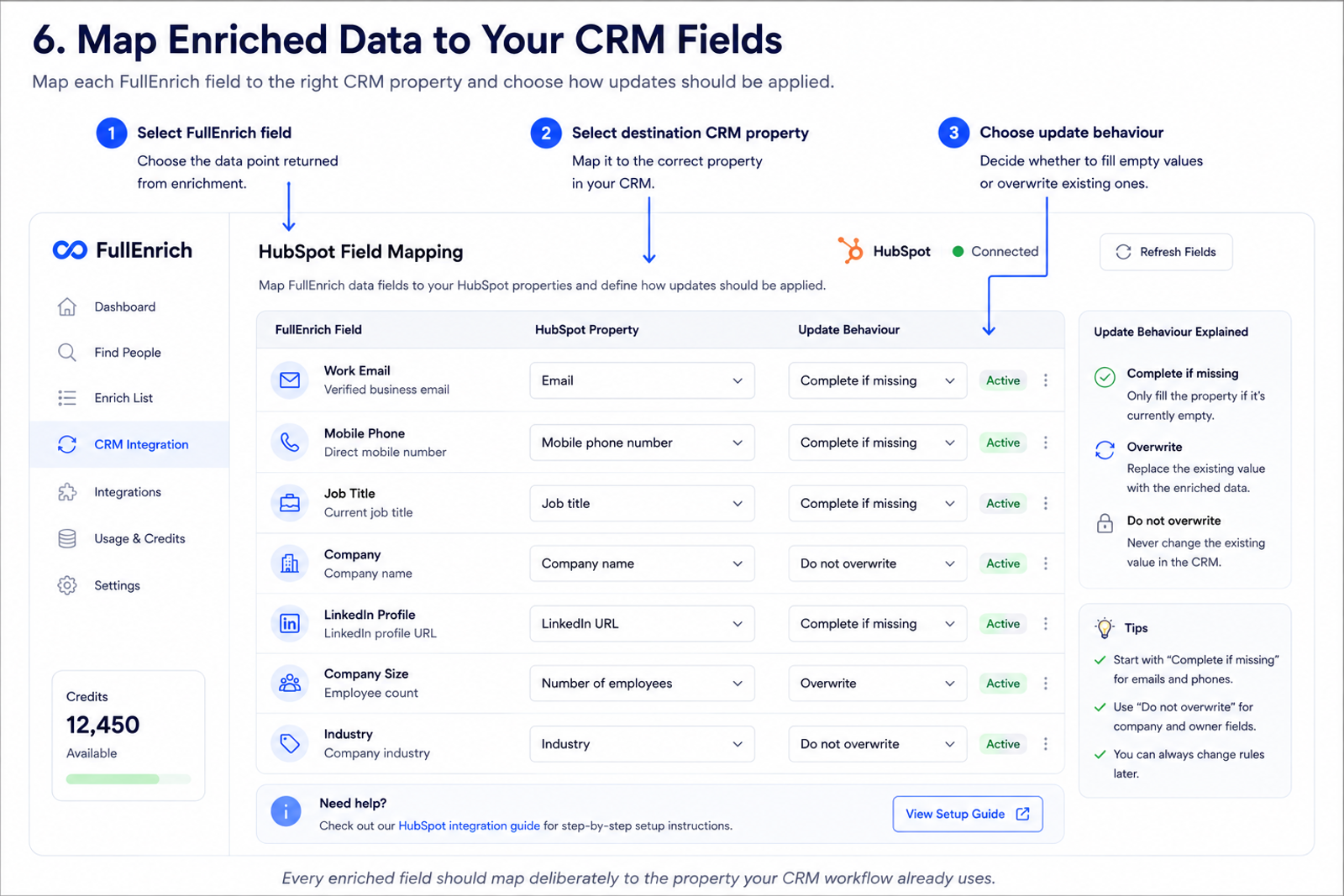
5. Map the data to your CRM fields
Once enrichment returns a result, each data point needs somewhere to go.
For example:
Enriched field | CRM property |
|---|---|
Work email | |
Mobile phone | Mobile phone number |
Job title | Job title |
LinkedIn URL | LinkedIn profile |
Company | Associated company |
Industry | Industry |
Employee count | Number of employees |
This sounds basic until companies start using custom CRM properties.
Your sales team may deliberately store personal mobiles separately from switchboard numbers. LinkedIn URLs may live in a custom field. Different business units may use their own account classification.
Good enrichment respects the CRM schema instead of flattening everything into whatever default fields happen to exist.
Implementation: FullEnrich HubSpot integration | HubSpot setup guide
6. Apply overwrite and deduplication rules
This is where a lot of enrichment projects go wrong.
Imagine a sales rep gets a direct number from a prospect during a call.
Two weeks later, your enrichment provider finds a different phone number.
Should it overwrite the number the rep entered?
Probably not.
For each CRM field, decide whether enrichment should:
- Fill the field only when it is empty
- Overwrite the current value
- Hold the new value for review
- Never modify that field automatically
FullEnrich's HubSpot integration currently supports per-field rules including Complete if missing, which leaves existing values untouched, and Overwrite, which replaces an existing value. Its documentation recommends starting conservatively with emails and phone numbers so manually sourced contact information isn't unnecessarily replaced.
Identity matching matters just as much.
FullEnrich checks multiple contact and company attributes when pushing data to HubSpot and flags uncertain matches for review rather than blindly creating another record.
Reference: FullEnrich HubSpot matching & deduplication guide
7. Write the approved data back to the CRM
Once the record is matched, the data found and your rules applied, the approved enrichment can be written back into the CRM.
That newly completed record can then feed the systems that actually generate value from it:
- Sales outreach
- Call lists
- Lead scoring
- Territory routing
- ICP qualification
- Marketing segmentation
- Personalisation
- Account research
The enrichment itself isn't the end result.
The downstream action is.
What CRM data can you enrich?
The useful fields depend on what your GTM motion actually needs.
Contact-level enrichment
Common contact fields include:
Field | Typical use |
|---|---|
Work email | Email outreach |
Mobile phone | Calling |
Job title | Qualification and messaging |
Seniority | Buyer identification |
LinkedIn URL | Identity and research |
Location | Territory routing |
Company | Account association |
Company-level enrichment
Company attributes can include:
Field | Typical use |
|---|---|
Company name | Account matching |
Domain | Identity and routing |
Industry | Segmentation |
Employee count | ICP qualification |
Location | Territory assignment |
Company description | Research |
The mistake is assuming more fields automatically mean better enrichment.
If your sales process never uses a particular property, paying to populate it probably doesn't improve anything.
Start with the fields that change a decision.
CRM data enrichment examples
The easiest way to understand enrichment is to look at actual workflows.
Example 1: Enrich an incomplete inbound lead
A prospect submits a demo form with:
- Name
- Work email
- Company
Before the record is routed, enrichment can add useful information such as:
- Job title
- Mobile number
- LinkedIn profile
- Company data
Your routing rules now have more context, and the sales rep starts with more than the information the prospect typed into the form.
Example 2: Fill missing phone numbers before outbound
Suppose you have 8,000 target contacts in HubSpot but only 4,500 have usable phone numbers.
Don't automatically enrich all 8,000 contacts for every available field.
Build a segment containing the contacts that:
- Fit your ICP
- Are actually being prospected
- Have no phone number
Run mobile enrichment against that segment.
That's a far better use of budget than enriching thousands of dormant contacts nobody intends to call.
Example 3: Enrich an event list
An event export might contain:
- First name
- Last name
- Company
- Job title
Enrichment can attempt to find:
- Work email
- Mobile phone
- LinkedIn profile
- Additional company context
The enriched records can then be matched against your CRM before new contacts are created.
Example 4: Backfill a valuable CRM segment
Historical CRM data can be commercially useful without enriching the entire archive.
For example, take:
- Closed-lost opportunities
- High-fit enterprise accounts
- Old inbound leads matching your current ICP
Then fill the fields that would make those records actionable again.
The principle is simple:
Enrich based on expected commercial value, not database size.
CRM enrichment in HubSpot and Salesforce
Enrichment becomes much more valuable when it connects directly to the system your GTM team already uses.
HubSpot CRM enrichment
FullEnrich currently supports enriching existing HubSpot contact lists and writing the results back without requiring a CSV export and re-import.
Product: HubSpot enrichment | HubSpot integration
Teams can select a HubSpot list, choose the data they want to search for and apply field-level write rules. Current supported workflows include work email, mobile phone and personal email searches alongside additional contact and company fields.
The HubSpot integration also includes matching and deduplication logic.
When an existing contact can be matched confidently, FullEnrich can update the existing record. Ambiguous matches can be flagged for human review, reducing the chance that enrichment creates a second version of the same person.
There are still differences between available and roadmap functionality, so teams building advanced automated workflows should check the latest integration documentation before designing the process around a specific trigger or schedule.
Salesforce CRM enrichment
FullEnrich currently lists its Salesforce integration as Beta.
That matters when planning implementation.
Don't assume a beta Salesforce connector has feature-for-feature parity with the current HubSpot workflow. Verify the exact functionality you need before building your RevOps process around it.
Automation and custom workflows
For workflows that go beyond native CRM integration, FullEnrich also supports automation platforms including Zapier, Make and n8n, as well as API-based implementations.
Developer resource: FullEnrich API documentation | Integrations
That lets teams build flows such as:
New lead → enrichment → CRM update → lead scoring → routing
without requiring enrichment to be a separate manual task.
Single-source vs waterfall CRM enrichment
One of the biggest architecture decisions is whether your CRM enrichment relies on one database or multiple sources.
Factor | Single-source enrichment | Waterfall enrichment |
|---|---|---|
Data sources | One primary provider | Multiple providers |
Lookup process | Search once | Search providers sequentially |
Coverage ceiling | Limited to one dataset | Combines differing coverage |
Geographic performance | Depends heavily on provider | Can benefit from regional source diversity |
Vendor management | Simple | Orchestration platform can manage complexity |
Failed lookup | Usually stops | Can continue to another source |
Cost structure | Provider dependent | Can stop once a result is found |
The waterfall model isn't magic.
Twenty poor providers don't automatically beat one exceptional database.
Its advantage comes from non-identical coverage.
If different providers know different things about the same market, querying several of them creates more opportunities to find the result.
That's the core reason FullEnrich uses a waterfall architecture across 20+ sources rather than operating as another standalone contact database.
What are the benefits of CRM data enrichment?
CRM enrichment is useful when it removes a constraint from a commercial workflow.
Better contactability
Missing emails and phone numbers are obvious blockers.
Adding usable contact information turns records your team can't reach into records they can actually work.
Less manual prospect research
A salesperson shouldn't spend half their morning jumping between Google, LinkedIn and different data tools simply to find basic contact information.
Enrichment automates a chunk of that research.
Better qualification
Job title, seniority, company size, industry and related attributes can give sales and marketing teams more context for determining whether a lead fits the ICP.
Better segmentation
Complete CRM properties make it easier to build usable lists.
Instead of:
Contacts where we vaguely think they're enterprise prospects.
You can create:
UK-based VP+ sales leaders at companies with 200–2,000 employees.
The quality of that segment still depends on the quality of your data, but missing values no longer automatically exclude good prospects.
Better routing
Location, company and role data can feed rules that send leads to the correct team, territory or owner.
More trusted CRM data
A CRM people don't trust gets bypassed.
Reps build personal spreadsheets. Marketing exports its own lists. Operations spends more time reconciling systems.
Enrichment won't fix a broken CRM strategy, but it can eliminate a major reason users stop trusting the records inside it.
7 common CRM enrichment mistakes
Buying an enrichment platform doesn't automatically improve your database.
Implementation matters.
1. Enriching every record
Your 10-year-old database does not deserve equal budget.
Prioritise:
- Active opportunities
- Current target accounts
- Active outbound lists
- Recent inbound leads
- High-fit historical records
- Everything else
Enrich where improved data can change an action.
2. Overwriting good human-entered data
Rep-sourced information may be more valuable than the latest value returned by a provider.
Use fill-if-missing rules conservatively, especially for phone numbers and other fields where your team may have first-party information.
3. Optimising only for fill rate
A provider that fills 95% of records with unreliable information is not better than one that returns fewer but more usable results.
Track:
- Coverage
- Accuracy
- Email bounce rate
- Phone connectability
- Cost per usable result
Don't reduce data quality to one percentage.
4. Creating duplicate contacts
If your workflow doesn't properly match incoming enrichment against existing CRM entities, it can create duplicates instead of improving records.
Define identity and deduplication rules before pushing at scale.
5. Ignoring geographic coverage
A provider that works well for US SaaS contacts may perform very differently for prospects in France, Germany, Brazil or Singapore.
Test the platform against your actual market.
6. Treating enrichment as data cleaning
Adding new information doesn't solve every underlying CRM problem.
If your database contains:
- Duplicate records
- Broken field definitions
- Bad lifecycle stages
- Inconsistent account structures
enrichment won't magically repair them.
7. Collecting data nobody uses
Before enriching a field, ask:
What workflow changes when this field is populated?
If nobody can answer, don't pay for it.
How to build a CRM data enrichment strategy?
A good enrichment strategy starts with the commercial workflow, not with the provider.
Step 1: Define the outcome
Bad objective:
Improve our CRM data.
Better objective:
Find mobile numbers for enterprise accounts our SDR team is calling this quarter.
Or:
Fill job title and company information on inbound leads before they enter our routing workflow.
Specific objectives make enrichment measurable.
Step 2: Audit field completeness
Measure how complete the relevant segment currently is.
For example:
- Work email completeness
- Mobile coverage
- Job title completeness
- LinkedIn coverage
- Company association
- Industry completeness
Don't measure the whole database unless the whole database matters.
Step 3: Prioritise records
Segment by business value.
High-fit accounts being worked this month should normally outrank cold records imported four years ago.
Step 4: Choose the fields
Decide which information the workflow actually requires.
If you're solving call coverage, start with phones.
If you're solving lead routing, company, seniority or geographic fields may matter more.
Step 5: Set field rules
For every field, decide:
- Fill only if missing
- Overwrite existing data
- Review conflicts manually
- Never update automatically
Do this before the first large enrichment run.
Step 6: Test the provider on your own data
Vendor averages are useful for orientation.
Your records are the real test.
Take a representative sample and measure:
- Successful match rate
- Verified email rate
- Mobile find rate
- Accuracy
- Regional performance
- Cost per usable record
If you already use another provider, include records that provider failed to enrich.
Those are particularly useful for measuring whether a waterfall actually creates incremental coverage.
Step 7: Scale what works
Once the test demonstrates useful economics, expand.
Don't commit your entire CRM to an enrichment architecture before you've established that it improves the exact segment your sales team cares about.
How to measure CRM enrichment ROI?
The cleanest enrichment metrics are operational.
CRM completeness rate
Records containing required fields ÷ total target records × 100
If 700 of 1,000 target accounts have all required fields, completeness is 70%.
Successful enrichment rate
Records successfully enriched ÷ records submitted × 100
Measure this by field as well as overall.
A platform may have strong work-email coverage and weaker mobile coverage.
Cost per successful enrichment
Enrichment spend ÷ successful usable results
This is more informative than simply comparing subscription prices.
A cheaper database isn't cheaper if it fails most of the records your team needs.
Contactability improvement
Compare before and after enrichment:
- Percentage with valid email
- Percentage with mobile phone
- Email bounce rate
- Call connection rate
Research time saved
If reps are manually researching every prospect, track the amount of research required before and after enrichment.
Pipeline impact
Where volume is sufficient, compare downstream metrics such as:
- Meetings booked
- Qualification rate
- Opportunities created
- Pipeline generated
Be careful with attribution.
Enrichment may contribute to better results without being the only thing that changed.
How to choose a CRM data enrichment provider
Don't choose an enrichment provider based on the biggest database number on a pricing page.
Run your own sample.
Compare: CRM data enrichment tools
Evaluate:
- Match rate on your records
- Accuracy of returned data
- Work email coverage
- Mobile phone coverage
- Geographic coverage
- Verification process
- Underlying data-source diversity
- CRM integration depth
- Field mapping
- Deduplication and conflict handling
- API and automation support
- Cost per usable result
- Privacy and security requirements
The real question is not:
Which enrichment company has the most data?
It is:
Which enrichment workflow gives us the most usable data for the records we actually need to work?
How FullEnrich handles CRM data enrichment ?
FullEnrich takes a waterfall approach to contact enrichment.
Instead of forcing teams to subscribe to several separate data vendors and manually search each one, FullEnrich aggregates more than 20 sources behind one enrichment workflow. A lookup can move through multiple providers until a result is found.
Verified emails and mobile numbers
The primary use case is straightforward: find contact information that your existing CRM or data provider is missing.
FullEnrich currently reports an overall waterfall find rate above 80% and less than 1% bounce rate for verified emails. As with any vendor benchmark, your own representative dataset is the number that ultimately matters.
HubSpot CRM enrichment
FullEnrich can connect with HubSpot, map contact and company properties and write enriched results back into existing CRM records.
Its current HubSpot workflow supports field-level controls including filling empty values or deliberately overwriting selected properties.
Deduplication and review
Before pushing contacts into HubSpot, FullEnrich checks multiple identifiers including names, company information, LinkedIn data, phone numbers and emails.
When matching is uncertain, the record can be flagged for review rather than automatically treated as a new contact.
CRM and automation workflows
Beyond HubSpot, FullEnrich currently lists Salesforce as a beta integration and supports automation through Zapier, Make and n8n.
The practical advantage is that enrichment can sit inside the workflow rather than becoming another database your sales team needs to remember to check.
The simplest way to evaluate it is not to take our word for it.
Take a segment of CRM records your existing process couldn't complete and run those contacts through the waterfall.
FullEnrich currently offers 50 free credits with no credit card required, giving teams a low-friction way to test their own records rather than relying only on vendor benchmarks.
Turn your incomplete CRM records into usable sales data
A CRM doesn't need every possible field populated.
It needs the right information on the records your team is actually going to use.
Start with the contacts and accounts closest to revenue. Decide which missing fields prevent your team from taking action. Protect existing first-party information. Then test enrichment against a real sample and measure the result.
If a single data source leaves too many gaps, waterfall enrichment gives each record additional opportunities to find a match.
Test FullEnrich on the CRM records your current provider couldn't find.
Test FullEnrich on your own CRM data → Start with 50 free credits
Frequently asked questions
What is CRM data enrichment?
CRM data enrichment is the process of adding missing information to existing CRM contact and account records using external data sources. It can add information such as verified work emails, mobile phone numbers, job titles, LinkedIn profiles and company attributes, then map the results back into CRM properties.
What is the difference between CRM enrichment and data enrichment?
Data enrichment is the broader process of adding information to an existing dataset. CRM enrichment applies that process specifically to contacts and accounts in a CRM and includes implementation concerns such as field mapping, deduplication, overwrite rules and CRM write-back.
What information can be enriched in a CRM?
Common fields include work emails, mobile phone numbers, job titles, LinkedIn profiles, company names, domains, industries, employee counts and locations. The exact fields available depend on the enrichment provider.
What is waterfall CRM enrichment?
Waterfall CRM enrichment searches multiple data providers sequentially instead of relying on a single database. If one provider cannot find the requested information, the lookup can continue to another source until a usable result is found or the available providers are exhausted.
How often should CRM data be enriched?
There is no universal refresh interval. Frequency should depend on how quickly the relevant field changes, how valuable the record is, the length of your sales cycle and the cost of enrichment. Active pipeline and high-value target accounts generally deserve more attention than dormant historical records.
Can CRM enrichment create duplicate contacts?
It can if matching logic is poorly configured. A good enrichment workflow should compare the incoming record against existing contacts using identifiers such as email, LinkedIn profile, name, company and phone number before deciding whether to update an existing record or create a new one.
External reference: HubSpot record deduplication guidance
Can enrichment overwrite existing CRM data?
Yes, depending on how the integration is configured. Many workflows allow teams to fill empty fields without changing existing information or deliberately overwrite selected values. FullEnrich's HubSpot integration supports both approaches on a field-by-field basis.
Is CRM data enrichment the same as CRM cleaning?
No. Data cleaning fixes or removes incorrect information, such as duplicates and badly formatted records. Enrichment adds missing information. A CRM can be heavily enriched and still badly organised if the underlying database hasn't been cleaned.
Is CRM data enrichment GDPR compliant?
CRM enrichment is not automatically compliant or non-compliant by definition. Compliance depends on what personal data is processed, the purpose and lawful basis for processing it, the jurisdictions involved, the provider's practices and how your organisation ultimately uses the data. Privacy and legal requirements should be assessed for your specific workflow.
External reference: ICO direct marketing guidance
Can FullEnrich enrich HubSpot contacts?
Yes. FullEnrich currently supports enriching existing HubSpot lists and mapping returned information back into HubSpot properties. Its integration includes field-level update rules and deduplication logic.
Turn your incomplete CRM records into usable sales data
A CRM doesn't need every possible field populated.
It needs the right information on the records your team is actually going to use.
Start with the contacts and accounts closest to revenue. Decide which missing fields prevent your team from taking action. Protect existing first-party information. Then test enrichment against a real sample and measure the result.
If a single data source leaves too many gaps, waterfall enrichment gives each record additional opportunities to find a match.
Test FullEnrich on the CRM records your current provider couldn't find.
Test FullEnrich on your own CRM data → Start with 50 free credits