First-party data enrichment means adding missing details to records you collected yourself. You start with what people gave you on your own forms, site or CRM. An outside source fills in the rest, such as a job title, a company size or contact details.
For B2B sales teams, those records are CRM contacts and form fills. The missing details are usually a title, a work email or a mobile number.
I co-founded FullEnrich and run product there. We run each contact through a waterfall of 20+ data providers, so we see daily which fields come back and which don't.
Key Takeaways
- First-party data enrichment adds missing details (job title, company size, work email, mobile) to records you collected yourself: CRM contacts, signups, demo requests and event lists.
- The record stays yours. The added fields come from outside providers, so check how they source data and which legal basis you rely on.
- Records go stale fast. ZeroBounce found that at least 23% of the email addresses it checked in 2025 were invalid or risky.
- Enrich for an action: who gets routed where, who gets called first, who can be reached at all. Extra fields nobody uses don't help.
- Start small. Enrich one sample, check how many records came back filled, then automate on form submit.
What is first-party data enrichment?
First-party data enrichment is the process of completing records you already own with details from outside sources. It's data enrichment applied to your own data: the contacts, customers and leads who came to you directly.
The term gets used in two ways. Some teams mean joining their own sources, like linking CRM records to product usage. Others mean adding outside data to those records. This guide covers the second meaning.
A signup with only an email is a first-party record. Once a provider adds a job title and a company, it's an enriched first-party record. The record stays yours, but the added fields come from a provider, which is why sourcing and consent matter.
What counts as first-party data?
First-party data is anything you collect directly from customers, prospects and visitors on your own channels. Google's ads policy defines it as information people share while they interact with your products and services, on your own sites, apps or stores.
What are examples of first-party data?
Examples of first-party data include website and app behavior, purchases, survey answers and email engagement:
- Website and app behavior: pages viewed, features used, trials started.
- Purchases: orders, plans, renewals and invoices.
- Surveys and feedback: NPS replies, onboarding answers, support tickets.
- Email engagement: opens, clicks and replies to emails you sent.
What a sales team already holds
A sales team usually sits on more first-party data than it thinks, and much of it lives in the CRM.
- CRM contacts: name, email and company, sometimes entered years ago.
- Signup and trial forms: often just an email.
- Demo and pricing requests: name, email, sometimes a company size.
- Webinar and event lists: name, email, now and then a title.
- Closed-lost deals: contacts who may have moved on since.
- Email replies and call notes: what people told you in their own words.
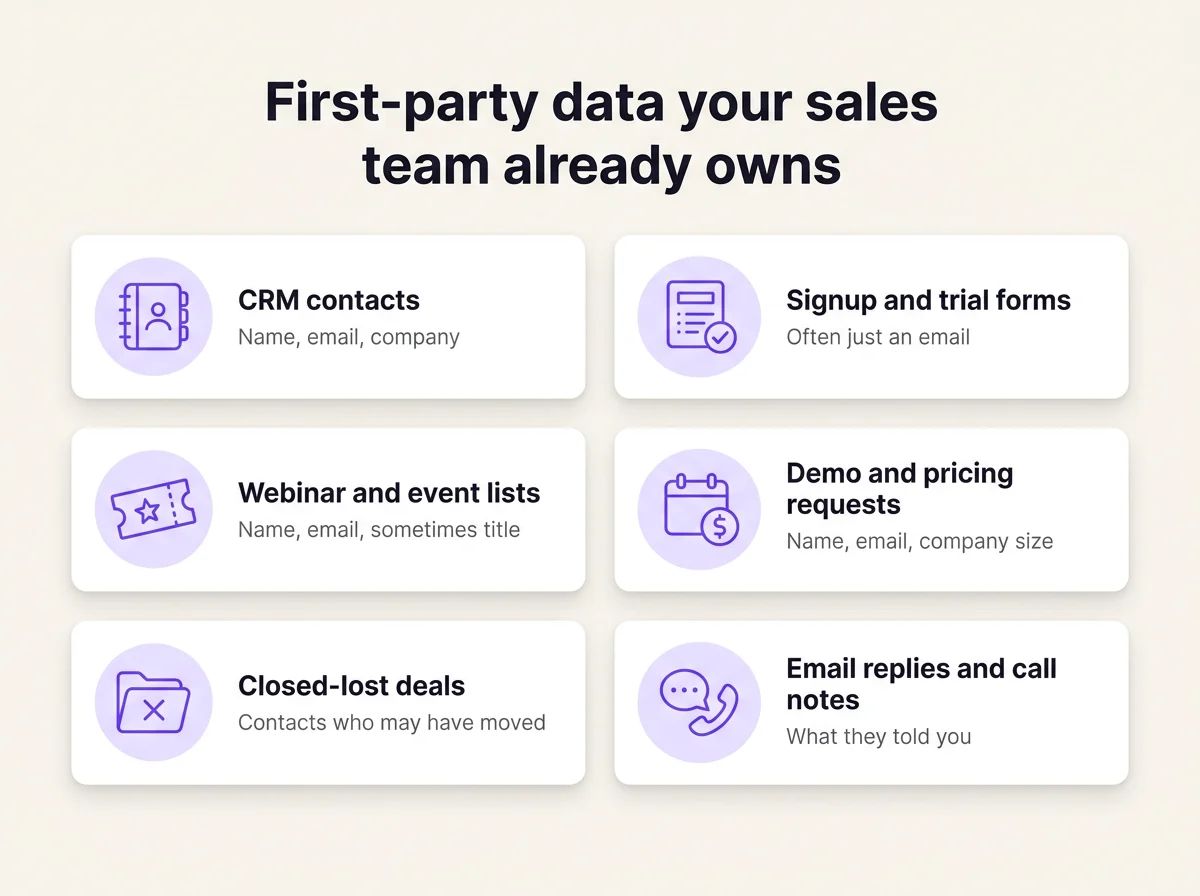
Six places a sales team already collects first-party data, each with gaps.
Each of these sources is yours. Each one is also missing something, and that gap is where enrichment starts.
How is first-party data different from second-, third- and zero-party data?
The difference is who collected the data, and from whom. First-party data is what you collect yourself on your own channels. Zero-party data is what a person tells you on purpose, like a stated preference. Second-party data is another company's first-party data, shared with you directly. Third-party data comes from outside sources you don't control, which is the core of first-party vs third-party data.
Salesforce credits Forrester with the term zero-party data. It's what a customer "intentionally and proactively shares with a brand," like preferences and purchase plans. Third-party data, by contrast, is data bought or obtained from sources that aren't yours.
Type | Who collects it | Example | Typical use |
|---|---|---|---|
Zero-party | You, because the person chose to tell you | Preferences picked in a signup survey | Personalizing content and offers |
First-party | You, on your own channels | A demo request or a CRM contact | Sales follow-up, scoring, retention |
Second-party | A partner, who shares it with you | A co-hosted webinar's attendee list (illustrative) | Joint campaigns with that partner |
Third-party | Outside providers you don't control | Job titles or company size from a data vendor | Filling gaps in your own records |
Enrichment usually means layering third-party fields onto first-party records.
What does enrichment add to your records?
Enrichment fills in the details you never asked for and updates the ones that went out of date: mostly facts about the company, the person's role, and how to reach them.
- Firmographic: company name, size, industry and revenue.
- Geographic: country, region and time zone.
- Contact: work email and mobile number.
- Role: job title, seniority and department.
- Technographic: the software a company uses.
- Behavioral and intent: signs that an account is researching a topic.
- Demographic: age, income or household details.
For a sales team, one family decides whether a record is usable at all. A contact with a perfect title and no working email or phone is a nice profile nobody can reach. That's why lead enrichment for sales puts the email and the mobile first. Company size helps you score a lead. A working number lets you talk to them.
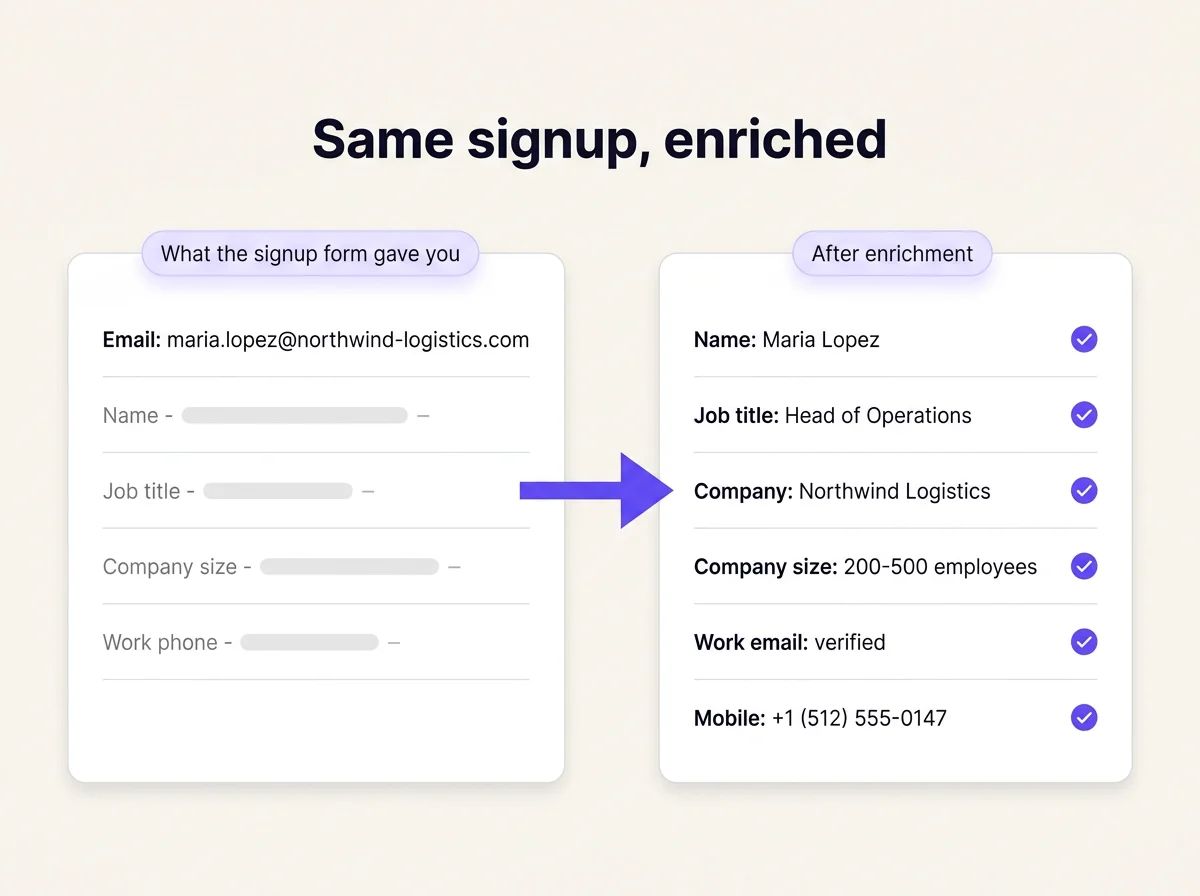
An illustrative record. Maria Lopez and Northwind Logistics are fictional, but the gap between the two cards is typical.
Why enrich first-party data?
You enrich first-party data because it's incomplete on the day you collect it and goes stale after that. The payoff shows up in six places.
- Shorter forms: ask for an email and let enrichment fill in the rest. HubSpot's look at over 40,000 landing pages found extra fields cut conversion only slightly. The bigger gain is getting the details you never asked for.
- Faster routing: a record with company size and region can go to the right rep on arrival. Nobody has to research it first.
- Better scoring: title and seniority tell you who deserves a call first.
- Personalization: industry and role let you write to someone's actual job.
- Fresher records: re-enriching catches contacts whose email or role changed since they signed up.
- No cookie dependency: the contact data in your own forms and CRM doesn't depend on third-party cookies, and Chrome kept third-party cookie choice in April 2025 anyway.
Stale records are the cost teams underestimate. ZeroBounce found that at least 23% of the email addresses it checked in 2025 were invalid or risky. That's from more than 11 billion addresses, across business sizes and industries. The yearly figure has moved between 22% and 28% since 2021.
CRM users report it too. Three in four CRM users and administrators (76%) told Validity's 2025 survey that less than half of their organization's CRM data is accurate and complete. Validity, which sells data-quality software, surveyed 602 people for it. One commenter on Reddit puts it this way: reps skip a CRM when its data is outdated and they have to research accounts by hand anyway.
How do you enrich first-party data?
You enrich first-party data in one of three ways, and many teams combine them.
Three ways to do it
- Ask your customers: progressive forms and onboarding questions collect more over time. It's accurate and consented, but slow, and people skip questions.
- Research by hand: a rep looks up each contact on LinkedIn and company sites. It's precise for a few dozen records and breaks down at a few hundred.
- Use an enrichment tool: a provider fills fields in bulk or in real time. It scales, and accuracy depends on the provider. Tools built on waterfall enrichment check several sources in turn, which raises coverage.
Five steps for a first run
- List your sources. Start from the sales list above: CRM contacts, signups, demo requests, events and closed-lost deals. Pick one to begin with.
- Clean and dedupe first. Merge duplicates and drop obvious junk before you enrich. Otherwise you pay twice for the same person under two spellings.
- Pick the two or three fields that change an action. A good starting set for a sales team is title, company size and a working email or mobile. Skip this choice and you end up like one B2B software team on Reddit that went "from having 5 fields nobody looks at to having 20 fields nobody looks at."
- Test on a sample. Run about 500 records and check the fill rate, meaning the share of records that came back with the fields you wanted. Spot-check a handful by hand.
- Automate. Enrich new records on form submit, so new leads arrive filled in. Fill empty fields only, so enrichment never overwrites what a rep typed in. Then refresh older records on a schedule, starting with active pipeline. Our guide to CRM data enrichment covers that refresh in more detail.
What does first-party data enrichment look like in FullEnrich?
In FullEnrich, you send the records you already own, and we run each contact through 20+ data providers in a waterfall. We return data that passes our verification checks. We throw away about 30% of what providers send back before it ever reaches you.
There are two common starting points.
Enrich every signup as it arrives
Most signup forms ask for an email and little else. Signup enrichment appends verified company data, job titles and phone numbers to each form submission in real time. An email-only signup becomes a record with a name, title, company and phone when we find them, ready to route.
Some people sign up with a personal Gmail or Outlook address. For those, reverse email lookup starts from the personal email and looks for the person and their company.
Signup enrichment fills in each form submission as it arrives.
Refresh the contacts already in your CRM
For older records, the route today is simple. Export a list from your CRM as a CSV, enrich it in FullEnrich, then push it back. Our HubSpot integration pushes enriched contacts, with verified emails and mobiles, into HubSpot and checks for duplicates first. Automatic enrichment of existing HubSpot contacts is coming soon.
You can also start from an AI assistant. With the FullEnrich MCP, you ask Claude, ChatGPT, Gemini or Microsoft Copilot to enrich a list. The FullEnrich CLI lets your coding agent search, enrich and export contacts the same way.
The HubSpot integration pushes enriched contacts back with built-in duplicate checks.
You use credits only when data is found. A work email costs 1 credit, a mobile 10 credits and a reverse email lookup 1 credit. If nothing is found, you pay nothing. Every email we find costs 1 credit, including addresses on domains that accept all mail. You get 50 free credits with no card, and paid plans start at $29 a month.
Is enriching first-party data compliant with GDPR and CCPA?
Enriching first-party data can be compliant, as long as you have a lawful basis for using it and honor opt-outs. This isn't legal advice, so check your own setup with counsel.
B2B data isn't exempt from privacy law. The UK regulator says UK GDPR still applies to B2B marketing when you process personal data, like the name of the person who represents a business. It names consent and legitimate interests as the two most relevant lawful bases.
Legitimate interests comes with a three-part test. You need a legitimate purpose. The data has to be necessary for it. And the person's rights can't outweigh your interest.
California used to exempt personal information from business-to-business transactions. Under the CCPA, that exemption expired on December 31, 2022.
In practice, write down the lawful basis for each source, ask every provider where its data comes from, and make sure opt-outs reach every system the record touches.
Which tools enrich first-party data?
FullEnrich, Clay, HubSpot data enrichment and ZoomInfo are four common ways to enrich first-party B2B records. They differ in what they're best at: verified emails and mobiles, custom workflows, company details inside HubSpot, or firmographics and intent.
FullEnrich
FullEnrich finds verified work emails and mobile numbers for contacts you already own, using a waterfall of 20+ providers. It fits sales and revenue operations (RevOps) teams who need to reach the people already sitting in their CRM and signup forms.
Clay
Clay is a spreadsheet-style tool for building your own enrichment workflows. Clay connects to 150+ data providers, and you can chain them into waterfalls. If an enrichment returns no result, you aren't charged. The free plan includes 100 data credits a month, without phone enrichment. CRM integrations come with the Growth and Enterprise plans. It fits builders who want custom workflows.
HubSpot data enrichment
HubSpot data enrichment is built into the Starter, Professional and Enterprise editions of HubSpot's hubs. It fills company properties like industry and employee count. On contacts, it adds fields like job title, seniority, location and LinkedIn URL. It doesn't add a contact email or mobile phone, and it doesn't use HubSpot Credits. It fits teams that live in HubSpot and mostly need company context.
ZoomInfo
ZoomInfo is a large B2B database with company data and intent signals. It adds firmographics, contacts and buying signals to your records, and can sync them to your CRM. There's a free ZoomInfo Lite plan, and paid pricing isn't public. It fits teams that want company context and intent data from one vendor.
If you work in ad tech, customer data platforms (CDPs) and identity platforms unify first-party data and match audiences, which is a separate job from filling contact fields. For a wider comparison, see our roundup of data enrichment tools.
Frequently asked questions
Is enriched first-party data still first-party?
Yes. You collected the record, so it stays first-party and the relationship is yours. Whether your original consent or legal basis covers enrichment depends on what you told people at collection. The fields a provider adds are third-party data sitting on that record. That's why you should know where they come from, and keep honoring opt-outs on the whole record.
What's the difference between data cleansing and data enrichment?
Cleansing fixes what's wrong, and enrichment adds what's missing. Cleansing removes duplicates, corrects typos and drops invalid emails. Enrichment fills empty fields like title, company size or mobile. Run cleansing first, so you don't pay to enrich duplicates or junk.
How often should you refresh enriched records?
There's no universal interval. Refresh as often as the field changes and the record matters, so active pipeline and target accounts come first. Email addresses go bad fast (see the decay chart above), so a once-a-year refresh can leave a lot of bad emails in place. Enrich new signups on arrival, and re-enrich dormant records right before you contact them again.
Can you enrich a signup that used a personal email?
Yes, through reverse email lookup. It starts from the personal email and looks for the person's name, title and company. Results depend on how much of a professional footprint the person has online. A Gmail signup can still be a senior buyer testing a tool outside work.
What are examples of data enrichment?
An email-only signup gains a name, job title, company and phone. An old CRM contact gains a new company and work email after a job change. An account list gains company size and industry.
Where should you start with first-party data enrichment?
Start with the records you already own, and enrich them for an action: who gets routed, who gets called first, who can be reached. A short record your team acts on beats a long one nobody reads.
Keep the first run small. Take this week's signups or one CRM list, clean it, enrich it and check the fill rate. If the records come back reachable, automate the next ones on form submit.
You can try it with 50 free credits, no card needed.