
Quick summary:
The best place to buy an email list depends on what you need: FullEnrich for B2B cold email lists built from your own targets, BookYourData for pay-as-you-go B2B files with a bounce guarantee, and LeadsPlease for one-off consumer or local mailing lists.
A B2B email list is a file or export of business contacts: names, job titles, companies and work emails, bought from a list seller or pulled from a database. Most offers sell a file that starts going stale the day you download it, and the people on it never agreed to hear from you.
The sales page rarely says what happens when those emails bounce, hit a spam trap or opt out. That's where the real cost sits.
The 12 places below fall into three groups: list sellers, B2B databases and one tool that builds lists from your targets. Our top three picks:
Seller | Best for |
|---|---|
FullEnrich | B2B lists built from your target accounts, paying only for emails found |
BookYourData | Pay-as-you-go B2B lists with a published deliverability guarantee |
LeadsPlease | One-off US consumer and business files, including direct mail |
Disclosure: we build FullEnrich. We put it first, and its entry carries real cons like the other eleven.
Why is the price per contact the wrong way to compare email lists?
Price per contact is the wrong comparison because two lists at the same price can leave you with very different numbers of emails you can actually send to. Most rankings compare cents per record anyway.
Four things decide what a list really costs you: what you get (a file you keep, database access or a list built from your targets), when each record was last checked, what happens when emails bounce, and how many emails are left once the bad ones are gone.
Data doesn't sit still. ZeroBounce reports that email databases degrade by at least 28% a year. That's an email verification vendor's own figure, based on the data it processed in 2024, and it says B2B data decays even faster because people change jobs.
Under all four sits one question. When an address bounces, turns out to be a spam trap or opts out, who pays, and what protects your domain? A bought list is someone else's data, checked once. Permission doesn't come with it. So the seller's remedy and your own checks matter more than the price per contact.
Why trust us?
Because we buy contact data from 20+ B2B data providers every day, and 31.53% of it fails our verification. FullEnrich is a contact enrichment platform, and our waterfall draws on those outside providers in real time.
That failure share sits on our homepage. In 2024, it was 13%. None of the failed data reaches our customers or their invoices.
12 Best places to buy email lists at a glance:
The 12 best places to buy email lists in 2026 are FullEnrich, BookYourData, LeadsPlease, Datazapp, Lake B2B, Salesgenie, ZoomInfo, Apollo, Cognism, Lusha, Seamless and Kaspr.
Seller | What you get | Bounce remedy | Starting price |
|---|---|---|---|
FullEnrich | A B2B list built from your targets or its search | Not billed | 50 free credits; Pro $29/month |
BookYourData | Credits you turn into B2B contact exports | Credit back | $99 for 250 credits |
LeadsPlease | A one-off consumer or business file | Money back | $299.95 per 1,000 consumer emails |
Datazapp | Pay-per-record lists and appends | Replacement | $0.06 per business email, $125 minimum |
Lake B2B | A custom B2B data project | Not stated | Quote only; free 25-contact sample |
Salesgenie | A US business and consumer database subscription | Email excluded | $99/month, 12-month term |
ZoomInfo | Enterprise database, one credit per export | Not stated | Quote only; free ZoomInfo Lite plan |
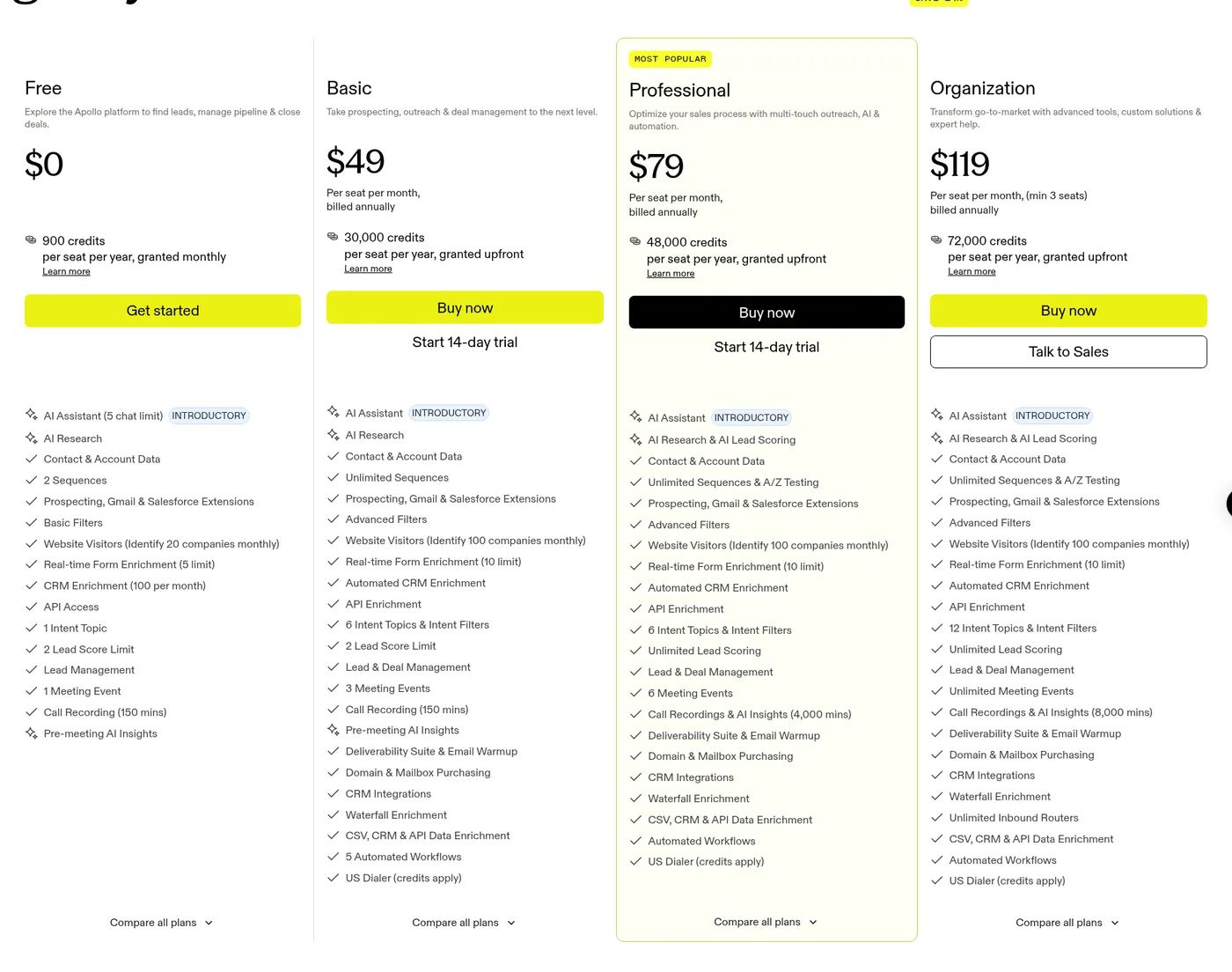
Apollo | Database credits; you keep exported contacts | Not stated | Free plan; $49/seat/month yearly |
Cognism | Database seats; one credit per revealed contact | Not stated | Quote only |
Lusha | Credits to reveal contacts | None | Free plan; $37.45/month yearly |
Seamless | Real-time search with credits | Credit back | Quote only (demo first) |
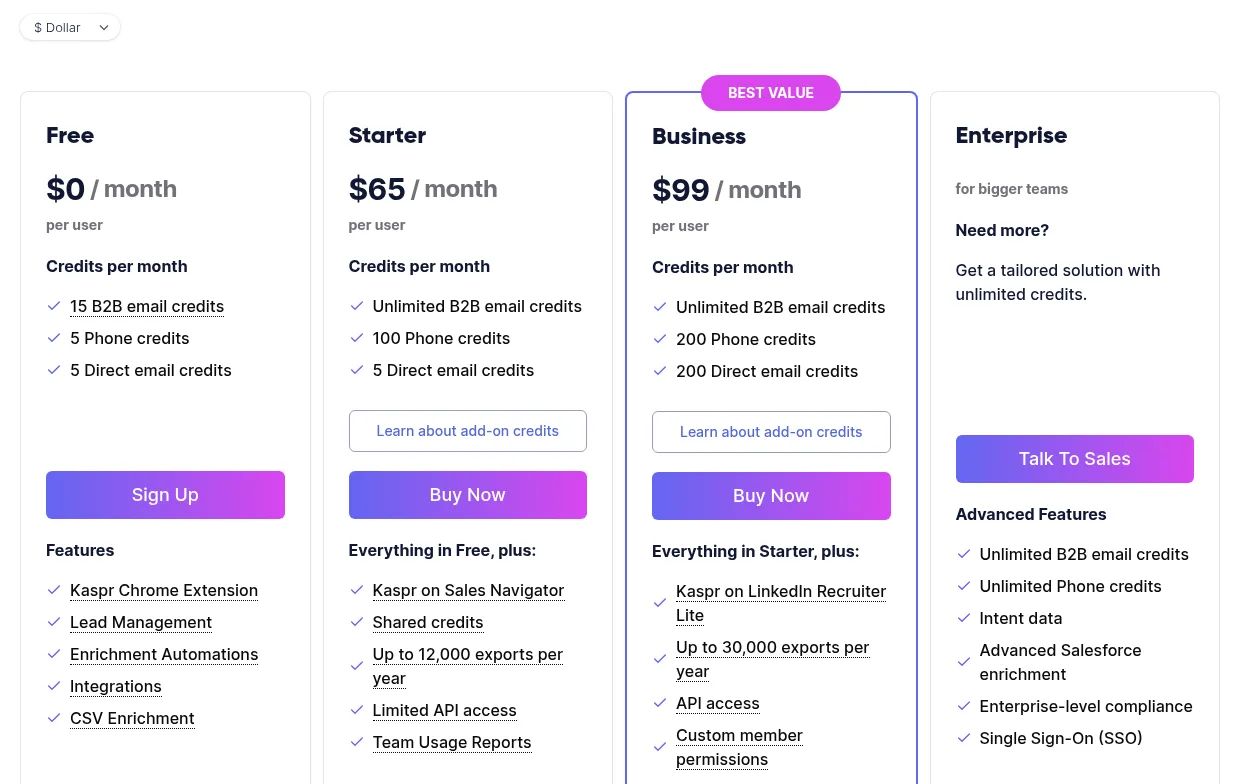
Kaspr | LinkedIn extension with per-user credits | None | Free plan; $49/user/month yearly |
1. FullEnrich
FullEnrich G2 rating: 4.8/5 (245 reviews)
Best for: B2B teams that know their ICP and send cold email from their own domain; it builds lists to order and sells no ready-made files.
FullEnrich is a B2B contact enrichment and search platform. Instead of a ready-made file, you get a list of the exact people you chose. Upload your target accounts or contacts, or filter FullEnrich's people search across 800M people and 50M companies, with 15+ filters each. If your ICP is still fuzzy, a template can build your ICP from your best customers on free search first.
Each request runs through waterfall enrichment, meaning it asks one provider after another until one returns an email that passes verification. Three independent engines must agree on each email. Catch-all domains get a resolution attempt, and every email comes with a bounce probability.
Who pays for a dead address here? Mostly FullEnrich. Data that fails verification is thrown out before it reaches you, and a lookup that finds nothing is free. Catch-alls are the exception: one it finds costs a credit, so the risk on that address is shared.
A CEO reviewing it on G2 put the billing this way: "The pay-for-results model keeps costs predictable, since I pay for a hit and not for every lookup."
Key features
- People and company search, plus email enrichment of a CSV you already have
- Work emails at 1 credit and mobile numbers at 10, with landlines never charged
- Export to CSV, push to HubSpot, or pull data through the API and MCP server
- Unlimited users on every plan
Pros
- Leftover credits carry over: 3 months on a monthly plan, 12 on a yearly one
Cons
- It doesn't sell pre-built list files, and it's built for B2B contacts, not household mailing lists
- Catch-all emails it finds use a credit, so check each email's status before you send
- You define the targets yourself, so it suits a known target list better than a "send to everyone" plan
Pricing: Paid plans begin at $29 a month for 500 credits on monthly billing, or $26 a month on yearly billing (October 2026). The full credit ladder is on the FullEnrich pricing page.
Build the list from your ICP: 50 free credits, no card. Start a free FullEnrich account.
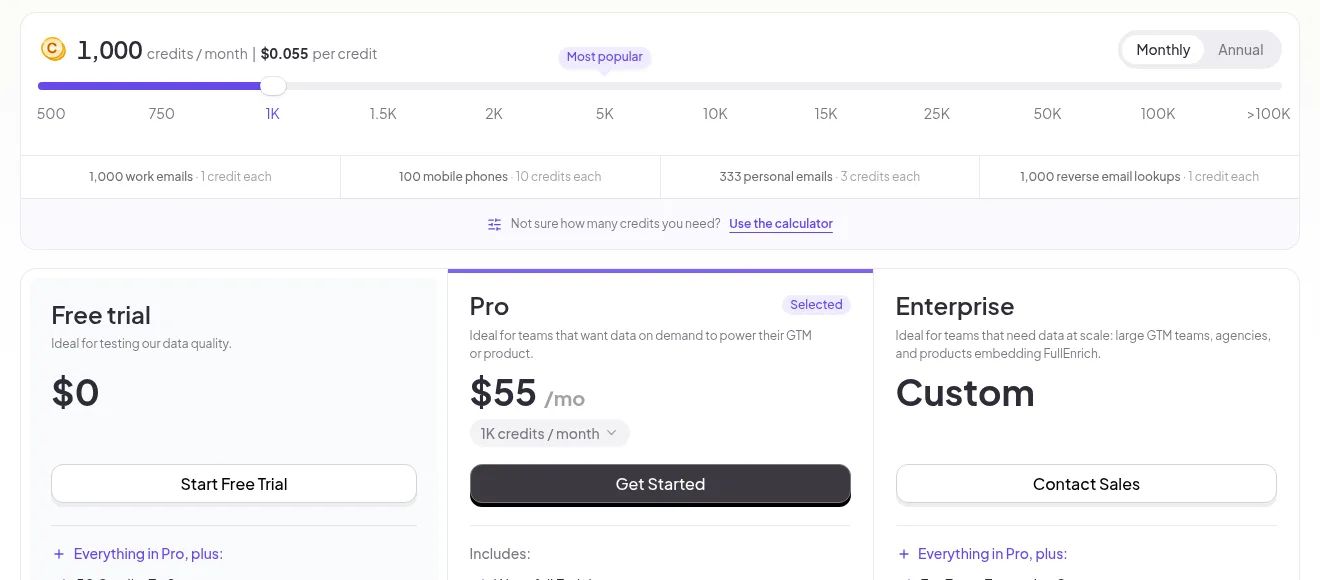
Why choose FullEnrich? You already know which accounts you want, and you'd rather pay for emails that come back than for rows that might not.
Skip it if you're mailing households or need a consumer file; LeadsPlease sells those as one-off downloads. To see how other multi-source tools handle the same job, read our waterfall enrichment tools comparison.
2. BookYourData
BookYourData G2 rating: 4.9/5 (361 reviews)
Best for: Occasional small B2B buys where credits back are enough of a remedy.
 BookYourData shows how many contacts sit at each management level before you build a list.
BookYourData is a pay-as-you-go B2B contact data seller. You buy credits, filter its database by job title, level and other criteria, and export the contacts you want. One credit equals one contact, with no subscription.
The seller says it gathers data "via multiple sources, including public data, niche third-party providers, community contributors, and a dedicated research team," and claims daily updates. What sets it apart is a written guarantee: if a list's deliverability comes in under 97%, you send a hard-bounce report and it adds free data credits until the 97% is met.
The guarantee is a credit top-up, not a refund, and it triggers only on hard bounces you report. A spam trap that accepts your mail doesn't bounce, and a complaint isn't a bounce either. Spamhaus's marketing FAQ says of list-cleaning services: "Spamhaus frequently sees mail in its spamtraps from 'cleaned' lists!" That's not about BookYourData, but it's why a deliverability figure alone can't protect your domain.
One reviewer liked "being able to buy just what we need" (translated by G2).
Key features
- Filters by job title and management level across B2B, Healthcare and Realtors data
- Credits that never expire
- A BeSpoke service for custom builds, from $499 for 1,000 records
Pros
- 10 free credits to test the data first
- Big volume discounts at the top of the ladder
Cons
- The guarantee pays back in credits, not cash; its terms say the sale of data is final and credits are non-refundable
- You can't resell or share the data with third parties
- No claim window for the bounce guarantee is published
Pricing: 10 credits free, then packs from $99 for 250 credits up to $24,999 for 2,500,000 (October 2026).
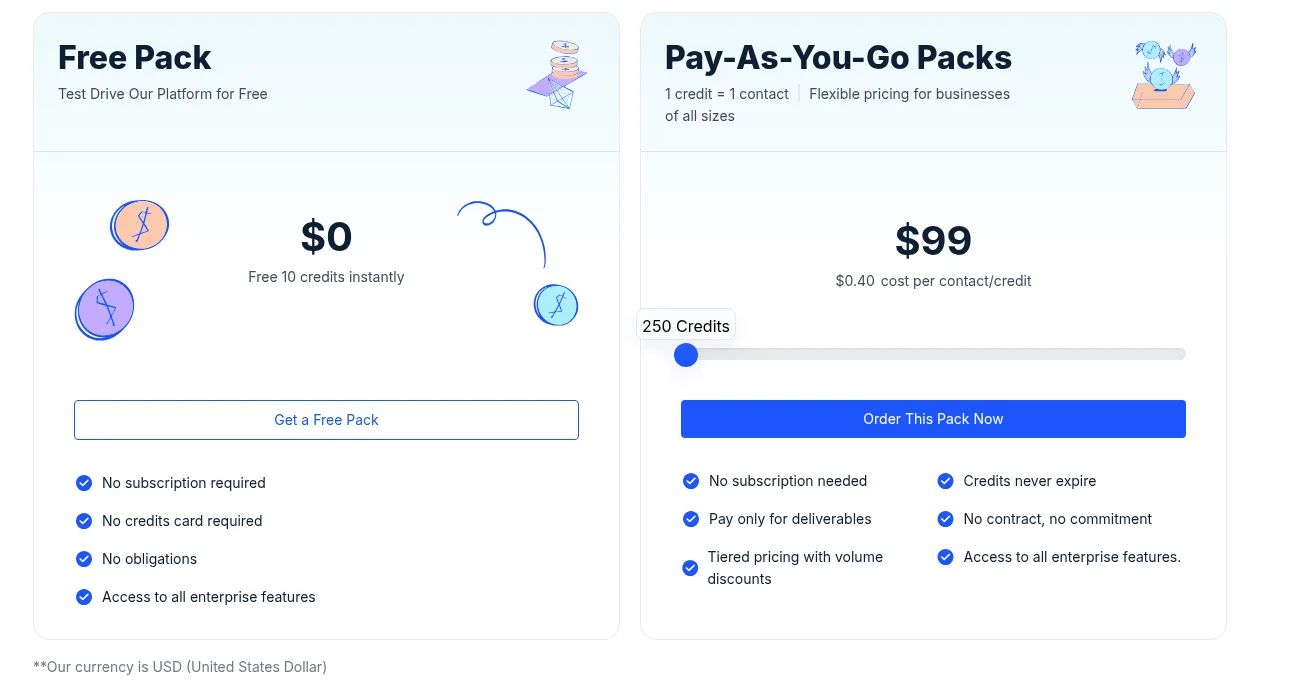
Why choose BookYourData? You run a campaign every few months, want to pay for that list alone, and don't mind filing a hard-bounce report if a list underdelivers.
Skip it if you need consumer or homeowner data; Datazapp sells consumer email lists and appends by the record.
3. LeadsPlease
LeadsPlease G2 rating: 4.9/5 (13 reviews)
Best for: A single US consumer or local mailing, if a guarantee worded around postal accuracy is enough cover.
 LeadsPlease's list builder at the demography step, where you pick criteria like title and annual sales.
LeadsPlease is a US list broker that sells one-off files. You pick consumers by demographics or businesses by firmographics, pay once, and download a CSV or Excel file, or print-ready mailing labels for direct mail.
Its FAQ says the data "comes from public records and licensed compilers." Email list orders go through email verification, and postal data goes through USPS CASS and NCOA processing. The homepage pitch is ownership: "One-time purchase with full usage rights," with no auto-renewals or expiring credits.
The FAQ words the 98%+ promise around postal accuracy, so it's unclear whether a bounced email on a $299.95 file counts, and your domain is yours to protect. The FAQ also says every list "is processed for compliance." If any recipients are in the UK, the ICO's guidance on using data brokers is blunt: "Simply accepting a data broker's assurances that the data they are supplying is compliant is not enough."
Key features
- Consumer lists by household demographics, business lists by firmographics
- CSV, Excel and mailing-label formats
- Optional phone numbers on any list, for $0.10 more per record
Pros
- Covers consumer households, which most B2B tools don't touch
Cons
- The 98%+ "money back" guarantee is worded around postal accuracy, not email deliverability
- The site gives daily, weekly and monthly update cycles in different places
- Business emails cost more per record than consumer ones at every tier
Pricing: Consumer email lists start at $299.95 for 1,000 records, and business email lists at $299.75 for 500 (October 2026).
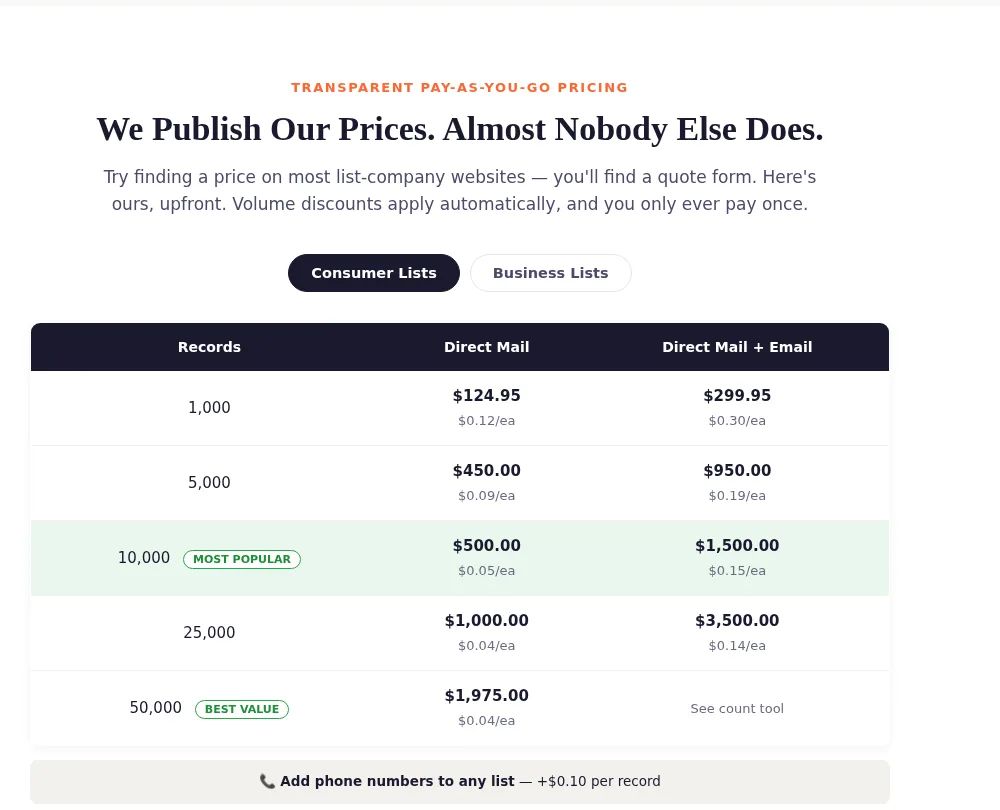
Why choose LeadsPlease? You're planning a postcard drop and an email send to the same households, and want both from one purchase.
4. Datazapp
Best for: Filling gaps in a consumer file you already hold, if you clean the results yourself.
 Datazapp's append screen, where you upload your own file to add emails and phone numbers.
Datazapp is a pay-per-record data seller for consumer and business lists. It sells email lists outright and appends emails or phones to a file you already have, with no subscription.
You upload a file or define a list, and you get a free match report showing your count before you pay. Its FAQ is unusually direct about quality: "Our data averages 70% to 85% accuracy across phones, emails, and property and consumer records." It has one G2 review, so outside feedback is thin.
At an average 70% to 85% accuracy (across phones, emails and property records), 15% to 30% of a list may be inaccurate, and Datazapp replaces only a share of bad leads. Appended emails also come from Datazapp's data, not from your customers, and your email platform may refuse them: Mailchimp's Acceptable Use Policy bans sending to purchased, rented or third-party lists.
Key features
- Consumer, homeowner, voter and business email lists
- Email append, phone append and email verification on your own files
- Prepaid credits that don't expire, and an API on prepay plans
Pros
- Low per-record prices, falling further with prepay
- No contracts, no monthly fees
Cons
- Its terms state a no-refund policy; it may replace a percentage of inaccurate leads instead
- A $125 minimum order on pay as you go
Pricing: Pay as you go costs $0.06 per business email and $0.03 per consumer email, with a $125 minimum. A $1,000 prepay drops business emails to $0.05 and a $2,000 prepay to $0.04 (October 2026).
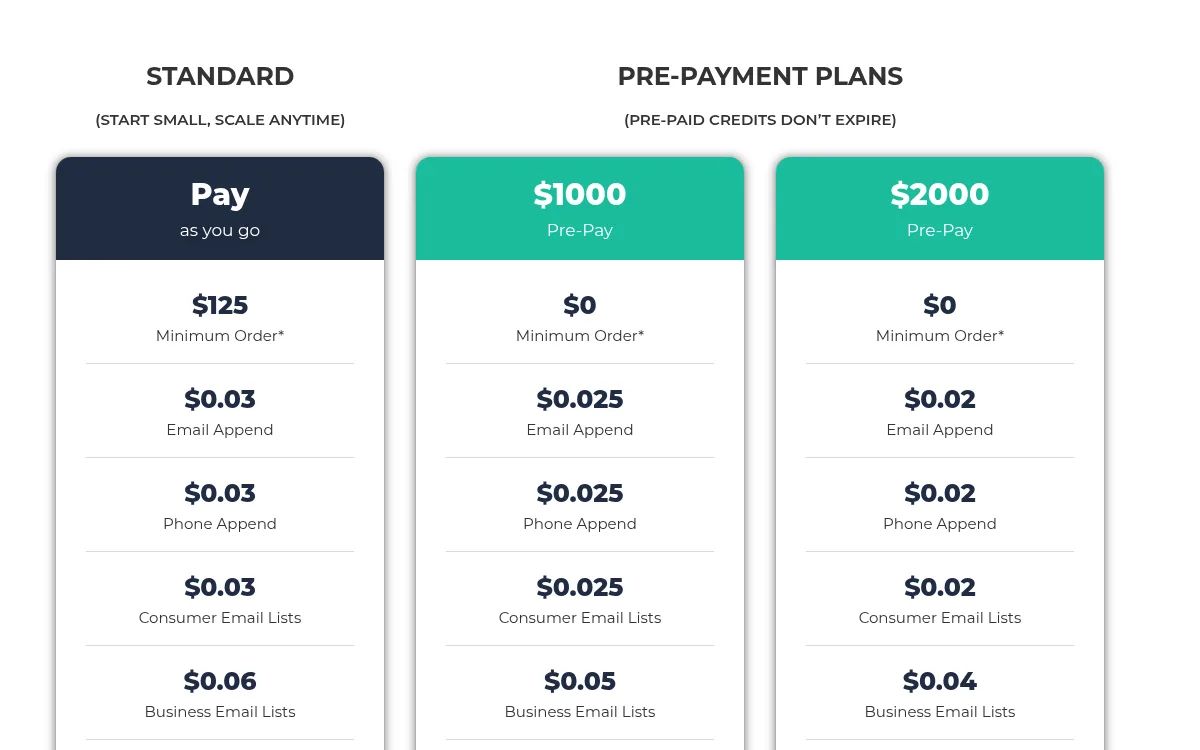
Why choose Datazapp? You already hold a customer or homeowner file with missing emails, and filling those gaps beats buying a fresh list.
5. Lake B2B
Lake B2B G2 rating: 4.8/5 (7 reviews)
Best for: Briefs a filter panel can't express, such as healthcare lists, if you have time for a pilot.
 A Lake B2B "Buy Targeted Email List" page, showing the seller's own stat tiles.
Lake B2B is a custom B2B data provider. You describe the audience, and its team builds the dataset, from industry and healthcare lists to a People API and tech install data.
There's no self-serve store and no public price. You start with a free sample of 25 verified contacts, no card needed, and can run a 500-contact pilot campaign before a full order. The homepage promises a "95% Data Accuracy Commitment." A separate Data Licensing product lets buyers "use, process, redistribute" datasets, which is rare on this list.
No refund terms sit beside the 95% commitment on its homepage, so the 500-contact pilot is where to measure bounces against that figure before the full order.
The trade-off of a built-to-order list shows up in reviews: "Custom list requests can take a little longer than I'd like when the criteria get complicated." (translated by G2)
Key features
- Custom B2B lists built to your brief, including healthcare data
- A People API for pulling contacts into your own tools
Pros
- Handles complex briefs a filter panel can't
Cons
- Quote only, the one list seller here you can't cost upfront
- Its pages give two database sizes (450M+ verified business profiles and 800M+ total contacts)
Pricing: Quote only (October 2026).
Why choose Lake B2B? Your audience is hard to describe with standard filters, and you want proof from a pilot before signing for the full order.
6. Salesgenie
Salesgenie G2 rating: 4.3/5 (362 reviews)
Best for: Monthly US small-business prospecting, if a 12-month term is fine and you don't need bounce cover on email.
 A Salesgenie lead list with export and tagging buttons, shown with demo data.
Salesgenie is Data Axle's subscription database for US business and consumer leads (our Data Axle pricing guide covers the parent company). You search, save and export lists, and on the Pro and Team plans, exports and email addresses use credits.
Salesgenie's packages page promises access to prospects from over 19.5 million businesses and 255 million consumers, and weekly updates that include email and phone.
On an email buy, the guarantee won't help you. Salesgenie's satisfaction guarantee excludes lists bought for email, so a bounced address is your cost.
The 12-month term is what one G2 reviewer objects to: "I dislike the fact that there is an agreement that has to be done instead of a month to month to use the service".
Key features
- US business and consumer records in one subscription
- Monthly credits you can add to any plan at any time
- A Buyer Intent add-on (intent data) for $50 a month
- Download lists or move them into a CRM through its API
Pros
- Public plan prices, which most databases on this list don't publish
Cons
- A 12-month initial term, then month to month at the current rate
- Only the Team plan includes more than one user (5)
Pricing: Basic starts at $99 a month, Pro at $149 and Team at $299 (October 2026). Credits and add-ons are broken down in our Salesgenie pricing guide.
Why choose Salesgenie? You can commit to a full year up front, and after that you want month-to-month billing on the same data.
Skip it if you buy lists a few times a year; BookYourData has no subscription and credits that never expire.
7. ZoomInfo
ZoomInfo G2 rating: 4.5/5 (9,196 reviews)
Best for: Enterprise teams that negotiate one contract for many reps.
 ZoomInfo's homepage leads with a business-email field for its free trial.
ZoomInfo is an enterprise sales intelligence platform. Your reps search its database, then export contacts into a CRM or file, and every export uses a credit.
ZoomInfo's pricing page publishes one rule you can plan around: "Each export costs one credit," and credits can be added to any package. It shows no dollar amounts.
At one credit per export, a bad address costs the same credit as a good one.
One G2 reviewer flags smaller companies: data is "not always completely accurate or up to date, especially for smaller organizations."
Key features
- 500M+ contacts and 100M+ companies by ZoomInfo's own count, with 120M+ direct dials
- GTM Studio for multi-source checks
Pros
- Signals beyond contact data in the same platform
Cons
- Every export spends a credit, so big list pulls burn through the allowance
Pricing: Paid plans are quote only; ZoomInfo Lite is free (October 2026). What pushes the quote up or down is in our ZoomInfo pricing guide.
Why choose ZoomInfo? Sales and marketing both need data, and your procurement team is happy to negotiate one quote for the lot.
8. Apollo
Apollo G2 rating: 4.7/5 (9,848 reviews)
Best for: Founders testing a list for free, who'll verify before sending.
 Apollo's homepage offers a free sign-up with no credit card.
Apollo is a self-serve B2B database with prospecting tools built in. You filter contacts, spend credits to reveal emails (one credit unlocks one contact's email address), and export.
Credits are granted per seat. Its terms are clear about what happens after you cancel: you may keep the business contact information you exported into your own records. Plans are for internal business use only, and resale isn't allowed.
The free tier's 900 credits a year are enough to export a sample and test its bounce rate before paying. One founder reviewing Apollo on G2 found that "some contact data... can occasionally be outdated or lead to email bounces." Every export needs its own verification pass before it touches your domain.
Key features
- A free tier that grants 900 credits per seat each year
- Record selection limits of 25 (Free), 1,000 (Basic), 2,500 (Professional) and 10,000 (Organization) per action
- Phone reveals at 8 credits
- Prospecting and outreach in the same app
Cons
- Credits you don't spend are gone when the billing cycle ends, bought add-ons too
- Priced per seat, so bigger lists can mean more seats
- No refunds for unused time when you downgrade
Pricing: Free plan available. Billed yearly, Basic is $49 per seat a month, Professional $79 and Organization $119 (3-seat minimum); monthly, Basic is $65 and Professional $99 (October 2026).
Why choose Apollo? You might stop paying in six months, and the contacts you exported need to stay in your CRM when you do. If Apollo stops fitting, our list of Apollo alternatives groups the swaps by job.
9. Cognism
Cognism G2 rating: 4.5/5 (1,376 reviews)
Best for: Teams whose buyers sit mostly in the UK and Europe, if thinner coverage elsewhere is acceptable.
 Cognism pitches its data to European revenue teams on its homepage.
Cognism is a B2B sales intelligence platform sold through tailored packages. Your team reveals contacts with credits and builds lists in its prospecting tool.
Cognism uses one credit per revealed contact, and your team can keep using that record "throughout the contract." A credit is spent again only if that contact changes jobs.
That model protects your credits, not your domain: a revealed email that bounces still bounces from your sending domain, and the term to check is what happens to revealed records when the contract ends. For UK and EU contacts, GDPR duties also come with every record you reveal.
European data carries its own catch-all problem. One r/EmailProspecting user described "european data where catch-alls feel like a coin flip, addresses coming back valid then bouncing within the week."
Key features
- Standard and Pro prospecting packages, 5 seats included
- Mobiles it sells as phone-verified (Diamond Data)
- CRM Enrichment sold as a separate product
Cons
- Bundled seats suit a team more than a solo buyer
Pricing: Quote only; its pricing page says packages are tailored to the product, team setup and usage (October 2026).
Why choose Cognism? You call UK and EU prospects as often as you email them, and phone-verified mobiles are part of the brief.
Skip it if you're a small team that needs a price today; Lusha publishes plans from $37.45 a month. For more options, see our Cognism alternatives.
10. Lusha
Lusha G2 rating: 4.3/5 (1,670 reviews)
Best for: A handful of contacts a week, not a list of thousands.
 Lusha's homepage, with free sign-up and demo buttons.
Lusha is a credit-based B2B contact platform. You find a prospect, reveal an email for 1 credit or a phone for 5, and export to CSV at 1 credit per 25 results.
Starter's 400 monthly credits are 400 chances to pay for a wrong email, because Lusha's terms say no replacement credits or refunds are provided based on the quality of a particular record. Part of its data comes from the Lusha Community, whose members "share business contact details from their email headers and signatures."
Key features
- 40 free credits every month on the free tier
Pros
- Simple per-reveal billing with a low entry plan
Cons
- No reselling or sharing the data with third parties
- One credit per reveal, so a list of thousands costs thousands of credits
Pricing: Starter costs $37.45 a month billed yearly or $49.90 monthly, with 400 credits a month (October 2026).
Why choose Lusha? You need a handful of emails a week, and a few hundred credits a month covers it. More swaps sit in our Lusha alternatives.
11. Seamless AI
Seamless G2 rating: 4.4/5 (5,416 reviews)
Best for: Teams happy to sign for a year who never want to file a bounce claim.
 A Seamless marketing card showing a contact profile with outreach buttons.
Seamless is a B2B prospecting search engine sold through credit-based subscriptions. You search for prospects and spend credits to get emails and phone numbers.
It describes itself as "a real-time search engine, not a database" that scours the public web, while also advertising 1.6B+ verified business emails. Its standout promise for list buyers: "If an email is invalid, we automatically refund your credit."
Seamless credits an email back the moment its own check flags it, with no claim to file. The open case is the address that passes that check and bounces a week later.
Key features
- Plans for unlimited users, bulk credits, job changes and buyer intent
Pros
- Covers both emails and phone numbers
Cons
- No public price; the pricing page asks you to book a demo
- A yearly contract rolls into another 12 months unless you give notice 60 days before the renewal date
Pricing: Quote only; plans are set after a demo (October 2026). Reported plan ranges are in our Seamless pricing guide.
Why choose Seamless? You can sign for a year, and you never want to file a bounce claim again.
Skip it if you need to keep your exports after you stop paying: when the contract ends, Seamless's terms of use require you to destroy Seamless data.
12. Kaspr
Kaspr G2 rating: 4.4/5 (837 reviews)
Best for: LinkedIn-first reps who stay under 10,000 emails a month.
 Kaspr's contact card puts B2B emails, direct emails and phones next to an Export button.
Kaspr is a LinkedIn-based contact finder sold per user. You browse LinkedIn, open a profile, and Kaspr shows the person's emails and phone numbers to save or export.
For one rep, the paid plans' "unlimited" B2B emails go a long way, but they aren't endless: Kaspr's terms cap them at 10,000 credits per account per month and treat use through APIs or bots as abuse. Kaspr says it pulls "real-time verified data from over 150 sources."
Kaspr's credits aren't refundable, so a wrong email is simply a spent credit. One G2 reviewer who tracked accuracy in 2023 put it bluntly: "with 20-25% errors, you would expect some kind rebate. Well, there is none." That's one critical voice against a 4.4 average. For European prospects, GDPR follows each profile you save into your CRM.
Key features
- LinkedIn extension for one-click contact reveals
- 100 phone credits a month on Starter, 200 on Business
- Exports up to 12,000 a year on Starter and 30,000 on Business
Cons
- "Unlimited" emails stop at 10,000 credits a month
- Export caps limit how big a list you can pull in a year
- Plans renew automatically
Pricing: Free plan available, with 15 B2B email credits a month. Billed yearly, Starter is $49 per user a month and Business $79; monthly, they're $65 and $99 (October 2026). Phone and export limits per plan are laid out in our Kaspr pricing breakdown.
Why choose Kaspr? Your research already happens on LinkedIn, and your monthly email volume stays well under the 10,000 cap.
Skip it if a single campaign needs thousands of emails at once. FullEnrich enriches whole files and searches without per-user caps.
What do sellers promise when a bought email list bounces?
"Guaranteed" covers four different things: credits back, money back, replacement records, or no published promise at all. None of them refunds your campaign or a damaged sending domain.
No refund repairs sender reputation either. Bounces and spam-trap hits damage it, and a trap hit can land your domain on a blocklist such as Spamhaus's. Whatever the promise, get the claim window and the seller's definition of a bad email in writing before you sign.
Buyers tend to learn this after the fact. One r/email user asked whether they'd made a mistake buying a $1,300 list of around 40,000 addresses (their own figures). One reply was flat: "Yes, you made a mistake." A gentler one put the weight on the contract: "As long as they reimburse you for bad emails, you should be okay. Make sure you read the fine print in the SLA to see what they determine as a bad email."
The fine print does vary. Salesgenie's satisfaction guarantee refunds the undeliverable portion of a list, but says plainly: "Lists purchased for fax and email are not covered."
Seller | What's promised | What you get back | Term to check |
|---|---|---|---|
FullEnrich | Pay only for data found and verified | Nothing to claim: misses aren't billed | Catch-all emails it finds use a credit |
BookYourData | 97% deliverability | Free data credits until 97% is met | Claim window; sales are otherwise final |
LeadsPlease | 98%+ accuracy | Money back, or replaced or credited records | Whether it covers email as well as postal |
Seamless | Credit back on invalid emails | The credit, automatically | How "invalid" is decided |
Datazapp | 70% to 85% stated accuracy | No refunds; some leads may be replaced | What share gets replaced |
Salesgenie | Refund for undeliverable records | Excludes email and fax lists | Whether any cover applies to email data |
Not every bounce means bad data. Some work emails bounce because the person left the company. FullEnrich's bounce recovery template treats that bounce as a job-change signal: it reads the old address, searches career history and returns a new verified work email, after confirming the credit cost.
Can you reuse or resell an email list after you buy it?
You can usually reuse a list you bought for your own outreach, but almost no seller lets you resell it. What changes is how long your rights last and what happens when a subscription ends.
Seller | Reuse | Resale | After you stop paying |
|---|---|---|---|
LeadsPlease | One-time purchase with "full usage rights" | Ask; its terms don't cover data resale | You keep the download |
BookYourData | Non-exclusive, non-transferable licence | Not allowed | Credits never expire |
Apollo | Internal business use | Not allowed | Keep exported business contacts |
Lusha | Limited licence | Not allowed | You may keep using data, with restrictions |
Cognism | Revealed records usable all contract | Ask sales | Ask what happens at contract end |
Seamless | Revocable, personal licence | Not allowed | Destroy Seamless data on termination |
Lake B2B | Depends on the product | Redistribution only under Data Licensing | Ask sales |
The law adds one rule of its own. Once someone opts out, CAN-SPAM says you can't sell or transfer their address, "even in the form of a mailing list," according to the FTC guide covered in the legal section below.
Before you pay, ask three questions. Is the file single-use or unlimited? Is the same file sold to other buyers? What must you delete when the contract ends?
Is it legal to buy an email list?
It depends on where your recipients are: in the US, buying a list and emailing it is legal if every message follows CAN-SPAM, which makes no B2B exception, while consent rules in Canada and for individuals in the UK mean a bought list often can't be emailed at all. CAN-SPAM governs sending, and the FTC's compliance guide is clear on the basics:
- B2B email gets no exemption: "The law makes no exception for business-to-business email."
- You must honor opt-out requests within 10 business days.
- Each message needs a valid physical postal address.
- Each separate email in violation can cost up to $53,088.
Buying a list doesn't buy consent. Canada's CASL needs consent, and the CRTC's guidance says the buyer of an address list "could not rely on those express consents," and that "the onus of proving consent" sits with the sender.
In the UK, the ICO's business-to-business guidance says the PECR rule on email marketing "doesn't apply to corporate subscribers." Sole traders and some partnerships count as individual subscribers and still need to give specific consent. Under UK GDPR, you must also tell people you've obtained their data.
Lists of individual subscribers face a stricter test. The ICO's page on using marketing lists says: "You can only use them if all the people on the list specifically consented to receive that type of message from you." It adds: "Generic consent covering any third party will not be enough." In the EU, GDPR applies to the personal data on any list, and each country's ePrivacy rules decide whether B2B email needs consent, so check with counsel.
California's CCPA is about data rights, not sending. The California Attorney General's CCPA page notes that its employment-related and business-to-business exemptions "expired on December 31, 2022." So work contacts who live in California now fall under the same rights as other California consumers, including the right to opt out of the sale of their data.
There's a fair case for buying. UK email to corporate addresses doesn't need prior consent, and the ICO says that where PECR doesn't require it, "in many cases it is likely that legitimate interests will be the appropriate lawful basis." Even Spamhaus, which tells marketers to "Never buy or rent email addresses from anyone," allows one narrow exception: a confirmed opt-in list transferred exclusively from one owner to another, such as in a company buyout, where "COI records should be transferred as part of the agreement." And postal list rental is its own trade. As one r/marketing user put it: "For DM I rent lists from a list rental company."
Where consent is required, though, a bought list can't carry it. That covers UK consumers, sole traders and other individual subscribers, and recipients in Canada. Spamhaus's take on cold emailing puts it plainly: "permission is not transferrable." Even where consent isn't required, the spam-trap and bounce risk stays with your domain, so the protection sits in the seller's remedy and in the checks you run before you send.
This is a summary, not legal advice. If you send at volume across borders, ask a lawyer.
What should you check before you send to a bought email list?
Check your mailbox providers' rules, your email platform's rules and the list itself, because a bought list puts your sender reputation at risk from the first send.
Google's sender guidelines say it outright: "Don't purchase email addresses from other companies." They also ask senders to keep spam rates in Postmaster Tools below 0.10% and to avoid ever reaching 0.30%. Anyone sending more than 5,000 messages a day to Gmail accounts also needs SPF, DKIM and DMARC, plus one-click unsubscribe on marketing messages. Yahoo's sender best practices are just as blunt: "Don't purchase mailing lists." Yahoo asks senders to keep their spam rate below 0.3%.
Email platforms go further. Mailchimp bans purchased, rented and third-party lists. HubSpot's opt-in consent article says purchased contacts can't be used in its marketing email tool, even if the list claims opt-in consent.
Spam traps are the risk a bounce report never shows. SendGrid's spam-trap guide warns: "Using a purchased list almost guarantees that you'll run into a spam trap." Spamhaus says the same of bought lists: "Inevitably, purchased lists contain spamtraps or generate abuse complaints and bounces." One r/Coldemailing user at an agency traced a blocklisting on a fresh domain to a dead address recycled into a trap. In their words: "One bad row in a CSV, and three weeks of careful warm-up got undone in about 48 hours."
Bounces cost replies, too. One r/Coldemailing user shared an analysis of 56,614 campaigns from about 7,000 companies (self-reported, not independently checked). Their finding: "a campaign under 2% bounce gets about 60% more replies than one bouncing over 20%." They also warned that catch-all domains "can quietly push you over 5-10%."
Several sellers let you try before you pay:
- BookYourData: 10 free credits
- Lake B2B: a free 25-contact sample, then a 500-contact pilot
- Datazapp: no free sample, but a free match report shows your count before you buy
- Lusha: 40 free credits a month
- Apollo: a free tier with 900 credits per seat a year
- FullEnrich: 50 free credits, no card
Then, before the first send:
- Re-verify on send day: a list checked last month isn't checked today. Instantly, a cold email software vendor, makes the case for quality over size: "A scrubbed list of 500 verified contacts will consistently outperform a purchased dump of 5,000 decayed records." Run every email through verification, or rebuild risky rows from name and company with a free FullEnrich account.
- Use a separate domain: send from a secondary domain, give it a proper warm-up, and ramp volume slowly.
- Watch the numbers: keep an eye on your bounce rate and your spam rate in Postmaster Tools, and pause the list if either climbs.
Stop buying lists that bounce: build one that lands
Every seller on this list solves a real problem for someone. If yours is B2B outbound that keeps bouncing, a bigger file won't fix it, because the risk stays on your domain and permission never comes with the file. A list of your own targets, checked email by email, will. That's what we built FullEnrich to do.
Start with 50 free credits, no card needed: try FullEnrich free.
FAQ
Where is the best place to buy an email list?
It depends on who you're emailing. FullEnrich is best for B2B lists built from your own targets, BookYourData for pay-as-you-go B2B files with a bounce guarantee, and LeadsPlease for one-off consumer or local mailing lists. The other nine fit narrower jobs, from LinkedIn prospecting to enterprise data contracts.
What is a B2B email list?
A B2B email list is a set of business contacts, usually names, job titles, companies and work emails, that you buy as a file or export from a database. Sellers charge once, by credit or by seat. Its real value depends on when each email was last checked and what the seller does when one bounces.
Is it legal to buy email lists?
In the US, yes, as long as every message follows CAN-SPAM, which covers business and consumer email alike. The UK, Canada, the EU and California add their own consent and data rules; see the legal section above.
How much does an email list cost?
At the list prices on this page, buying email addresses costs from about 1 cent a contact (BookYourData's 2,500,000-credit pack) to about 60 cents a record (a 500-record LeadsPlease business file). What counts is the cost per email you can send, worked out in the cost section above.
What's the difference between buying and renting an email list?
Buying gives you a file you keep under the seller's licence. Renting usually means the list owner sends your message for you, so you never get the addresses. Database subscriptions sit in between, as the reuse section above shows.
Can you get a free email list?
Not a full one, but several sellers offer free credits, samples or plans to try first. The pre-send section above lists the main free options.
Can you send a bought email list through Mailchimp or HubSpot?
No. Mailchimp bans purchased, rented and third-party lists and can suspend accounts that break the rule. HubSpot says purchased contacts can't be used in its marketing email tool, even when the list claims opt-in consent.
How fast does a bought email list go out of date?
Fast. ZeroBounce, an email verification vendor, reports that email databases degrade by at least 28% a year, and B2B data decays faster because people change jobs.
Does FullEnrich sell email lists?
No. FullEnrich doesn't sell pre-built list files, and it's built for B2B contacts, not household mailing lists. It builds lists from people you choose, through its search or your own CSV, and finds and verifies their work emails and mobiles. You pay for data found, and misses cost nothing.